Who says retro sampling has to be a slow-motion pain? Espen Kraft drops a no-nonsense, totally free browser-based editor for the Korg DSS-1. If you’ve ever wanted to dodge tedious menus and get filthy-fast tweaks on your beloved glitchy sampler, this is your new street weapon. MIDI wrangling, multi-sound management and more—all in your browser. No installer. No fluff. Just pure ‘80s workflow, hacked for today. Ready to push your DSS-1 harder? Let’s see what Espen’s tool can really do.
29. July 2026
SPARKY
Espen Kraft’s DSS-1 Editor: Free Browser Power for the 80s Beast
All Aboard the Browser Mothership
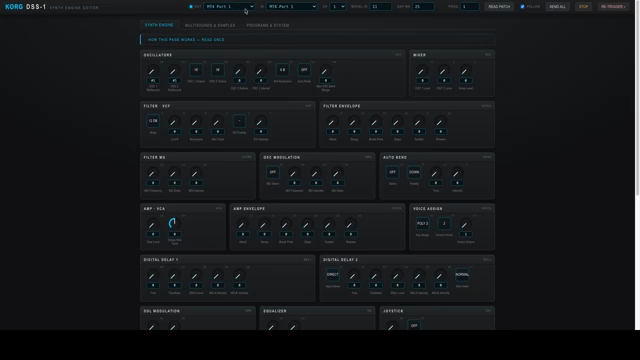
Espen Kraft is clearly sick of menu-diving on his classic Korg DSS-1, so he’s built a web-based editor that aims to make the ancient beast more fun to wrangle. Forget about awkward hardware controls—this tool lets you manage the sampler right from Chrome or Edge, no installer, no fuss. Best part? It’s free. You just grab it from his webshop and you’re off—no hidden fees, no dodgy sign-ups, just pure synth community spirit.
Espen designed this for his own workflow, and it shows. Every feature is there to cut the headache, not add to it. If you’re deep in DSS-1 territory, you’ll see this as a lifeline. But even if you’re just synth-curious, the simplicity on offer here is worth a look. It’s like someone finally handed you the keys to the bunker instead of making you guess the combination.
Real-Time Tweaks, MIDI Mayhem & Sample Slicing
This editor isn’t just a pretty face. It’s loaded with real-time parameter tweaks—attack, resonance, delays, you name it. Hook up your DSS-1 over MIDI, and suddenly you’re slicing through patches and samples with modern speed. The tool tracks your patch changes live, so when you scroll on the hardware, the browser follows like a loyal synth dog. Multi-sound and sample management? Sorted. You can pull up all your multi-sounds, rename them, edit loop points, and tweak every sample’s parameters—levels, cutoffs, tunings—the works.
Of course, the DSS-1’s ancient MIDI implementation means you’ll need patience. Sample dumps crawl at ‘80s speeds, but Espen’s chunked transfer options help a bit. Want to fire raw SysEx straight at your sampler for wild parameter hacking? That’s in there too. And if you’re the type who likes a tutorial close at hand, each tab has a collapsible tip sheet. It’s a lot of power, all mapped out for hands-on chaos.
No Installs. No Excuses.
The killer move: this editor lives in your browser. No faffing with installers or sketchy drivers. Just open, connect your MIDI interface, and you’re editing. It runs on Mac, PC, and Linux—as long as you stick with Chrome or Edge. Sorry, Firefox rebels, you’re benched for now. For anyone sick of ancient floppies and cryptic OSes, this is liberation: ‘80s hardware, 2020s convenience.
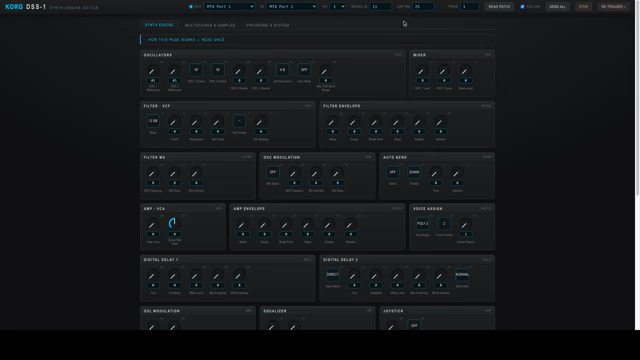
"It runs in your web browsers. There's no installer or anything."
© Screenshot/Quote: Espenkraft (YouTube)
Glitches, Gremlins, and the Save Game Hustle
"If you experience glitches when working with the DSS-1 from this editor you should know that and you probably do as well know that the DSS-1 is notoriously glitchy when it comes to MIDI C6."
© Screenshot/Quote: Espenkraft (YouTube)
Let’s not get misty-eyed—this is still the DSS-1, and that means random MIDI glitches will haunt you. Espen’s up front about it: sometimes, the old sampler just loses the plot. He even gives you a way to tweak the editor’s MIDI timing to reduce errors, but don’t expect miracles. The golden rule? Smash that save button often, and keep a floppy or emulator handy. Lose focus, and your session could evaporate faster than a cup of tea at a warehouse rave. Treat this editor like a mad scientist’s lab: powerful, but you’re on your own if you blow something up.
Live Demo: DSS-1 Hacking in Practice
Espen dives straight into the action, showing off patch tweaks, sample edits, and even raw SysEx experiments. It’s all done in real time, with the editor chasing the hardware, and the hardware responding to browser moves. If you want to see how multi-sound management or parameter chasing works in the wild, this section’s your jam. There’s even a bit where he demos how to avoid the DSS-1’s worst quirks by sticking to the right play mode.
Honestly, if you really want to feel the speed and see the workflow, you need to watch the video. The hands-on flow and those little browser tricks are better seen (and heard) than explained. Don’t just read—get your eyes and ears on the demo.
This article is also available in German. Read it here: https://synthmagazin.at/espen-krafts-dss-1-editor-kostenloses-browser-power-tool-fuer-den-80er-jahre-sampler/
More articles about these products:
Watch on YouTube:
Latest articles
Watch on YouTube:
Visit the channel:
https://www.youtube.com/EspenKraft
https://www.youtube.com/EspenKraft
Links from EspenKraft:
Instagram: https://instagram.com/espenkraft
Sponsored links:
If you purchase via these links, we may earn a small commission – at no extra cost to you. The link opens an Amazon keyword search, and results may vary depending on availability.
KORG DSS-1
🔗 Check price on Amazon
🔗 Check price on Amazon