Novation’s Launch Control steps into the spotlight as a hands-on bridge between Ableton Live’s macro architecture and real-world performance needs. In this official walkthrough, we see how macro mappings and custom modes turn drum racks, synths, and sequencers into tactile instruments, enabling fluid transitions between tweaking, balancing, and creative exploration. Novation’s practical, artist-focused ethos shines through as the video moves from basic mappings to a streamlined custom mode, all while keeping performance flow and mix integrity front and center. This video is a must-watch for anyone seeking an efficient, consistent mapping strategy in hybrid or DAW-centric setups.

11. September 2026
LYRA
Architecting Performances: Novation Launch Control and Ableton Live Macro Workflows
Launch Control: The Macro Mapping Hub
Novation’s Launch Control is positioned as a flexible tool for mapping and controlling performance parameters directly within Ableton Live. The video’s introduction lays out an architectural mindset: instead of being locked into static controller assignments, users are encouraged to leverage macro mappings to bring a tactile, performative dimension to their workflow. This approach isn’t just about having 16 encoders—it’s about building a consistent surface that adapts to the evolving needs of a live or studio set, always ready to tweak drums, manipulate synth lines, or adjust effects on the fly.
Macro Mapping for Real-Time Drum and Synth Control
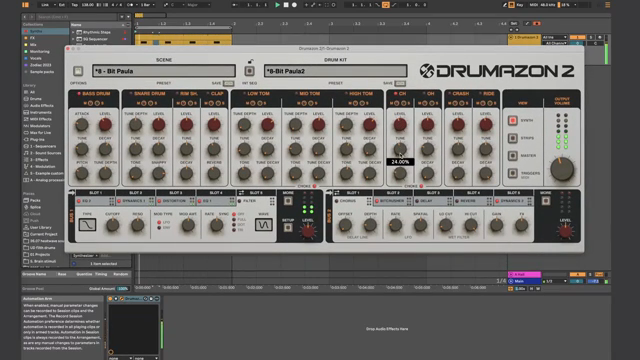
The first practical demonstration focuses on drum racks in Ableton Live, mapping decay, volume, reverb, and filter parameters across the Launch Control’s encoders. Rather than relying on static loops, this setup allows the performer to inject life into repetitive patterns, adjusting individual drum elements or global kit characteristics as the track evolves. The result is a drum section that feels organic and dynamic, responding instantly to the performer’s input.
Shifting to synth control, the video highlights the integration of generative sequencers like Sting 2 and instruments such as Drift. By mapping both sequencer and synth parameters to the same control surface, the performer can simultaneously sculpt rhythm complexity, timbral character, and groove. This dual mapping breaks down barriers between beat programming and melodic shaping, enabling fluid experimentation and in-the-moment adjustments that are crucial for spontaneous performance.

"Makes it really easy to tweak and play."
© Screenshot/Quote: Novationtv (YouTube)
Creative Workflows: Balancing Tweaks and the Mix

"By being consistent with your mappings and always having a volume control at the end of your rack, it's very easy to tweak and adjust your mix on the fly."
© Screenshot/Quote: Novationtv (YouTube)
Macro mapping isn’t just about hands-on sound design; it also addresses the practicalities of maintaining mix balance during high-energy performances. The video demonstrates how output volume and envelope controls are purposefully assigned to the same encoder positions across different racks. This consistency means performers don’t have to hunt for level controls while tweaking filters or effects—volume is always at the end, making quick adjustments intuitive and minimizing mix mishaps.
Novation also explores the challenges of page navigation in DAW control mode. By consolidating key parameters into a single macro page, users avoid the cognitive overhead of flipping between plugin pages mid-set. The workflow demonstrated here is all about efficiency: critical sound-shaping and mix controls are always under the performer’s fingertips, supporting both deep editing and fast, reactive balancing across tracks.
Custom Mode: One Page to Rule Them All
The video culminates in the introduction of a single-page custom mode, where the Launch Control is mapped to manage both track levels and the most important performance macro for each track. This streamlined layout combines the best of mix mode and macro mapping, eliminating the need to switch controller banks or modes during a performance. Manual mapping in Ableton’s map mode allows users to tailor the controller’s layout to their set’s architecture—track levels sit predictably on the bottom encoders while key sound parameters occupy the top. This architecture-centric approach empowers performers to control their entire set from one page, ensuring nothing interrupts the creative flow.

"By organizing your macro mappings and combining those with the custom mode, it's really easy to make a single page performance template."
© Screenshot/Quote: Novationtv (YouTube)
This article is also available in German. Read it here: https://synthmagazin.at/performance-architektur-novation-launch-control-und-ableton-live-macro-workflows/
More articles about these products:
 Voltage Labs x Benjamin Damage: Berlin Studio Weapons Unleashed
 Rapid Flow’s Step Sequencer Survival Kit: omniGRID 1.1 from Blank Slate to Bass Face
 Underdog Electronic Music School: When One Pulse is Enough to Break Your Brain
 Markers That Splash: Underdog Electronic Music School’s Guide to Kickstarting Your Phrases
 Kairos as Living Sculpture: MusicRadar Tech Enters Laura Misch’s Sonic Sanctuary
 Voltage Labs: Berlin’s Sonic Mosaic – Studios, Shadows and the Pulse of Creation
 Nebula Machines: Bahadırhan Koçer and the Sonic Physics of Dub Techno
 Pick Yourself’s Hypnotic Bass Hack: Rumble Kicks Are Out, Sliding Grooves Are In
 Mad Moments & Club Tactics: Tom VR Gets Real with MusicRadar Tech
 Bonedo Synthesizers: How to Make Any Synth Scream Acid Like a 303
 LNA Does Audio Stuff: Making Beats on the Cheap with Ableton Note—Beach Edition
 Andrew Huang’s Remix Rodeo: Four Producers, One Song, Total Mayhem
Watch on YouTube:
Latest articles
Watch on YouTube:
Visit the channel:
https://www.youtube.com/NovationTV
https://www.youtube.com/NovationTV
Links from NovationTV:
website: https://novationmusic.com
instagram: https://instagram.com/wearenovation
twitter: https://twitter.com/WeAreNovation
facebook: https://facebook.com/NovationMusic
Sponsored links:
If you purchase via these links, we may earn a small commission – at no extra cost to you. The link opens an Amazon keyword search, and results may vary depending on availability.
Ableton Live
🔗 Check price on Amazon
🔗 Check price on Amazon
Drift
🔗 Check price on Amazon
🔗 Check price on Amazon
Novation Launch Control
🔗 Check price on Amazon
🔗 Check price on Amazon
Sting 2
🔗 Check price on Amazon
🔗 Check price on Amazon