Ever wrestled with getting your analog-modelled plugins to sound like the legends they claim to be? Creative Sauce, champion of the home studio underdog, takes Wave Balance for a spin—a dirt-cheap plugin that promises smarter, faster gain staging without the usual faff. In classic Mike style, it’s all about getting pro results without buying into gear snobbery. If you’re tired of plugins that only shine for YouTube influencers, this one’s got something for the rest of us. Let’s see if it’s all sauce, or actually some substance.
9. September 2026
SPARKY
Creative Sauce Schools Us: Wave Balance Plugin Turns Gain Staging Into Child’s Play
Wave Balance: No More Level Guesswork
Creative Sauce doesn’t waste time: straight in with the pain point of using analog-modelled plugins wrong—namely, by feeding them limp or overcooked signals. Enter Wave Balance, a plugin that takes the mystery out of setting input levels so your plugins actually do what the marketing promised. Mike’s keen on the price too—less than a fifteen quid round at the pub for a tool that could save hours fiddling.
If you’re the kind of producer who’s sick of plugins looking vintage but sounding like a laptop speaker, Wave Balance claims to get you the character and bite you want. No more praying to the DAW meters or trusting your dodgy gut; this is about hitting the right spot every time, with no tears.

"That's where this plugin called Wave Balance comes in, because it makes it really quick and easy to set an optimum level."
© Screenshot/Quote: Creativesauce (YouTube)
Meters Galore & Level Magic
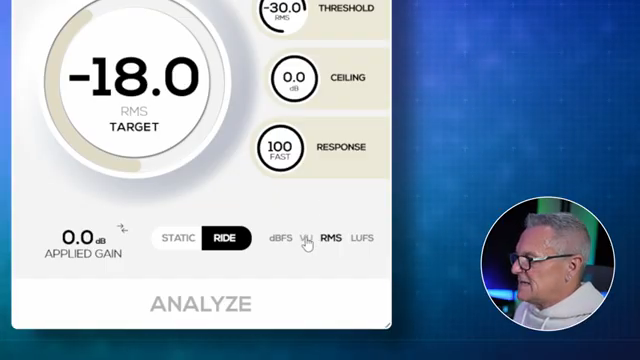
"In this plugin, 0 dB VU is calibrated to -18 dBFS."
© Screenshot/Quote: Creativesauce (YouTube)
Wave Balance comes stacked with four metering types: dBFS, VU, RMS, and LUFS (with three LUFS options, for the real nerds). Mike’s quick to warn against the classic -18 dBFS trap—if you use peak metering, your signal will be as feeble as a festival tent at 4am. The secret? Use RMS or, better, VU mode, which is calibrated to -18 dBFS, the sweet spot for vintage plugin voodoo.
The plugin’s Analyze button is the star: play your track, hit Analyze, and Wave Balance tells you exactly how much gain to add. It’s not just for static boosts—there’s also a ceiling control to keep things from going full toaster fire. If you’re used to fiddling with metering in your DAW and never quite knowing if it’s right, this plugin takes that hassle and punts it out the window.
Dynamic Gain: From Whispers to Shouts
Static mode is great for one-shot fixes, but the real sauce is in Wave Balance’s dynamic gain handling. Using the ‘ride’ setting, it adapts gain on the fly—perfect for vocals that go from library whisper to stadium roar. If your source jumps around, set a threshold so silences don’t mess up the maths, then let the plugin do its thing.
Mike demonstrates how the response control tames the sometimes twitchy auto-riding, smoothing those jumps so your gain moves sound human, not robotic. When balancing a stereo guitar, the plugin even helps level out mismatched left/right channels. It’s not magic, but for anyone who’s spent hours nudging faders, it feels close.
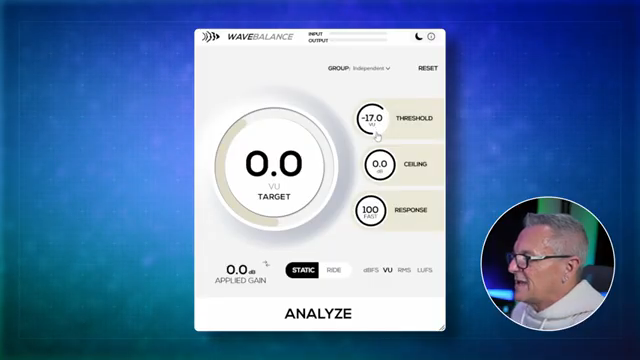
"Ignore anything below that level when you're making your gain calculations."
© Screenshot/Quote: Creativesauce (YouTube)
Group Therapy for Tracks
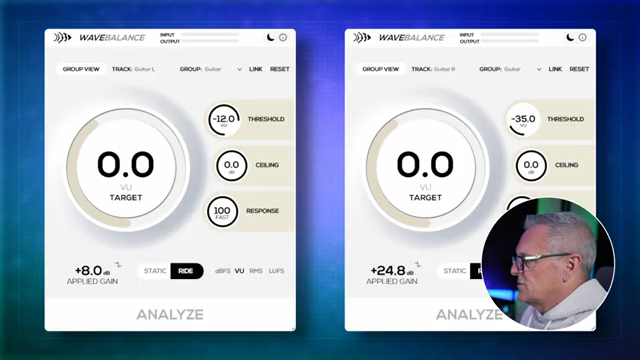
"We can just use one of these instances now."
© Screenshot/Quote: Creativesauce (YouTube)
Managing a pile of tracks? Wave Balance lets you group plugin instances, so you can tweak controls for a whole gang of channels at once—think drums, multi-mic guitars, or whatever chaos you’ve got going. You don’t need to open a dozen plugin windows just to make a mix tweak; one group view pulls it all together, and you can still unlink things when you want to get surgical.
For anyone who likes to keep their sessions lean and mean, this is a massive time-saver. You can link parameters like response, but still adjust thresholds per channel, so nothing gets lost in the herd.
Want the Real Picture? Watch the Demo
Mike makes it clear: gain staging changed his mixes for the better. But if you want to see the exact A/B comparisons, hear the difference, and watch how the plugin responds in real time, you’ll need to check out the video. There’s only so much you can get from words—sometimes you’ve got to see (and hear) it to believe it.
This article is also available in German. Read it here: https://synthmagazin.at/creative-sauce-zeigt-uns-wave-balance-plugin-macht-gain-staging-zum-kinderspiel/
Watch on YouTube:
Latest articles
Watch on YouTube:
Visit the channel:
https://www.youtube.com/CreativeSauce
https://www.youtube.com/CreativeSauce
Links from CreativeSauce:
website: https://www.creativesauce.net
instagram: https://www.instagram.com/creativesauce2b
soundcloud: https://soundcloud.com/user-183426888
Sponsored links:
If you purchase via these links, we may earn a small commission – at no extra cost to you. The link opens an Amazon keyword search, and results may vary depending on availability.
Wave Balance
🔗 Check price on Amazon
🔗 Check price on Amazon