What happens when home-studio sense meets a free bass plugin that actually slaps? Creative Sauce’s latest deep-dive into Ample Bass P Lite proves you don’t need a swanky wallet to lay down serious low end. Expect amp sims, effects, and a Riffer that might just make the piano roll jealous. This isn’t your average YouTube gear rundown—Mike’s in it for the sound, the detail, and the occasional pun. If you want to know whether this plugin is more than just another freebie, keep reading.
22. July 2026
SPARKY
Creative Sauce Dials Up Ample Bass P Lite: Free Bass That Hits Hard
A Freebie With Bite
Creative Sauce jumps straight in, calling out Ample Bass P Lite as the new king of free bass plugins—and honestly, it’s hard to argue. The sound quality is solid, with articulation that doesn’t feel like you’re wrestling MIDI mud. Even before you start fiddling, the default sustain patch pops out of the speakers with more definition than some paid options.
But it’s not just about the raw tone. Creative Sauce sets the record straight: this isn’t a stripped-down toy, but a plugin loaded with features that punch far above the ‘free’ label. If you’re expecting another limp virtual instrument, this one’s got teeth. Mike’s focus is on how these extras make the P Lite a real studio contender, not just a download-and-forget gadget.
"It also has some fantastic features, including an amp sim, various effects, a tab feature, and more importantly in my opinion, Ample Sounds Riffer."
© Screenshot/Quote: Creativesauce (YouTube)
Amp Sims, FX & Tab: Not Just for Show
"In the amp section, with the free version, we've only got one amp to choose from, but it's got a couple of different modes, and I think they both sound great."
© Screenshot/Quote: Creativesauce (YouTube)
Here’s where things get spicy. You get a built-in amp sim with two flavours—1966 and 1964—that both bring out different vibes. Even with just one amp model in the free version, the tonal range is impressive, and you can swap out mics for further colour. Creative Sauce walks through the effect suite, and while delay or reverb on bass is a debate for another day, it’s all here if you want it. The onboard EQ and compressor are especially useful—no need to clutter your DAW with third-party plugins just to shape a simple groove.
The tab feature is a clever touch, letting you load up tablature files and play them right in the interface. You can drag them into your DAW if you fancy more editing. It’s a workflow tweak that’s going to click for some and confuse others, but it’s good to see Creative Sauce show real-world uses instead of just listing features.
Riffer: Goodbye Piano Roll Boredom
Let’s talk about the Riffer, because this is the bit that feels like a proper power-up. Instead of the usual piano roll slog, Riffer gives you a graphical view of the bass’s strings and lets you drop notes where they’d actually be played. Mike highlights how this makes composition more intuitive, especially for non-bassists who still want that authentic string feel.
Editing is dead simple—double-click to add or tweak notes, drag for length and position, and assign notes to specific strings for realism. There’s a separate panel for velocity, bends, and volume, plus a side panel for key changes and quantisation. The workflow is snappy, and while it won’t turn you into a session player overnight, it does make writing convincing basslines a hell of a lot faster. If you want to see the kind of detail Riffer enables, you’ll need to watch the video—some things are just better seen and heard than described.
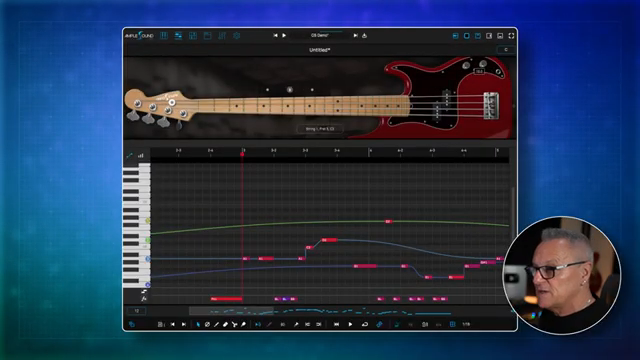
"Riffa is an incredibly powerful feature which provides an alternative to your regular piano roll view in your DAW, and it's more tailor-made if you like, so it's worth actually learning, in my opinion."
© Screenshot/Quote: Creativesauce (YouTube)
Key Switches: Realism Without the Fuss
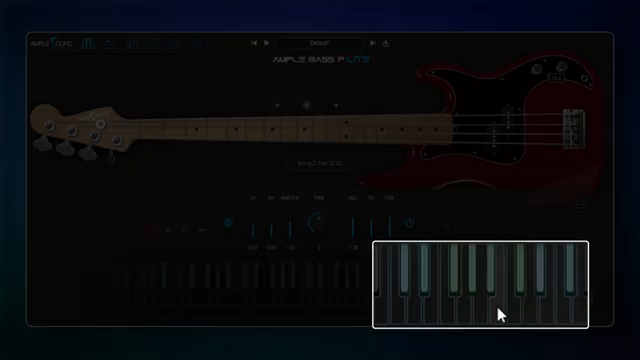
"All of that can kind of help to the realism of the bass guitar part."
© Screenshot/Quote: Creativesauce (YouTube)
No one wants a bassline that sounds like it was sequenced by a robot stuck in 1996. Creative Sauce shows off the key switch system—hammer-ons, legato slides, mutes—so you can inject real playing techniques without fiddling with endless automation. You even get control over fret position, which is the kind of detail that elevates a bass part from ‘meh’ to ‘yep, that’s a player.’ It’s a clever mix of hands-on control and automation, giving you the best of both worlds.
Let the Bass Speak: Demos & Final Word
Ultimately, Creative Sauce keeps it honest—sound is king. The video is packed with real-world audio examples, letting the plugin show what it can actually do in a mix. If you want to know how this thing holds up in your own bunker, you’re going to have to give it a listen. As Mike puts it, this is probably the best free bass plugin out there right now. And if you’re still on the fence, stop reading and hit play—the proof’s in the low-end pudding.
This article is also available in German. Read it here: https://synthmagazin.at/creative-sauce-bringt-ample-bass-p-lite-auf-den-punkt-kostenloser-bass-der-richtig-knallt/
Watch on YouTube:
Latest articles
Watch on YouTube:
Visit the channel:
https://www.youtube.com/CreativeSauce
https://www.youtube.com/CreativeSauce
Links from CreativeSauce:
website: https://www.creativesauce.net
instagram: https://www.instagram.com/creativesauce2b
soundcloud: https://soundcloud.com/user-183426888
Sponsored links:
If you purchase via these links, we may earn a small commission – at no extra cost to you. The link opens an Amazon keyword search, and results may vary depending on availability.
Ample Bass P Lite
🔗 Check price on Amazon
🔗 Check price on Amazon