Expressive E’s Noisy 2.6 aims to redefine what a software synth can be, especially for players who demand nuance and tactile control. This video tutorial, guided by composer Josh Madoff, builds a full track from scratch, exploring the new engines, effects, and the unique Expression Blocks system. Along the way, it demonstrates how Noisy 2.6 bridges traditional MIDI, advanced MPE setups, and even DAW automation, showing off its workflow flexibility and sonic depth. If you’re curious about digital architectures designed for nuanced performance and fast sound shaping, this walkthrough offers a clear, hands-on perspective.
31. July 2026
LYRA
Expressive E Noisy 2.6: Deep Dive into Expressive Synthesis Workflows
Noisy 2.6: Expressivity at the Core
The tutorial opens with composer Josh Madoff introducing Noisy 2.6 as a software synthesizer designed to push expressivity and creativity in music production. Expressive E’s ethos—to bring physicality and responsiveness to digital instruments—comes through immediately, with the video highlighting that Noisy 2.6 isn’t just about new sounds, but about enabling the artist to shape and control them in real time. Even before delving into features, the focus is clearly on how software can rival hardware in translating gesture into sound.
Engines, Effects, and Presets: The Expanded Sonic Palette
Noisy 2.6 brings a suite of new tools to the table, including revamped analog, FM, harmonic, and wavetable engines. The update is more than cosmetic: nine new effects and five additional noise sources open up a broad spectrum of timbral possibilities, while a new LFO shape adds further modulation depth. The preset library now boasts 1,400 options, each designed to be both playable and responsive, with clear attention given to how they react to performance gestures and controller data.
What stands out in the workflow is how quickly a track can be built up by layering and tweaking these new sounds. Madoff demonstrates selecting and modifying presets, using macro controls and expression assignments to push the sounds further. The immediacy of switching engines or layering effects encourages experimentation, making Noisy 2.6 as much a playground as a production tool.
"It's been updated with brand new analog, FM, harmonic, and wavetable synth engines, as well as nine new effects, five new noise sources, a new LFO shape, and it comes with 1,400 expressive presets."
© Screenshot/Quote: Expressivee (YouTube)
Expression Blocks: Redefining Sound Interaction
"And when you control them together, completely new dimensions of expression open up."
© Screenshot/Quote: Expressivee (YouTube)
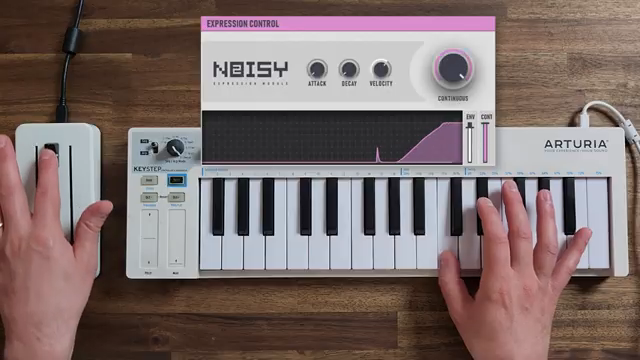
A central innovation in Noisy 2.6 is the Expression Blocks system, which allows users to map physical or MIDI controls to sound-shaping macros with remarkable flexibility. The video walks through mapping mod wheels, faders, and other MIDI CCs to multiple parameters—sometimes controlling several effects in different directions with a single movement. This matrix-like approach means that even with a standard MIDI keyboard, you can sculpt sounds in real time, layering evolving gestures and dynamic changes.
The tutorial showcases two expression controllers working in tandem, such as a fader mapped to CC1 for effects and another to CC11 for layer-specific expression. This dual-control setup opens new expressive dimensions, and the workflow for assigning and tweaking these mappings appears streamlined. From a digital architecture perspective, Expression Blocks stand out as a core differentiator, enabling deep user-driven modulation without menu diving.
Unlocking MPE: Osmose CE and Multidimensional Performance
Noisy 2.6’s integration with MPE (MIDI Polyphonic Expression) controllers, such as the Osmose CE, is a highlight. Once MPE mode is enabled, the synth’s architecture shifts: expression controls for each layer become independently addressable, and new envelope trigger modes—standard, dynamic push, dynamic lift, and dynamic shake—are available. These let players define exactly how gestures like velocity, pressure, or lateral movement retrigger or shape envelopes, opening up entirely new performance techniques.
The video demonstrates practical applications, like morphing a bell sound into a sub bass with a few parameter tweaks and using the Osmose’s arpeggiator and ultra-sensitive keybed to control timbre and articulation. Notably, all this nuanced data is recorded into the DAW, and the editability of MPE data in Ableton is highlighted. The workflow encourages not just performance, but post-recording refinement of every expressive nuance—a significant advantage for hybrid studio/live environments.
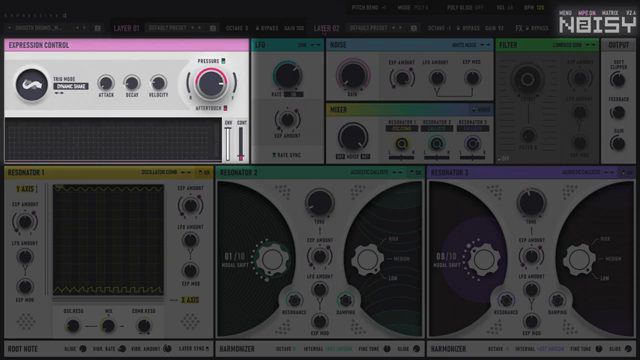
"The MPE expression control has two separate envelopes, a continuous MPE envelope, and a second envelope that can get triggered in four different ways."
© Screenshot/Quote: Expressivee (YouTube)
Intuitive Workflow, Versatile Setups: Noisy 2.6 in Action
"But what I think is uniquely special about Noisey 2 is just how quick and intuitive it is to shape the way the sounds respond to your physical playing."
© Screenshot/Quote: Expressivee (YouTube)
The latter part of the tutorial underscores Noisy 2.6’s adaptability, whether you’re using a traditional MIDI keyboard, faders, DAW automation, or advanced MPE controllers. The process of building drum sounds, layering presets (including those bundled with Expressive E’s Ctrl-E software), and shaping parts in real time is shown to be quick and direct. Editing and refining performances in the DAW is straightforward, making the synth suitable for both spontaneous jam sessions and meticulous studio work.
What sets Noisy 2.6 apart, according to the video, is the immediacy with which users can reshape sound response to physical input. The interface and menu flow are designed to minimize friction: whether you’re tweaking expression curves, browsing presets, or assigning macros, the synth maintains a hands-on, responsive feel. This workflow-centric design, combined with deep integration across controllers, marks Noisy 2.6 as a flexible hub for expressive digital synthesis.
This article is also available in German. Read it here: https://synthmagazin.at/expressive-e-noisy-2-6-detaillierter-einblick-in-expressive-synthese-workflows/
More articles about these products:
 Expressive E Osmose Firmware 2.3: DAW Control, Ctrl-e and the Next Level of Expressive Integration
 Expressive E Noisy 2.6: Expanding the Architecture of Expressive Synthesis
 Resonant Alchemy: Sam Gutman Dives into the Sonic Worlds of Noisy 2.6
 Expressive E’s Osmose CE: A New Blueprint for Expressive MIDI Control
Watch on YouTube:
Latest articles
Watch on YouTube:
Visit the channel:
https://www.youtube.com/ExpressiveE
https://www.youtube.com/ExpressiveE
Links from ExpressiveE:
Sponsored links:
If you purchase via these links, we may earn a small commission – at no extra cost to you. The link opens an Amazon keyword search, and results may vary depending on availability.
Ctrl-e
🔗 Check price on Amazon
🔗 Check price on Amazon
Noisy 2.6
🔗 Check price on Amazon
🔗 Check price on Amazon
Osmose CE
🔗 Check price on Amazon
🔗 Check price on Amazon