The Lexicon 224 is no stranger to studio legends, but in the hands of Mike from Creative Sauce, this reverb beast gets a streetwise breakdown. Forget glossy marketing and cryptic manuals—here, it’s all about practical hacks, hidden gems, and using the 224’s quirks to your sonic advantage. Expect fast talk, real-world tips, and a healthy splash of sarcasm as Creative Sauce demystifies the controls and shows why this classic still packs a punch. Ready for a reverb ride? Let’s dive.

19. September 2026
SPARKY
Creative Sauce Gets Deep with the Lexicon 224: Reverb Wizardry Uncorked
Reverb Royalty with a Side of Confusion
The Lexicon 224 isn’t just a reverb—it’s a studio icon with a reputation for sounding lush and expensive, but also for making users scratch their heads. Mike from Creative Sauce wastes no time admitting the 224’s controls look like a spaceship dashboard after a late-night curry. If you’ve ever stared at those sliders and buttons, wondering if you’re about to craft a legendary snare tail or accidentally launch the studio dog into orbit, you’re not alone.
This video sets the record straight with a no-nonsense walkthrough, promising to unravel the tangled web of controls and even expose a hidden option most users miss. Don’t expect any hand-holding here—Mike keeps it real, with tips you’ll actually use instead of the usual waffling. Strap in, because things get practical fast.
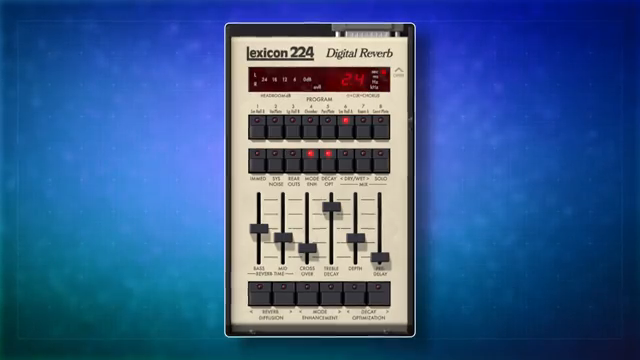
"It's a little confusing to use."
© Screenshot/Quote: Creativesauce (YouTube)
Sliders, Programs, and Frequency Fiddling
"They could definitely be a source of confusion if you don't fully understand them."
© Screenshot/Quote: Creativesauce (YouTube)
Mike dives straight into the heart of the 224—its reverb programs and those infamous sliders. Each program button changes the overall vibe, but the real magic (and occasional chaos) happens down below, where the bass, mid, treble, depth, and pre-delay sliders let you carve out frequency-specific decay times. The crossover control decides where the bass hands off to the mid, letting you banish mud or crank up the shimmer with surgical precision.
If you’re thinking the labels make sense, think again. The ‘mid’ slider is a bit of a trickster, controlling everything above the crossover, including highs. And when chorus mode comes out to play, all bets are off—the sliders abandon their original jobs and morph into outputs for four independent chorus effects, ready to turn your reverb into a swirling, stereo monster. It’s confusing, but Mike’s breakdown keeps it from turning into a toaster-fight.
Hidden Buttons & Secret Sauce
Here’s where Creative Sauce earns the name. Among the usual suspects, Mike spotlights a control so well-hidden you’d think Lexicon designed it after a night out. The ‘mode enhancement’ button introduces subtle delay movement to kill unwanted ringing—handy for anyone who likes their tails lush, not clanging. But the real jaw-dropper is a secret button hidden in the Universal Audio logo, toggling algorithmic imperfections that make the 224 sound either pristine or gloriously glitchy.
Add to that quirky controls for system noise, quad output switching, and independent channel gain, and you’ve got a playground for sonic weirdos and purists alike. Mike doesn’t just tell you what the buttons do—he shows how they actually change the sound, cutting through the mystery with clear, practical examples. If you’ve ever wondered what’s under the hood, this is the deep dive you didn’t know you needed.

"If you look at the logo at the top here the universal audio logo you can switch this off and on and again this is about imperfections that they've modeled."
© Screenshot/Quote: Creativesauce (YouTube)
Making the 224 Play Nice in the Mix

"In most cases I would insert a reverb plugin on a bus and then I would control the balance between the dry and wet signal using the faders in my DAW."
© Screenshot/Quote: Creativesauce (YouTube)
No point having a legendary reverb if you can’t wrangle it in a real mix. Mike drops actionable advice for blending the 224 on buses or inserts, controlling dry/wet with DAW faders or plugin buttons, and using pre-delay for separation without smudge. The immediate mode keeps your slider settings sticky across programs—handy if you’ve dialled in a sweet spot and don’t want it wiped when flipping patches.
From taming boomy lows with the crossover to dialling in smooth, tail-heavy ambience on acoustic guitar, the tips here are gold for anyone who wants their mixes to sound pro without reading a 400-page manual. The 224’s versatility is front and centre, proving it can handle subtle glue or full-on space-cave theatrics, depending on how reckless you get with those sliders.
Sound Demos—Go Watch the Mayhem
If you think words can do the Lexicon 224 justice, you’re dreaming. Mike’s video is loaded with sound demos—acoustic guitar, lush tails, extreme settings, and some wild chorus action. You’ll want to hear how the hidden controls and mix tricks actually sound in context. So, don’t just skim this article—hit play and let your ears decide if this reverb is your new secret weapon or just another studio relic.
This article is also available in German. Read it here: https://synthmagazin.at/creative-sauce-packt-aus-lexicon-224-reverb-legende-entschluesselt/
More articles about these products:


Watch on YouTube:
Latest articles
Watch on YouTube:
Visit the channel:
https://www.youtube.com/CreativeSauce
https://www.youtube.com/CreativeSauce
Links from CreativeSauce:
website: https://www.creativesauce.net
instagram: https://www.instagram.com/creativesauce2b
soundcloud: https://soundcloud.com/user-183426888
Sponsored links:
If you purchase via these links, we may earn a small commission – at no extra cost to you. The link opens an Amazon keyword search, and results may vary depending on availability.
Lexicon 224
🔗 Check price on Amazon
🔗 Check price on Amazon
UAD Lexicon 224
🔗 Check price on Amazon
🔗 Check price on Amazon