Chris Sangster, the tireless LA studio crusader, takes a no-holds-barred swing at Logic Pro 12.3 in his latest video. Forget fluffy release notes—this deep dive is all about real-world workflow, from that long-awaited foreground grid to Smart Tempo quirks and Beat Breaker tweaks. Chris doesn’t sugar-coat Logic’s bugs, but he does serve up the good, the bad, and the nerdy. If you want to know whether this update’s worth your precious SSD space, strap in. Some details you’ll simply have to see (and hear) for yourself.
19. July 2026
SPARKY
Chris Sangster vs Logic Pro 12.3: Foreground Grids and Other Headaches
Foreground Grid: Finally, We Can See
Logic Pro 12.3 lands with a headline feature: foreground gridlines. After years of grumbling, users can now see bar and beat lines on every region—muted or not. No more guessing where your snare drops just because Logic decided to hide the grid under a colourful clip. The new Placement menu lets you slap those gridlines right where you want ‘em, and a couple of sliders put you in control of their brightness and colour. You can go from ghostly white to blackout mode in seconds, all depending on your vibe and zoom level.
Of course, it wouldn’t be Apple without a quirk. The gridlines vanish when resizing a region—unless Flex Time is enabled. Sounds like a bug, feels like a bug, almost certainly is a bug. Chris calls it out, predicting a fix will land eventually, but in the meantime, you’ll need to keep one hand on Flex Time if you’re nitpicky about visuals. Still, it’s a win: Apple’s listening, even if they move like they’re mixing underwater.
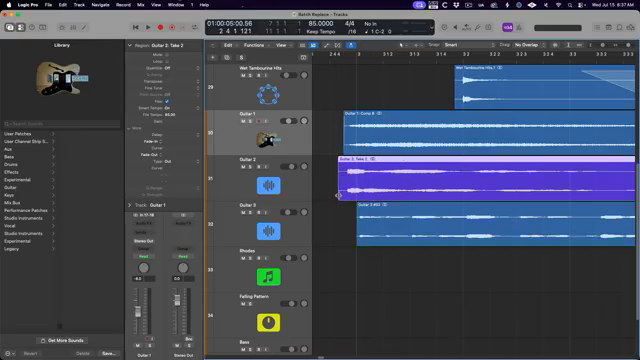
"This is pretty strange behavior and to me just seems like a bug, I think this is something that will probably be fixed pretty soon."
© Screenshot/Quote: Sangstersounds (YouTube)
Smart Tempo: Smarter, Not Smart Enough
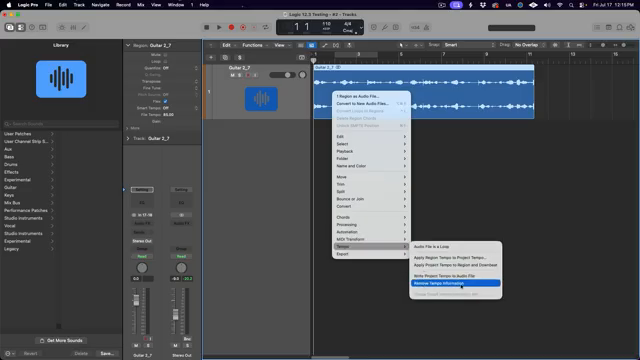
"Maybe the best update of all of this is the ability to type the original tempo of the audio file into the region inspector."
© Screenshot/Quote: Sangstersounds (YouTube)
Smart Tempo gets a much-needed overhaul, splitting Flex Time and Smart Tempo into separate controls. The days of head-scratching when an audio file goes rogue are (mostly) over—now you can toggle Flex Time and choose Smart Tempo behaviour without deep-diving into menus or hacking metadata. Chris is proper pleased about being able to type in the original tempo right in the region inspector. Half-time and double-time tricks are now a cinch, so if you’re into flipping beats on the fly, you’ll dig it.
But then comes the letdown. The whole ‘is it a loop?’ property in the Smart Tempo editor is more confusing than useful. Logic still makes its own calls about what counts as a loop, and if it gets it wrong, you’re stuck—editing BPM is off-limits, and the flex/smart menu logic is a mess. Chris’s verdict: it’s less flexible than promised, and sometimes more restrictive than before. Classic Logic—one step forward, one step sideways.
Beat Breaker: Slices Get Shifty
Beat Breaker just got a bag of new tricks. Each slice now has its own EQ filter—low pass or high pass—plus resonant sweeps that can get properly gnarly. Want to automate a filter motion inside a single slice? That’s now a two-second job. The resonance control lets you dial in as much or as little bite as you want, pushing things into full warehouse territory if you’re brave.
There’s also per-slice panning, but don’t get too excited if you’re working in mono—panning just mutes the slice if you push it hard right. Convert to stereo and you’re golden. And for the chaos merchants, there’s a new dice icon: randomise settings per slice, with control over what gets scrambled and how much. Chris admits it’s a bit of a gimmick but fun to mess around with. If you want every hi-hat to sound like it’s having its own little rave, go wild. For the full sonic mayhem, though, you’ll want to watch his demo.
The Bugs and Bummers
No update is perfect, and 12.3 is no different. Chris rattles off some classic Logic oddities: gridlines disappearing unless Flex Time’s on, Smart Tempo loop confusion, and that infamous export naming bug (finally squashed, praise be). There’s also a fix for the Cue Range function, which now behaves predictably—a small mercy for anyone who quantises on the edge. Add in a few legacy patches returning and tweaks to duplicate track behaviour, but if you expected a flawless DAW, keep dreaming. Some changes are subtle, others overdue, but it’s clear Apple still does things on its own schedule.
Should You Upgrade?
Chris sums it up: Logic Pro 12.3 is a solid update, not a revolution. The new features will absolutely save time for some workflows, but the lingering bugs and odd decisions mean you’ll want to weigh up the pros and cons before diving in. If you live for new features like foreground grids or Beat Breaker tweaks, grab it. If stability is your only religion, maybe wait for the next point release. As always, some things—especially the real-world impact of these features—are best experienced in the video itself. Nothing beats seeing (and hearing) the chaos unfold.
"All in all, I think this is a meaningful update."
© Screenshot/Quote: Sangstersounds (YouTube)
This article is also available in German. Read it here: https://synthmagazin.at/chris-sangster-vs-logic-pro-12-3-foreground-grids-und-andere-kopfschmerzen/
More articles about these products:
Watch on YouTube:
Latest articles
Watch on YouTube:
Visit the channel:
https://www.youtube.com/sangstersounds
https://www.youtube.com/sangstersounds
Links from sangstersounds:
FREE DOWNLOADS!: https://linktr.ee/sangstersounds
Website: https://sangstersounds.com
Instagram: https://instagram.com/sangstersounds
Sponsored links:
If you purchase via these links, we may earn a small commission – at no extra cost to you. The link opens an Amazon keyword search, and results may vary depending on availability.
Beat Breaker
🔗 Check price on Amazon
🔗 Check price on Amazon
Logic Pro 12.3
🔗 Check price on Amazon
🔗 Check price on Amazon