In this deep dive, we explore how 1010music’s bento groovebox leverages tempo and beat-based modulation effects for creative sound design. The manufacturer walks through syncing modulation sources to tempo values, showing off the bento’s modulation matrix across a range of synth types. With a focus on LFOs, modulation sequencers, and the practical impact on real tracks, this video is a concise primer on turning rhythmic ideas into modulated textures—touchscreen workflow included.
Groovebox Foundations: Modulation, Meet the Beat
The video spotlights the 1010music bento groovebox as a flexible hub for tempo-synced modulation. With a nod to classic parameter locks and modern modulation flavors, 1010music’s approach is to let users infuse their tracks with rhythmic movement, not just static automation. The bento is presented as a touchscreen-centric device, aiming to streamline modulation workflows for both producers and performers.
From the start, it’s clear the focus is on bridging traditional modulation tricks with contemporary, beat-synced approaches. By allowing modulation sources to snap to tempo and musical note values, the bento aims to bring DAW-like automation tricks to hardware jamming and live performance. This sets the stage for hands-on, performance-oriented modulation without the need for complex menu diving.
Sync, Modulate, Repeat: Core Features in Action
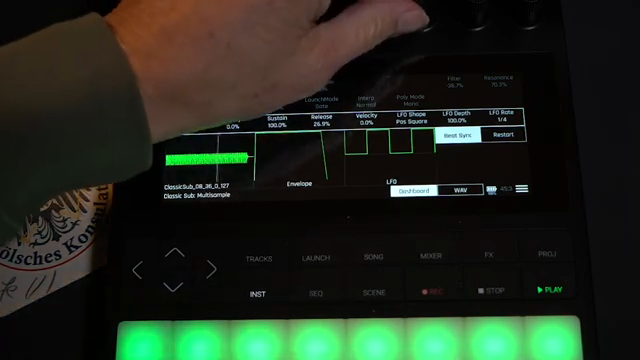
A central feature is the bento’s ability to sync modulation rates directly to the project tempo, using note values as modulation divisions. This means LFOs and sequencers can be tightly locked to the groove, allowing for modulation that feels musically integrated rather than floating or arbitrary. The video demonstrates this with a sub-bass patch: while the sequence may look static, the modulation matrix is doing the heavy lifting, with LFOs shaping pitch and filter sweeps at rates that sit right in the pocket with the beat.
The touch interface is leveraged to quickly inspect and adjust modulation routings. By setting LFO depths and rates in note divisions—like quarter notes—the workflow encourages experimentation without losing sync. This is especially handy for dynamic, evolving patterns in both studio and DAWless setups, and gives performers a fast way to dial in rhythmic variations on the fly.
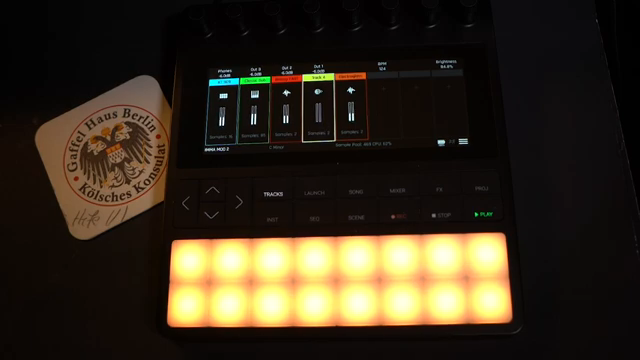
"Most modern synths and effects can also sync their modulation sources to tempo and note values in a similar way."
© Screenshot/Quote: 1010Music (YouTube)
Waveforms and Rhythms: LFOs as Creative Engines
The demonstration moves into creative modulation techniques, starting with LFOs using square waves at full depth. This results in clear, stepped modulations—essentially toggling between two levels for dramatic effect. Since these LFOs are set to musical note values (like quarter notes or triplets), the modulation feels inherently rhythmic and musical, adding groove without manual automation.
Varying the LFO assignment across synth layers, the video shows how using different note values—such as quarter note triplets—can introduce a slightly off-kilter, syncopated feel. This flexibility in choosing both waveform and rate lets users sculpt everything from straight, grid-locked movements to more complex, polyrhythmic modulations, all tightly synchronized to the track’s tempo.
Mod Sequencers: Drawing Rhythmic Modulation by Hand
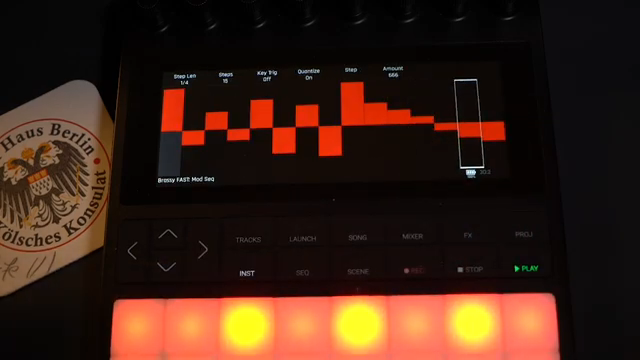
"You're able to draw in whatever you want. A really fun creative tool this one is."
© Screenshot/Quote: 1010Music (YouTube)
Building on the foundation of tempo-synced LFOs, the bento’s modulation sequencer is highlighted as a tool for drawing in custom modulation patterns. This is used to manipulate wavetable positions and filter resonance, adding evolving movement to polyphonic chord parts and arpeggios. The sequencer’s note-based timing options—like setting steps to eighth notes—let users layer different modulation rhythms for more complex textures.
The granular synth section showcases the sequencer’s ability to control grain density, while LFOs and envelopes modulate other parameters like pitch and playback rate. By assigning different modulation sources to parameters across multiple oscillators, the video demonstrates how users can create unpredictable, lively sounds. The touchscreen workflow makes it straightforward to experiment with these routings, encouraging hands-on exploration and real-time adjustment.
This article is also available in German. Read it here: https://synthmagazin.at/1010music-bento-tempo-synchrone-modulationseffekte-im-ueberblick/
More articles about these products:
Watch on YouTube:
Latest articles
Watch on YouTube:
Visit the channel:
https://www.youtube.com/1010music
https://www.youtube.com/1010music
Links from 1010music:
website: https://1010music.com
instagram: https://www.instagram.com/1010_music
downloads: https://1010music.com/downloads
forum: https://forum.1010music.com
Sponsored links:
If you purchase via these links, we may earn a small commission – at no extra cost to you. The link opens an Amazon keyword search, and results may vary depending on availability.
1010Music Bento
🔗 Check price on Amazon
🔗 Check price on Amazon