Ever had your synth’s keys ghost you mid-set or go full-on sledgehammer mode with every touch? Syntaur’s latest video doesn’t just nod at keybed carnage, it dives right in, showing exactly why your beloved rig keeps betraying you. With Sam Mims at the helm, expect a brisk, hands-on tour through grimy contacts, cable chaos, and the fine art of DIY synth revival. If you’ve ever wished your keyboard was less drama and more groove, this is the pit stop you need.
17. September 2026
SPARKY
Syntaur’s Keybed Survival Guide: When Your Synth Throws a Wobbly
Syntaur Key Contact Circuit Board, Syntaur Keybed Contact Strips
Keybed Woes: The Never-Ending Rave
Let’s face it—keybed issues are the synth world’s equivalent of flat tyres: everyone gets one sooner or later, and they’ll ruin your night faster than a blown PA. Syntaur’s Sam Mims wastes no time confirming what every keyboardist secretly dreads: most breakdowns start right under your fingers. It’s not just the big crashes either; even subtle faults can send your set list into meltdown.
With all the moving bits crammed into the keybed, wear and tear is inevitable. You know the drill: stuck keys, random velocity spikes, or that creeping sense of doom when nothing happens at all. Sam’s approach is refreshingly unflinching—no sugar-coating, just the blunt reality that if your keys are misbehaving, the keybed’s probably at the heart of it.
DIY or Die: Keybed Repairs for the Restless
Here’s the kicker—most keybed repairs are less rocket science, more Sunday DIY. Syntaur makes it clear: you don’t need a soldering iron, just a screwdriver and the will to get stuck in. Forget booking a slot at your local synth hospital; most fixes are within reach if you’re not scared to open things up.
This isn’t just pep talk. Syntaur’s very reason for existence is getting parts into greasy hands so you can keep your rig running. Their message? Stop panicking, grab your tools, and claim your right to synth self-sufficiency. Even if you’re more at home with Ableton than a Phillips head, you’ll survive this patch job.
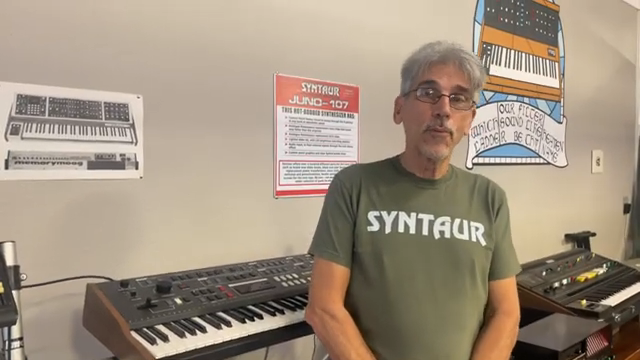
"The good news is that most keybed repairs are pretty easy to fix."
© Screenshot/Quote: Syntaur (YouTube)
Classic Crimes: Dead Notes & Velocity Mayhem
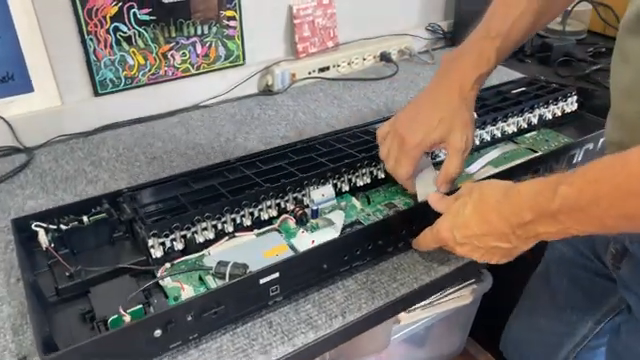
"That nearly always means that there's trouble with the ribbon cables that connect the two."
© Screenshot/Quote: Syntaur (YouTube)
So what’s actually going wrong down there? Sam breaks down the two headline annoyances: keys that refuse to play, and those that blast out at max velocity no matter how soft you tickle them. Nine times out of ten, it’s a dodgy connection or crusty contacts—not some mystical synth curse. Ribbon cables might be loose, or someone’s botched a repair and left your keybed sulking in silence.
The real villains are dust bunnies and worn-out carbon contacts—those sneaky gremlins that creep in after years of late-night jams. Syntaur’s explanation of how velocity works is a quick masterclass: multiple contacts under each key, timing differences, and how a bit of grit can turn your expressive playing into a dull hammer-on. If your synth’s acting up, chances are the answer’s under your fingertips (or a cat’s paw, if you’re unlucky).
Contact Sports: Cleaning, Swapping & Winning
Rescuing your keys is all about getting hands-on with those contact strips. Syntaur demystifies it: sometimes you’ll be popping off an octave’s worth of keys, sometimes just yanking out a board—depends on your synth’s mood. The main game? Clean those contacts first. Warm water, a drop of dish soap, and a bit of patience go a long way. Don’t get clever with alcohol on rubber—unless you like cracked silicone and more misery.
If cleaning doesn’t do it, swapping strips from another octave or grabbing a fresh one is your next move. If you’re still stuck after all that, it might be time to blame the circuit board—especially if you’ve had a run-in with cola, beer, or feline sabotage. Syntaur’s advice: replace the lot if you’re already in there. After all, you don’t want to be back in the rave bunker next week fighting the same battle.
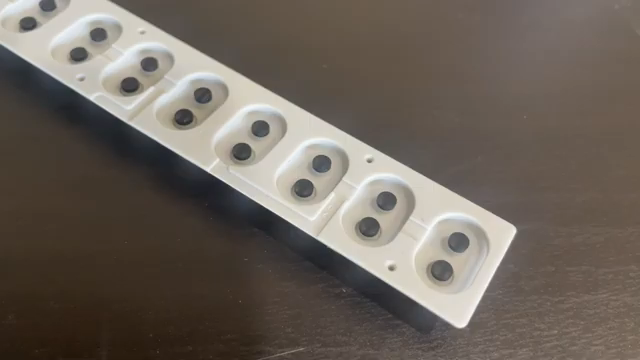
"The solution for keys that don't work correctly is either cleaning or replacing contact strips."
© Screenshot/Quote: Syntaur (YouTube)
See It, Don’t Just Read It: The Video Is Your Field Manual
Words only get you so far—Syntaur’s video is the real gig. If you want to see exactly how dirty, fiddly, or surprisingly simple these repairs can be, hit play and follow along. There’s nothing like watching the pros get their hands mucky to boost your confidence for your own synth surgery. Just don’t blame us if you end up fixing your mate’s gear next.
This article is also available in German. Read it here: https://synthmagazin.at/syntaurs-keybed-survival-guide-wenn-dein-synth-ausrastet/
Watch on YouTube:
Latest articles
Watch on YouTube:
Visit the channel:
https://www.youtube.com/Syntaur
https://www.youtube.com/Syntaur
Links from Syntaur:
Official Site: https://syntaur.com
Support on Patreon: https://patreon.com/synthwizards
Facebook: https://facebook.com/syntaur
Twitter: https://twitter.com/syntaursynths
Instagram: https://instagram.com/syntaursynths
Reverb: https://reverb.com/shop/syntaur
Sponsored links:
If you purchase via these links, we may earn a small commission – at no extra cost to you. The link opens an Amazon keyword search, and results may vary depending on availability.
Syntaur Key Contact Circuit Board
🔗 Check price on Amazon
🔗 Check price on Amazon
Syntaur Keybed Contact Strips
🔗 Check price on Amazon
🔗 Check price on Amazon