Chris Sangster, the man behind sangstersounds, takes Logic Pro 12 for a spin and doesn’t hold back. Is this update a true rave bunker upgrade, or just another shiny Apple distraction? From synth session players that flirt with greatness to a Chord ID that’s more confused than a DJ at a country fair, Sangster slices through the hype with his trademark LA polish and dry wit. If you’re wondering whether Logic Pro 12 is worth your precious SSD space—or if Apple’s new subscription model is about to mug your wallet—strap in. This review’s got more twists than a modular patch cable.
10. February 2026
SPARKY
Logic Pro 12: Chris Sangster Digs for Gold (and Finds a Subscription Paywall)
Logic 12: The Update Nobody Waited a Decade For
Apple’s dropped Logic Pro 12 barely a year and a half after version 11, which is a bit like getting a new iPhone before your old one’s even got a scratch. Chris Sangster wastes no time asking the big question: does this update deserve a full version bump, or is it just a marketing move to keep Logic feeling fresh in the Apple ecosystem?
The answer isn’t obvious. Sangster’s approach is classic—straight to the point, no fluff, and a healthy dose of scepticism. He’s not here to gush over every new icon or menu shuffle. Instead, he’s got his eyes on workflow, features, and whether any of this actually matters for real producers. If you’re expecting a revolution, brace yourself: this is more incremental than game-changing.
"There are three big new features in Logic 12, two of them I am legitimately excited about, and one has me scratching my head a bit."
© Screenshot/Quote: Sangstersounds (YouTube)
Synth Session Players: Gateway Drug or Cheesy Sideshow?
"Honestly, while I like the functionality, I'm not a huge fan of the sounds in the synth bass session player. I find a lot of the presets to be quite cheesy sounding, especially compared to the keyboard synths."
© Screenshot/Quote: Sangstersounds (YouTube)
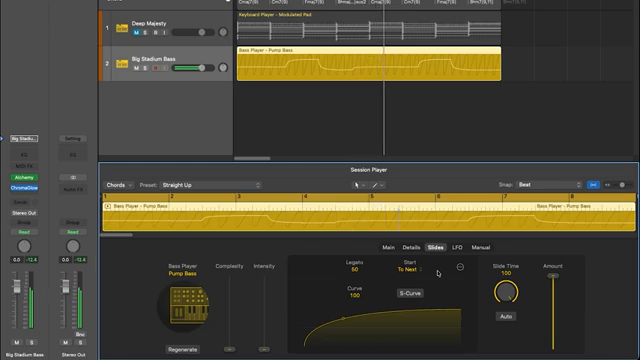
Logic 12’s headline act is the new synth session players—additions to the keyboard and bass players that promise everything from modulated pads to 808 bass. Sangster’s verdict? Don’t expect a second coming. The sounds are fun, especially for newcomers, but seasoned heads might find them more of a nice-to-have than a must-have.
The interface is slick, with envelope and LFO tweaks that make synth basics less terrifying for the uninitiated. But dig deeper and you’ll find quirks—like LFOs writing MIDI CC automation instead of using Alchemy’s built-in power. The synth bass presets? Let’s just say they’re cheesier than a late-night pizza. Still, for sketching ideas or teaching synth basics, these players are a quick win—even if they’re not about to headline your next warehouse set.
Chord ID: Genius in Theory, B-minus in Practice
Everyone’s hyped for Chord ID—the feature that promises to decode your audio or MIDI and spit out the right chords. Sangster puts it through its paces, and the results are… mixed. On simple tracks, it mostly gets things right, but throw in fast changes or tricky harmonies and it falls apart faster than a cheap patch cable.
The real kicker? Chord ID seems to analyse MIDI by converting it to audio first, leading to some head-scratching mistakes—like missing a seventh that’s clearly there. Sangster’s not impressed, especially since the feature was supposed to be a game-changer for MIDI workflow. There are small wins, like the improved chord picker, but overall, Chord ID feels half-baked. It’s promising, but needs a firmware miracle before it’s ready for prime time.
If you want to see just how off-the-rails Chord ID can get, you’ll have to watch the video—some of these errors are best experienced with your own ears. For now, it’s a B-minus: good idea, rough execution.
"This is really disappointing to me, as this was the feature I was most looking forward to with chord track, a quick way to convert my MIDI recordings into a chord track. But unfortunately, it seems like this can't be done with 100% accuracy right now."
© Screenshot/Quote: Sangstersounds (YouTube)
Workflow Tweaks: Small Wins for the Studio Rats
Beyond the headline features, Logic 12 is packed with tiny workflow improvements that only true studio rats will appreciate. Sangster lights up over things like plugins no longer popping open when you copy them, scale quantise for MIDI drawing, and Match EQ finally getting proper boost/cut limits. It’s the kind of stuff that makes daily production less of a toaster-fight.
Not every tweak lands—some new menus feel pointless, and a few changes (like the patch loading oddity) are more confusing than helpful. But overall, these are the updates that actually speed up your grind. If you’re the type who lives in the DAW day in, day out, these little fixes are where Logic 12 quietly earns its keep.
Subscription Shadows: The Creator Studio Gambit
"Doesn't that seem like an easy thing to integrate into this 'content hub' and lock behind a paywall?"
© Screenshot/Quote: Sangstersounds (YouTube)
Just as you’re getting comfortable, Apple drops the Creator Studio subscription bomb. For now, Logic’s one-time purchase is safe, but Sangster’s got his tinfoil hat on—and for good reason. The Pixelmator Pro bait-and-switch, the mysterious new Sound Library window, and Apple’s careful wording all hint at a future where features might get locked behind a paywall.
If you’re allergic to subscriptions, keep your eyes peeled. Sangster’s not buying the marketing spin, and neither should you. The verdict? Logic 12 isn’t a revolution, but if you’re deep into session players or chord tracks, it’s worth a look. Otherwise, keep your current setup and watch this space—because the real changes might be lurking just around the corner.
This article is also available in German. Read it here: https://synthmagazin.at/logic-pro-12-chris-sangster-sucht-nach-gold-und-findet-eine-abo-falle/
Watch on YouTube:
Latest articles
Watch on YouTube:
Visit the channel:
https://www.youtube.com/sangstersounds
https://www.youtube.com/sangstersounds
Links from sangstersounds:
FREE DOWNLOADS!: https://linktr.ee/sangstersounds
Website: https://sangstersounds.com
Instagram: https://instagram.com/sangstersounds
Sponsored links:
If you purchase via these links, we may earn a small commission – at no extra cost to you. The link opens an Amazon keyword search, and results may vary depending on availability.
Logic Pro 12
🔗 Check price on Amazon
🔗 Check price on Amazon