Kick drums are the heartbeat of any banging track. In his latest video, Bthelick dives deep into the essence of these essential sounds, offering both paid and free methods to elevate your beats. From mastering synthesis with Kick 3 to the slick simplicity of Drum Clone, he’s breaking it down so you can build it up! Oh, and there’s a side of wicked tips on matching your kicks to your track’s vibe.
The Heartbeat of the Track
Bthelick kicks off the video by emphasizing just how crucial kick drums are in dance music production. It’s akin to the solid foundation of a skyscraper, holding the rest of your track upright. He points out that producers often struggle with getting their kick sounds just right. But don’t sweat it—there are loads of ways to get those mighty kicks. As he puts it, re-synthesis might just be your new best friend over sampling.

"...crucial a good kick drum is. It's half of the entire foundation of your track..."
© Screenshot/Quote: Bthelick (YouTube)
Crafting Kick Drums: Two Approaches
The video lays out two fantastic ways to craft kick drums: a paid method using Kick 3 and a free alternative, Drum Clone. Kick 3 offers a deep dive under the hood, perfect for those who love to tinker and understand the intricacies. Meanwhile, Drum Clone appeals to the beatmaker on a budget, promising quick results. Bthelick ensures that whichever path you choose, your kicks will be pumping hard in no time.
Dive Deep with Kick 3
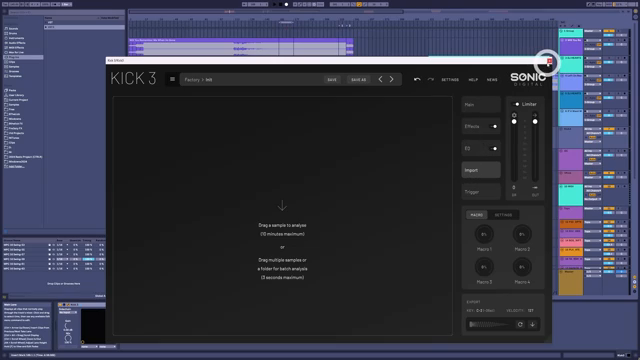
"Import. Here is where we can show it our favourite kick drum..."
© Screenshot/Quote: Bthelick (YouTube)
Firing up Kick 3, Bthelick demonstrates just why this tool’s a game-changer. It’s like a forensic lab for kicks, breaking down your beloved samples and re-synthesizing them to perfection. He walks through importing a track like DJ Heartstring’s and using sections where the kick is clean and clear, even delving into setting the perfect start point for analysis. Carefully dissecting the sub and click layers, he shows how to balance and boost them for maximum impact.
Speed Without the Frills: Drum Clone
Moving onto Drum Clone, Bthelick highlights its speed and efficiency. It’s as though you’re rolling up to a fast-food joint for kicks—quick, dirty, and usually hitting the spot. This plugin might lack the sophisticated editing options like Kick 3, but boy, does it save time. In minutes, you’re ready to drop those beats. Its sensitivity adjustments even let you tweak the click and sub elements just enough to find your groove.
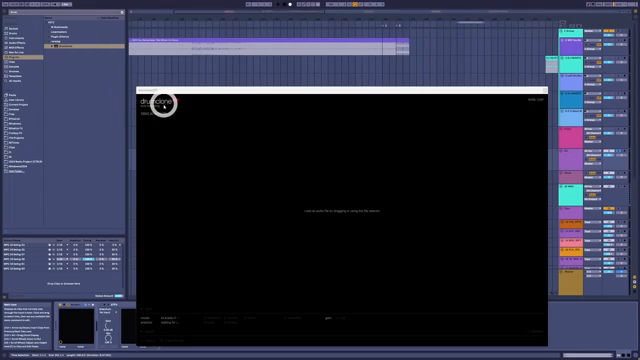
"It's actually a lot faster to get very good results."
© Screenshot/Quote: Bthelick (YouTube)
Selecting the Perfect Kick
"I want you to know there is no such thing as a perfect kick drum."
© Screenshot/Quote: Bthelick (YouTube)
Bthelick shares the wisdom of a seasoned producer, advising on how to select the perfect kick drum for your track. He recounts an experience of once using a ‘borrowed’ famous kick, only to find it didn’t fit every track. The takeaway is sharp: context is king. Consider your track’s venue, bass style, and key. A kick hard-hitting in G might not slap the same in B. Aim to harmonize with your track and keep those dance floors vibing.
Community Beats: Get Involved
Wrapping up, Bthelick invites his viewers to join his musical community. Whether it’s a cheeky like, a solid subscription, or diving into comments, he fosters an interactive experience. It’s like the best block party where everybody’s jamming and learning together. He even teases the idea of supporting him with a coffee, keeping the groove going strong in future videos.
This article is also available in German. Read it here: https://synthmagazin.at/kick-drum-meisterklasse-mit-bthelick/
Watch on YouTube:
Latest articles
Watch on YouTube:
Visit the channel:
https://www.youtube.com/Bthelick
https://www.youtube.com/Bthelick
Links from Bthelick:
Instagram: https://instagram.com/bthelickmusic
SoundCloud: https://soundcloud.com/bthelick
Ko-Fi: https://ko-fi.com/bthelick
facebook: https://facebook.com/bthelick
Twitter: https://twitter.com/BtheLick
Sponsored links:
If you purchase via these links, we may earn a small commission – at no extra cost to you. The link opens an Amazon keyword search, and results may vary depending on availability.
Drum Clone
🔗 Check price on Amazon
🔗 Check price on Amazon
Kick 3
🔗 Check price on Amazon
🔗 Check price on Amazon