Creative Sauce is back with another home-studio hack, and this time it’s all about iZotope’s Tonal Balance Control 3. Mike from Creative Sauce swears by this plugin, calling it his “secret sauce” for nailing mix balance without losing his mind (or his ears). Expect a deep dive into the new features, reference magic, and why this tool might just save your next project from sonic disaster. If you’re tired of guessing whether your low end is club-ready or just mud, this is the video you need. As always, Mike keeps it practical, no-nonsense, and just a touch nerdy—so you know you’re in good hands.

24. March 2026
SPARKY
Creative Sauce’s Secret Weapon: Tonal Balance Control 3 Gets the Sparky Treatment
Mixing’s Secret Street Weapon
Mike from Creative Sauce doesn’t mess about—he opens by declaring Tonal Balance Control his go-to plugin for every project. He’s not just hyping it; he calls it his “secret weapon” and makes it clear this isn’t some throwaway utility, but a core part of his mixing arsenal. The focus is on how the plugin turns the old-school reference track trick into a visual, actionable process, especially handy when your ears are fried from too many late-night sessions.
The video wastes no time showing off the target curve display, which isn’t just a static line but a range you’re meant to hit. Mike demonstrates how you can load up different genre presets—rock, generic, whatever—and instantly see where your mix sits. No more blind guesswork or endless A/Bing. If your mix lands in the zone, you’re golden. If not, you know exactly where to tweak. It’s a proper street weapon for anyone who wants to get pro results without the faff.
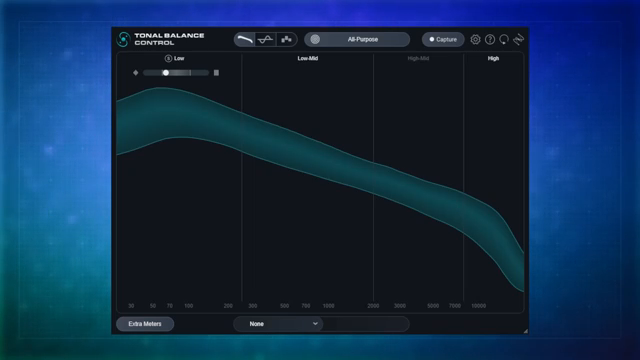
"I kind of feel like it's my secret weapon or my secret source, if you will."
© Screenshot/Quote: Creativesauce (YouTube)
Built-In EQ and Visual Candy
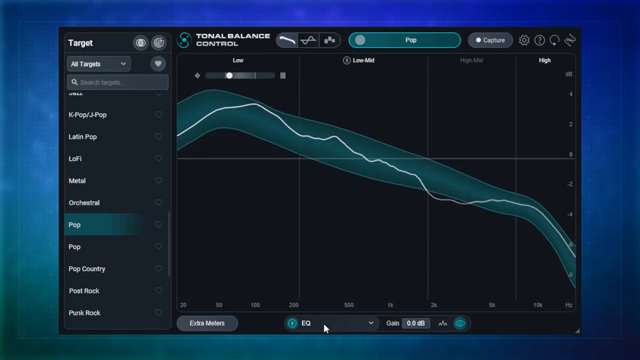
"You can in fact use the built-in EQ."
© Screenshot/Quote: Creativesauce (YouTube)
Now we get into the meat: Tonal Balance Control 3’s new built-in EQ. Mike explains how you used to have to juggle multiple plugins or link up with other iZotope EQs, but now you can just tweak frequencies right inside the plugin. No more plugin window spaghetti—just grab a band and go. The dynamic EQ is a nice touch, especially for taming that unruly low end that always seems to betray you when you play your mix on someone else’s system.
But it’s not just about EQ. The plugin’s visual aids are next-level: low end crest factor, vocal balance, dynamics, and stereo width meters. These aren’t just pretty lights—they actually help you spot problems before they become disasters. Mike calls out how the new extra meters and display modes make it even easier to see what’s going on, whether you want a fine-grained view or just a quick check across four frequency bands. It’s all about making your workflow faster and your mixes tighter.
Reference Capture and Curve Blending: The Real Sauce
Here’s where things get spicy. Mike shows off the ability to capture your own reference curves—just play your track, hit capture, and you’ve got a custom target for future projects. It’s dead simple, and you can name and save as many as you like. There’s even a standalone version now, so you can grab curves from Spotify, YouTube, or wherever you find your sonic inspiration. No more excuses for not knowing what a pro mix should look like.
The real kicker is the new blend feature. You can morph between two target curves—say, alt rock and country—and dial in the exact vibe you want. It’s like having a genre blender at your fingertips. Mike makes it look easy, but the creative potential here is massive. If you’re chasing a hybrid sound or just want to experiment, this feature alone could justify the upgrade.

"In this new version we can actually blend to target curves."
© Screenshot/Quote: Creativesauce (YouTube)
Seeing is Believing: Visualising Your Mix
"Now Tonal Balance Control kind of takes the reference track idea and turns it into something really visual."
© Screenshot/Quote: Creativesauce (YouTube)
Mike hammers home the point that visual feedback is a lifesaver, especially when your ears are shot. The plugin’s displays let you see exactly where your mix is sitting in relation to your target—no more flying blind. He points out that the visual aids are especially useful for catching issues you’d miss after hours in the bunker, like a vocal that’s too buried or a mix that’s gone mono by accident.
It’s not just about pretty graphs; it’s about confidence. When you see your mix hugging the target curve, you know you’re in the right ballpark. And if you’re off, you know exactly where to fix it. For anyone who’s ever second-guessed a mix at 2am, this kind of visual clarity is worth its weight in gold. But let’s be real: you’ll want to watch the video to see these meters in action—words don’t do the moving parts justice.
Price vs. Value: Is It Worth the Hype?
Mike doesn’t dodge the elephant in the room: Tonal Balance Control 3 isn’t exactly pocket change at $129. He admits some will find it steep, but argues that the time and stress it saves is worth every penny. For him, it’s about getting mixes done faster and with more confidence—less faffing about, more finishing tracks.
He leaves it up to the viewers to decide if the investment makes sense for their workflow, but he’s clear about the long-term value. If you’re serious about levelling up your mixes and want a tool that actually helps you finish songs, this plugin is a solid bet. As always, the comments section is where the real toaster-fight happens, so don’t miss the debate.
This article is also available in German. Read it here: https://synthmagazin.at/creative-sauce-geheimwaffe-tonal-balance-control-3-im-sparky-check/
Watch on YouTube:
Latest articles
Watch on YouTube:
Visit the channel:
https://www.youtube.com/CreativeSauce
https://www.youtube.com/CreativeSauce
Links from CreativeSauce:
website: https://www.creativesauce.net
instagram: https://www.instagram.com/creativesauce2b
soundcloud: https://soundcloud.com/user-183426888
Sponsored links:
If you purchase via these links, we may earn a small commission – at no extra cost to you. The link opens an Amazon keyword search, and results may vary depending on availability.
iZotope Tonal Balance Control 3
🔗 Check price on Amazon
🔗 Check price on Amazon