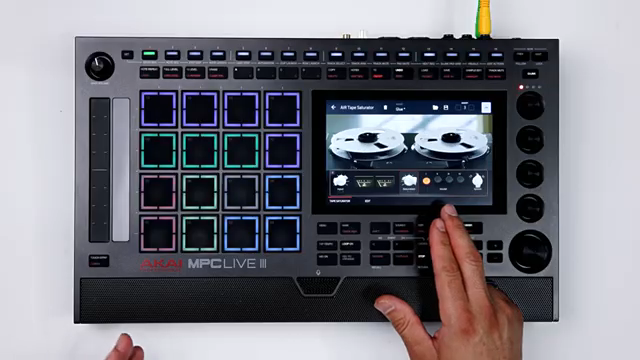
Akai Professional’s AIR Tape Saturator plugin promises to inject classic analog tape warmth into your modern MPC or DAW setup. In this official walkthrough, the plugin’s architecture is laid bare—showcasing a suite of controls that let you dial in everything from subtle glue to aggressive tape drive. With multiple saturation models, tape speed and condition tweaks, and a thoughtful auto makeup gain system, Akai aims to bridge the gap between vintage character and contemporary workflow. We break down how these features translate into real-world sound shaping and mixing, and where the plugin fits within Akai’s broader Tape Effects Collection.
22. May 2026
LYRA
Akai Professional Delivers Tape Saturation Mojo: AIR Tape Saturator for MPC and DAW Workflows
Warming Up: Virtual Tape in a Modern World
Akai Professional’s AIR Tape Saturator is pitched as a virtual analog plugin designed to emulate the subtle to dramatic warmth of classic tape machines. The walkthrough opens by clarifying that tape saturation is a form of mild musical distortion, occurring when audio exceeds the magnetic tape’s storage capacity. This effect, once a byproduct of analog recording, is now a sought-after sonic signature for digital producers seeking to add glue or character to their mixes.
The plugin is built for both DAWs and modern MPCs, reflecting Akai’s commitment to hybrid workflows. The video makes clear that AIR Tape Saturator isn’t just a one-knob effect; it’s a nuanced tool with a range of controls aimed at both subtle enhancement and bold coloration. The promise here is to bring the tactile, musical artifacts of tape into the digital realm, with enough flexibility to suit everything from drum busses to full mixes.
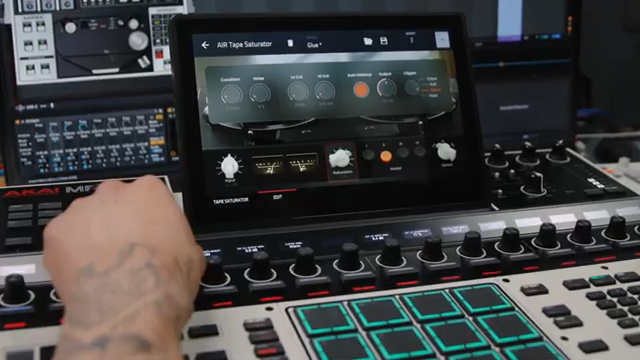
"Air Tape Saturator delivers real analog warmth from subtle glue to full character, built for DOS and modern MPCs."
© Screenshot/Quote: Akai Pro (YouTube)
Modeling the Magic: Saturation Engines, Tape Types, and Noise
"This will adjust the tape saturation model increasing in character and intensity."
© Screenshot/Quote: Akai Pro (YouTube)
The plugin’s core appeal lies in its multiple saturation models, each offering a distinct flavor of tape coloration. Users can select from four different models, with the saturation dial letting you control the intensity of the effect. The walkthrough demonstrates this on a bass track, showing how pushing the saturation can move a sound from subtle warmth to overt analog drive.
Tape speed is another key parameter, with options that affect the tonal balance and filtering characteristics. Higher speeds (like 30 ips) yield a brighter sound, while lower speeds (such as 7.5 ips) introduce a darker, more vintage vibe. This flexibility allows users to tailor the tape response to the needs of individual tracks or the master bus.
Noise and tape condition controls round out the analog emulation. The condition dial simulates tape age, introducing artifacts like wow, flutter, and dropouts, while the noise parameter lets you blend in tape hiss to taste. These features give producers the ability to dial in just the right amount of imperfection, from pristine to delightfully degraded.
Precision Sculpting: Input, Filters, and Tape Age
AIR Tape Saturator provides detailed control over the input gain, allowing users to drive the plugin harder for more pronounced saturation effects. The input meter offers visual feedback, making it easy to see how much signal is being pushed into the tape circuit. This is crucial for achieving the right balance between subtlety and character.
For further sound shaping, the plugin includes low cut and high cut filters, letting users trim unwanted frequencies and focus the tape effect where it matters most. Combined with the tape condition parameter, which ages the virtual tape for more or less degradation, these controls enable precise sculpting of the sonic result—whether you want clean enhancement or lo-fi nostalgia.
Level-Headed: Auto Makeup Gain and Output Management
One of the workflow-friendly features highlighted is the automatic makeup gain. This function, enabled by default, ensures that as you drive the input and tweak saturation, the output level remains consistent. For producers, this means you can experiment with tape coloration without constantly readjusting levels—a small but significant improvement for mixing speed and accuracy.
If you prefer manual control, auto makeup can be disengaged, allowing independent adjustment of input and output. This flexibility caters to both set-and-forget users and those who want to fine-tune every stage of their signal chain. The plugin also includes a clipper section for shaping the final output’s behavior, rounding out its utility as a mixing tool.
Beyond Saturation: The Tape Effects Collection
AIR Tape Saturator isn’t a standalone act—it’s part of Akai’s Tape Effects Collection, which also features Tape Echo and Tape Double Track plugins. This bundle aims to cover the full spectrum of classic tape processing, from saturation to delay and doubling effects, all modeled with a focus on authentic analog behavior.
For users invested in the Akai MPC ecosystem or looking to expand their DAW’s sonic palette, this collection offers a cohesive set of tools for adding movement, warmth, and vintage character. The walkthrough closes by encouraging experimentation, positioning Tape Saturator as a flexible option for both subtle enhancement and bold, creative sound design.
This article is also available in German. Read it here: https://synthmagazin.at/akai-professional-bringt-bandsaettigungs-mojo-air-tape-saturator-fuer-mpc-und-daw-workflows/
Watch on YouTube:
Latest articles
Watch on YouTube:
Visit the channel:
https://www.youtube.com/Akai_Pro
https://www.youtube.com/Akai_Pro
Links from Akai_Pro:
website: https://akaipro.com
instagram: https://instagram.com/akai_pro
facebook: https://www.facebook.com/AkaiPro
twitter: https://twitter.com/akai_pro
google_plus: https://plus.google.com/107127819149441645522/posts
Sponsored links:
If you purchase via these links, we may earn a small commission – at no extra cost to you. The link opens an Amazon keyword search, and results may vary depending on availability.
AIR Tape Saturator
🔗 Check price on Amazon
🔗 Check price on Amazon