If you ever thought making your own sample from scratch was a pain, wait till you see how Verysickbeats flips Logic Pro 12’s Session Player into a beatmaker’s secret weapon. JFilt isn’t here for the textbook workflow—he’s all about bending tools till they sound like dusty vinyl, not a sterile DAW preset. In this video, he breaks down how to shape chords, wrangle Logic’s sometimes-clueless Chord ID, and layer up a sample that’s so real, you’ll swear it came from a crate dig. If you want to dodge clearance headaches and still get that authentic vibe, this one’s for you. Grab a snack and get ready for some workflow hacks only a true beat nerd could love.
6. February 2026
RILEY
Verysickbeats Cooks Up Royalty-Free Heat with Logic Pro 12’s Session Player
Session Player: The No-Loop Groove Machine
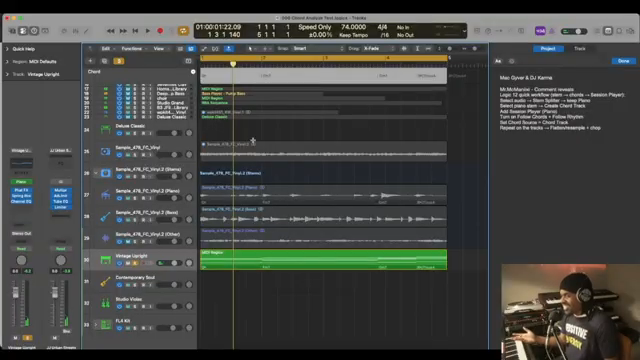
Verysickbeats jumps straight into the deep end with Logic Pro 12’s Session Player, showing us how to cook up a sample from scratch—no loops, no AI prompts, just pure beatmaker hustle. Forget the stock sounds and cookie-cutter patterns; this is about using the Session Player to build something that feels like it’s straight off an old jazz record, not a DAW demo.
He’s not just pressing play and calling it a day. The Session Player gets used as a creative tool, not a crutch. By layering up keys and bass, and tweaking every little detail, JFilt proves you can get that sample feel without ever touching a dusty crate. If you’re tired of hearing the same loops in every beat battle, this is the workflow you need to peep.
Chords and Melodies: Shaping That Sample Vibe
The real sauce here is how JFilt shapes his chords and melodies to capture the essence of a real-deal sample. He’s not just dropping in MIDI packs—he’s playing and correcting each chord, making sure every progression has that human touch. This isn’t about perfection; it’s about vibe, and he’s got plenty of it.
By manually fixing the chords and layering them with the Session Player, he brings out that lush, complex sound you’d expect from a chopped vinyl sample. The workflow might look a little tedious, but the end result is a melody that slaps harder than a late rent notice.
Chord ID: The Good, The Bad, and The Workarounds
Let’s talk about the elephant in the DAW—Logic’s Chord ID. JFilt keeps it real: this feature is cool in theory, but in practice, it’s like asking your little cousin to ID jazz chords—sometimes it nails it, sometimes it’s just guessing. Extensions like 9ths and 11ths? Chord ID’s still in kindergarten.
But here’s where the street smarts come in. Instead of whining, JFilt shows us how to work around the misses. He manually corrects the chords, adds the ones Chord ID skips, and basically treats the tool like a stubborn sampler—useful, but only if you know how to finesse it. It’s not perfect, but with a little elbow grease, you can get results that sound way more expensive than your plugin budget.
"For me I just believe it is not accurate enough."
© Screenshot/Quote: Verysickbeats (YouTube)
Layering Up: Building a Sample from the Ground Floor
Once the chords are locked in, it’s time to stack those sounds. JFilt takes us through layering keys, bass, and even strings, all inside Logic, using nothing but stock sounds and the Session Player. He’s tweaking rhythms, converting tracks to MIDI, and making sure every part grooves together like a late-night jam session.
This isn’t just about stacking instruments—it’s about making them talk to each other. By bouncing the tracks to audio and chopping them up, he creates a loop that feels lived-in and sample-ready. The workflow might be unpopular (and yeah, it takes some patience), but the end result is a sample that could fool even the most die-hard crate digger.
If you want the nitty-gritty—like exactly how he tweaks each note, or how the final arrangement comes together—you gotta watch the video. Trust me, some things just hit harder when you see and hear them in action.
The Final Flip: Hear It For Yourself
"It's going to take some work man, this is why it's unpopular, but it can be done, and the good news is, it's sample free, like if you want to go sample free and just create your own sample."
© Screenshot/Quote: Verysickbeats (YouTube)
After all the hustle, JFilt drops the finished sample, drums and all. The groove is tight, the vibe is vintage, and best of all, it’s 100% royalty-free—no lawyers, no clearance, just pure beatmaker joy. If you want to hear how Logic Pro 12’s Session Player can go from bland to banging, this is the proof. But don’t just take my word for it—hit play on the video and let your ears be the judge.
This article is also available in German. Read it here: https://synthmagazin.at/verysickbeats-baut-mit-logic-pro-12s-session-player-einen-sample-banger-ganz-ohne-loops/
Watch on YouTube:
Latest articles
Watch on YouTube:
Visit the channel:
https://www.youtube.com/Verysickbeats
https://www.youtube.com/Verysickbeats
Links from Verysickbeats:
Patreon: https://patreon.com/verysickbeats
Instagram: https://instagram.com/verysickbeats
Twitter: https://twitter.com/jfilt
Twitch: https://twitch.tv/verysickbeats
Discord: https://discord.com
Sponsored links:
If you purchase via these links, we may earn a small commission – at no extra cost to you. The link opens an Amazon keyword search, and results may vary depending on availability.
Logic Pro 12
🔗 Check price on Amazon
🔗 Check price on Amazon
Novation Launchkey 49 MK4
🔗 Check price on Amazon
🔗 Check price on Amazon
Serato Hex FX
🔗 Check price on Amazon
🔗 Check price on Amazon