TAETRO just dropped his first plugin, Pentamento, and it’s got more flavor than a late-night taco truck. Forget dry, sterile tracks—this tool lets you slap field recordings, noise, and all sorts of wild textures right on top of your sounds, and it does it in real time. If you’re into making your beats stand out with some gritty, personal sauce, this is the kind of streetwise hack you’ll want in your DAW. TAETRO’s always been about helping folks get creative, and Pentamento is his latest love letter to the beatmaking community. Curious? There’s a free version, so you’ve got zero excuses.
17. January 2026
RILEY
TAETRO’s Pentamento: Texture Layering That Slaps Harder Than a Broken Subwoofer
Layering Textures Like a Pro (Or at Least Like TAETRO)
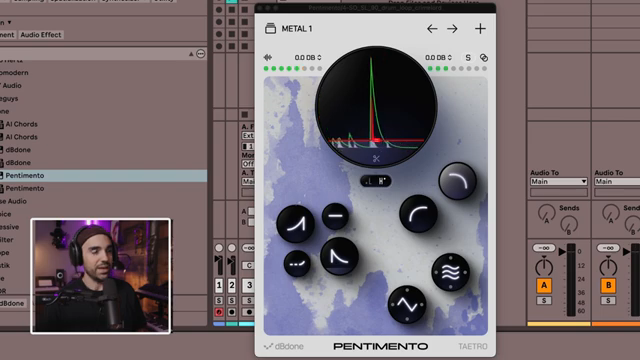
TAETRO kicks things off with a confession: he’s always been about those field recordings and weird textures, but he wanted a quicker, dirtier way to glue them onto any sound in his tracks. Enter Pentamento, his first plugin collab with the DB Dunn crew. This isn’t just another VST collecting dust in your plugin folder—it’s a tool for slapping noise, atmospheres, or whatever sample you want right on top of your instruments or drums. There’s even a free version, so you can try it before you commit your lunch money.

"I wanted a plugin that would help me embed these sounds into basically any instrument or any sound in my tracks."
© Screenshot/Quote: Taetro (YouTube)
Real-Time Reaction: No Science Degree Required
"It's almost like we're adding a subtle tambourine to this drum loop."
© Screenshot/Quote: Taetro (YouTube)
What sets Pentamento apart from the usual suspects? This thing reacts to your audio in real time, so your textures aren’t just glued on—they dance with your beats. TAETRO demos it on a basic drum loop, picking a metal rattle that jumps in every time the kick or snare hits above a certain threshold. You can even isolate the plugin’s reaction to just the lows or highs, so if you want that rattle only on the kick or just the snare, it’s a breeze.
The threshold control is your secret sauce for catching those sneaky hi-hats or ghost notes. Without Pentamento, your drums are just drums. With it, you’re basically adding a tambourine or whatever weird sound you want, and you can crank the overlay’s volume or swap out textures on the fly. Import your own samples if you’re feeling spicy—TAETRO’s all about making it personal.
Chop, Shape, and Follow: Pentamento’s Toolbox
Pentamento isn’t just about layering—this plugin’s got some serious street smarts. You can crop your samples right inside the plugin with a scissor tool, so you’re not stuck with boring loops. The filter section lets you high-pass or low-pass the overlay, keeping your main sound clean while the texture gets all the love.
The Envelope Follower is where things get wild. Tweak the attack, release, and hold to make your overlay tail off or swoop in however you want. There’s even a delay for the Envelope Follower, so you can offset the reaction and get some real rhythmic magic happening. Want more movement? There are presets to pan your overlay around your head, and a shaper for dirtying things up with distortion or bitcrushing. It’s all about making your sound unique—no science degree required, just a good ear and a taste for chaos.

"Now the noise is reacting, but that reaction is offset, creating this really cool rhythmic effect."
© Screenshot/Quote: Taetro (YouTube)
Beyond Drums: Pentamento on Anything
TAETRO’s not here to box you in—Pentamento isn’t just for drums. He throws it on electric piano, grand piano, and gets experimental with overlays like bells, voices, and flowing water. Suddenly, your keys have a soft fuzz or a creek running through them. The original sound is still there, but now it’s got character—like a street mural on a blank wall. If you want to hear just how wild these textures get, you gotta check the video. Words don’t do justice to the vibe Pentamento brings.
Get Involved: Free Version and Community Vibes
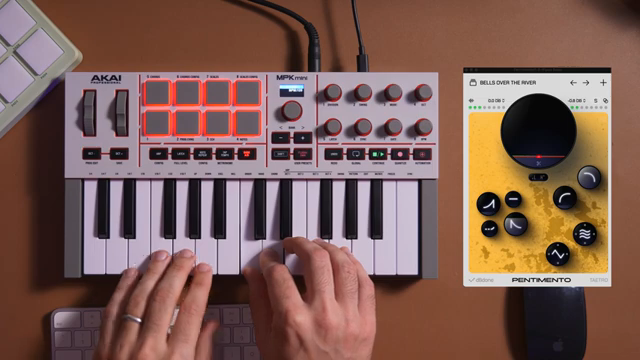
"I'm curious to experiment more myself with different kinds of samples, but also to see what you all end up inputting into Pentamento."
© Screenshot/Quote: Taetro (YouTube)
TAETRO wraps it up with a call to action—download the free version, drop your feedback, and get weird with your own samples. He’s hyped to see what the community cooks up, and there’s a Discord where you can swap ideas, report bugs, or just flex your wildest overlays. This plugin isn’t just a tool—it’s a growing street party, and everyone’s invited. Don’t sleep on it.
This article is also available in German. Read it here: https://synthmagazin.at/taetros-pentamento-texturen-stapeln-die-haerter-knallen-als-ein-kaputter-subwoofer/
Watch on YouTube:
Latest articles
Watch on YouTube:
Visit the channel:
https://www.youtube.com/Taetro
https://www.youtube.com/Taetro
Links from Taetro:
Instagram: https://instagram.com/taetro
Facebook: https://facebook.com/taetromusic
Bandcamp: https://taetro.bandcamp.com
Sponsored links:
If you purchase via these links, we may earn a small commission – at no extra cost to you. The link opens an Amazon keyword search, and results may vary depending on availability.
Pentamento
🔗 Check price on Amazon
🔗 Check price on Amazon