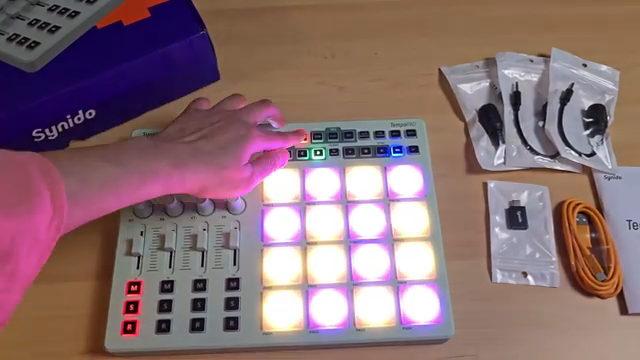
Synido Tech steps into the spotlight with the TempoPad C16, a compact MIDI controller that promises untethered creativity for producers, performers, and mobile musicians. This official walkthrough dives into the C16’s Bluetooth workflow, demonstrating how its 16 RGB pads, tactile knobs, and sliders can be mapped seamlessly to Ableton Live. With a rechargeable battery and three operational modes, the C16 aims to bridge the gap between portability and hands-on control. We take a close look at how Synido’s design choices translate into real-world workflow, performance, and customization, all as shown in the manufacturer’s own video.
12. October 2025
LYRA
Synido Tech’s TempoPad C16: Wireless MIDI Control, Mapped for Modern Creators
Unboxing Portability: The Wireless Promise
The Synido TempoPad C16 is introduced as a versatile MIDI controller that places a strong emphasis on wireless connectivity and mobile music-making. Right from the outset, the video highlights how Bluetooth support and a built-in rechargeable battery set the C16 apart from many traditional MIDI controllers. This combination is clearly aimed at users who want to create music anywhere, whether on a laptop, tablet, or even a phone, without being tethered by cables. The device’s compact form factor and included hard case reinforce its go-anywhere ethos, making it a compelling option for producers and beatmakers on the move.
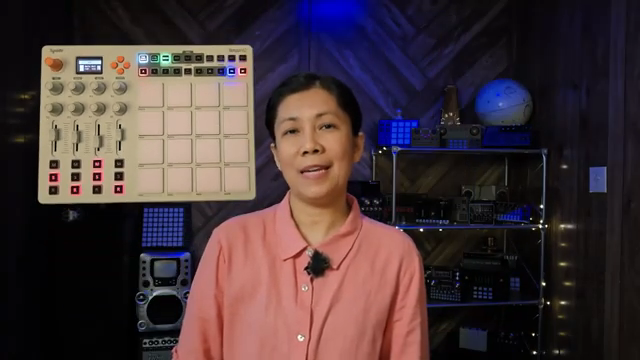
"It has a Bluetooth connectivity which you should be able to connect to your phones, iPads, tablets or laptop."
© Screenshot/Quote: Synidotech (YouTube)
Pads, Knobs, Modes: A Hands-On Feature Tour
"So this is your custom mode and this is your keyboard mode. And there should be one more dark mode."
© Screenshot/Quote: Synidotech (YouTube)
The C16’s control surface is densely packed yet thoughtfully laid out, featuring 16 RGB pads that are described as smooth and responsive. The video walks through the tactile experience—pads, buttons, sliders, and knobs all receive attention, with particular note given to their smooth action and build quality. The navigation control and main parameter knob are slightly clicky by design, allowing for parameter selection and fine-tuning, which is a subtle but important detail for workflow.
Three operational modes—Custom, Keyboard, and Dark—expand the device’s versatility. Custom mode offers flexible mapping, Keyboard mode transforms the pads into a playable scale with octave shifting, and Dark mode inherits Custom’s mappings with a different visual scheme. The inclusion of four pad banks (A–D) and control banks, plus a 16-track sequencer, further extends the C16’s range, making it suitable for everything from finger drumming to melodic sequencing.
Bluetooth Meets Ableton: Mapping the Workflow
The video provides a step-by-step guide to connecting the TempoPad C16 wirelessly to a laptop using Bluetooth, with a particular focus on Windows workflows. Key to this setup are two free utilities: MIDIberry and loopMIDI. The presenter demonstrates how to configure these tools to route MIDI data from the C16 to Ableton Live, emphasizing the importance of correct input/output settings and the quirks of maintaining a stable connection. The advice to avoid closing MIDIberry mid-session is especially practical, as it can instantly sever the wireless link.
Once inside Ableton Live, the mapping process is straightforward but flexible. The C16’s knobs, sliders, and buttons can be assigned to various DAW parameters, with the video showing clear examples of mapping volume controls and other functions across different control banks. The ability to switch between banks and map multiple layers of controls is highlighted as a workflow booster, allowing users to control a wide range of DAW functions without leaving the hardware.
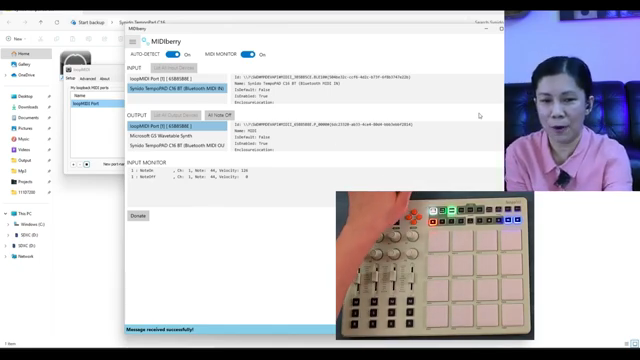
"Don't X out from the midi berry otherwise you will lost your connection wirelessly to your DAW opening on your laptop."
© Screenshot/Quote: Synidotech (YouTube)
Performance in Action: Drumming, Sequencing, and Transport Control
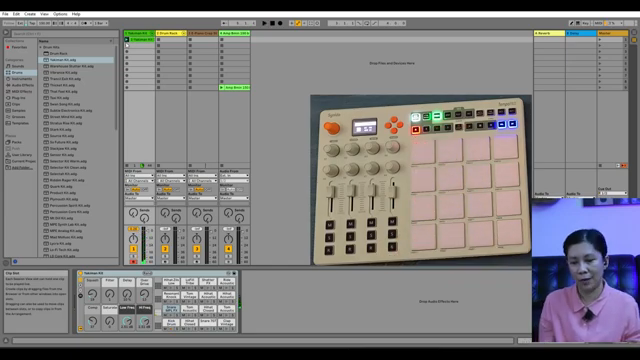
"You can pretty much play over here and this stop over there because I set this one as my play like this one here the play button right there I set or I map it as this one here so it's pretty cool."
© Screenshot/Quote: Synidotech (YouTube)
The hands-on demonstrations move from setup to performance, showing the C16 in action as a creative tool. Finger drumming on the RGB pads is showcased, with the device’s responsiveness and velocity sensitivity apparent in the video. The built-in sequencer is also put to use, enabling real-time pattern creation and playback directly from the hardware, which is a notable feature for a controller in this price and size category.
Transport controls are mapped to Ableton’s play, stop, and record functions, allowing for DAW operation without touching the computer. This integration is particularly valuable for live performance and DAWless workflows, as it keeps the user’s focus on the hardware. The video’s examples make it clear that the C16 is designed to be more than just a pad controller—it’s a central hub for triggering, sequencing, and navigating a session.
Personalization: Colors, Parameters, and Creative Control
Customization is a recurring theme, with the video highlighting how users can change pad colors and adjust parameters using the main control knob and navigation buttons. This hands-on editing allows for quick visual feedback and tailored setups, making it easier to organize complex projects or adapt the controller to different performance contexts. The ability to set parameters directly from the hardware—without relying solely on software editors—underscores Synido’s focus on empowering users to shape their workflow and creative environment on the fly.
This article is also available in German. Read it here: https://synthmagazin.at/synido-tech-tempopad-c16-drahtlose-midi-kontrolle-fuer-moderne-kreative/
Watch on YouTube:
Latest articles
Watch on YouTube:
Visit the channel:
https://www.youtube.com/synidotech
https://www.youtube.com/synidotech
Links from synidotech:
website: https://www.synido.com
instagram: https://www.instagram.com/synidotech
facebook: https://www.facebook.com/109726971738618
linktree: https://linktr.ee/synidotech
Sponsored links:
If you purchase via these links, we may earn a small commission – at no extra cost to you. The link opens an Amazon keyword search, and results may vary depending on availability.
Synido TempoPAD C16
🔗 Check price on Amazon
🔗 Check price on Amazon