Starsky Carr, the synth world’s straight-talking gear guru, dives headfirst into Beyerdynamic’s new Headphone Lab software—a tool promising to flatten your cans and teleport you into a pro control room. He’s not just twiddling virtual knobs; he’s pitting four classic Beyerdynamic models against each other to see if this software can really turn budget headphones into studio heavyweights. Expect honest opinions, a few sonic curveballs, and the kind of practical insight only Starsky delivers. If you mix on headphones and want to know if this is the next must-have, buckle up—this is no sales pitch.
24. January 2026
SPARKY
Starsky Carr Takes Beyerdynamic Headphone Lab for a Spin: Flat or Flop?
Beyerdynamic DT 1990 Pro MKII, Beyerdynamic DT 880 Pro, Beyerdynamic DT 900 Pro X, Beyerdynamic DT 990 Pro X, Beyerdynamic Headphone Lab
Flat Earth Society: Beyerdynamic’s Headphone Lab Lands
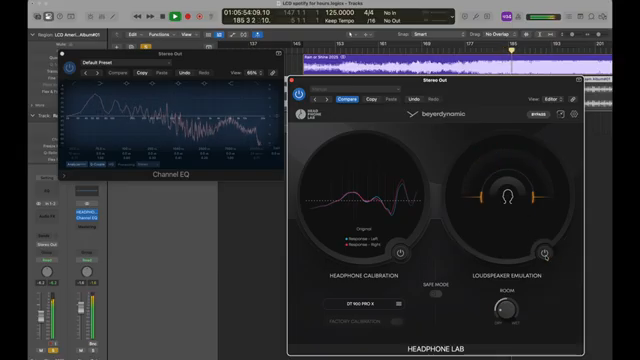
Beyerdynamic have lobbed their own virtual headphone calibration grenade into the mix with Headphone Lab, and it’s aiming straight for your main output bus. The promise? Not just a flat response for your headphones, but a full-on control room emulation—so you can pretend you’re in a plush studio even if you’re wedged between a radiator and a stack of pizza boxes. The interface is dead simple: add your headphones, punch in a serial number if needed, toggle calibration, and dial in your room. There’s even a safe mode to keep your ears from being fried if you get too rowdy.
What sets this apart is the factory-measured calibration for supported Beyerdynamic Pro models. Instead of a generic curve, you get correction data for your actual pair—down to the serial number. That’s a big deal if you’re sick of one-size-fits-all profiles that never quite nail your sound. Stick it on your main output and it even knows to stay out of your bounce—no more accidental mixdowns with weird EQ. Starsky Carr’s no-nonsense walkthrough shows just how plug-and-play it is, but as always, the devil’s in the listening.
Serial Killers: Personalised Correction Curves
Here’s the clever bit: Headphone Lab lets you enter your headphones’ serial number and pulls up the exact calibration curve for your unit—no more guessing games. Not every model gets this VIP treatment, but for the 900 Pro X, 1990 Pro MKII and a few others, it’s like getting your own sonic fingerprint. The result? A genuinely flat response, at least on paper, and a monitoring environment that’s a lot less guesswork and a lot more confidence. If you’re tired of wrestling with generic correction profiles, this is the kind of feature that could make you actually trust what you’re hearing.
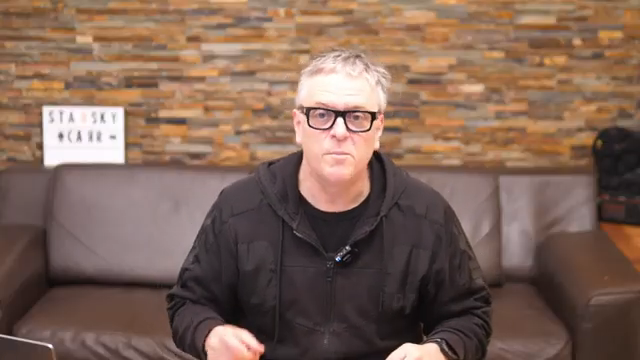
"So you put in your serial number and it knows exactly what your headphones are doing."
© Screenshot/Quote: Starskycarr (YouTube)
Battle of the Beyers: Four Headphones, One Lab
Starsky lines up four Beyerdynamic classics—the DT 880 Pro, DT 990 Pro X, DT 900 Pro X, and DT 1990 Pro MKII—for a proper shootout. Each has its quirks: the 880s are cheap and cheerful, the 990 Pro X is bright and clinical, the 900 Pro X is tuned for mixing, and the 1990 Pro MKII is the wallet-buster with Tesla drivers. The software’s calibration curves reveal just how much these models differ—especially in the highs and lows. For the 880s, the software pumps up the bass, while the 990 Pro X stays on the brighter side even after correction.
Starsky doesn’t just rattle off specs—he actually swaps between the models, toggling calibration on and off, and points out where the software helps and where it doesn’t. The 1990 Pro MKII gets the full serial-number-based treatment, and you can hear the difference in clarity and openness. But don’t expect miracles: the cheaper models get closer to the big boys, but there’s still a gap. For the full sonic smackdown, you’ll want to watch (and listen) to the video—no text can do those A/Bs justice.
Room with a View: Speaker and Space Emulation
"You should really put some headphones on for this because through monitors it's a bit confusing because you're hearing your own room and then this room as well, so put headphones on if you can."
© Screenshot/Quote: Starskycarr (YouTube)
Headphone Lab isn’t just about flattening curves—it’s got a party trick: room and speaker emulation. Flick it on and suddenly your headphones start behaving like you’re in a real studio, with all the reverb, width, and depth that brings. The dry/wet control lets you dial in anything from a dead room to a lively echo chamber. Bass perception, stereo width, and clarity all shift dramatically—sometimes for the better, sometimes just for the weird. Starsky’s verdict? It makes headphones sound less like headphones and more like speakers, but you’ll need to slap on your own cans and try it yourself to really get the effect. Through monitors, it’s just confusing—trust him on that.
Bridging the Gap or Just Patching Over?
So, does Headphone Lab turn a budget pair into a premium studio weapon? Not quite. Starsky’s honest: the software closes the gap, making the 880s and 990 Pro X sound more like their pricier siblings, but the differences don’t vanish. The 1990 Pro MKII still sounds more open and precise, especially in the highs and lows. Calibration can sometimes over-flatten the top end, making things a bit dull for long listening sessions. But for reference mixing, that’s exactly what you want—if you can still hear everything in the top end after flattening, your mix is probably solid.
The room emulation adds another layer, letting you check mixes in different virtual spaces. It’s not a total replacement for real monitors or high-end cans, but it’s a massive step up for anyone stuck mixing in a bedroom or on the go. If you’re serious about headphone mixing, this is a tool worth having—but don’t expect miracles. As Starsky puts it, the software works, but it won’t turn a £200 pair into a £500 one. Still, it brings everything closer, and that’s a win in our book.
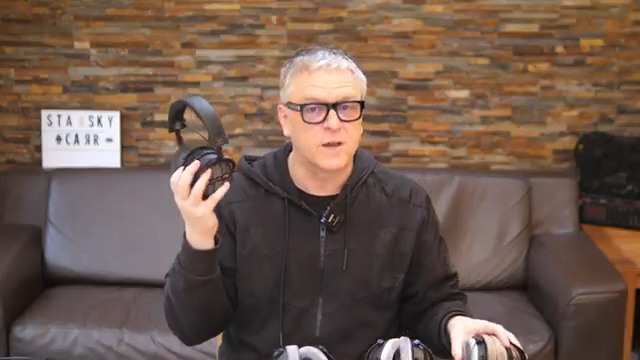
"You can really see why these are £500 more, but I know what you're wanting to know is, does the software make these sound like these? And the answer is, not quite."
© Screenshot/Quote: Starskycarr (YouTube)
This article is also available in German. Read it here: https://synthmagazin.at/starsky-carr-im-test-beyerdynamic-headphone-lab-flachgelegt-oder-flop/
Watch on YouTube:
Latest articles
Watch on YouTube:
Visit the channel:
https://www.youtube.com/StarskyCarr
https://www.youtube.com/StarskyCarr
Links from StarskyCarr:
Patreon: https://patreon.com/starskycarr
Instagram: https://instagram.com/starskycarr
Facebook: https://facebook.com/StarskyCarrOfficial
Sponsored links:
If you purchase via these links, we may earn a small commission – at no extra cost to you. The link opens an Amazon keyword search, and results may vary depending on availability.
Beyerdynamic DT 1990 Pro MKII
🔗 Check price on Amazon
🔗 Check price on Amazon
Beyerdynamic DT 880 Pro
🔗 Check price on Amazon
🔗 Check price on Amazon
Beyerdynamic DT 900 Pro X
🔗 Check price on Amazon
🔗 Check price on Amazon
Beyerdynamic DT 990 Pro X
🔗 Check price on Amazon
🔗 Check price on Amazon
Beyerdynamic Headphone Lab
🔗 Check price on Amazon
🔗 Check price on Amazon