Sonicware’s Ambient Ø receives a substantial v1.5 firmware update, positioning it as a more versatile and performance-ready ambient workstation. Known for their user-friendly yet innovative approach, Sonicware delivers new microtonal and workflow features that cater to both experimental sound designers and ambient composers. This official walkthrough, presented in collaboration with Daniel Beck Rose, dives into the update’s highlights: per-pattern temperament, expanded LFOs, relaxation playback, and real-time line-in processing. We break down how these architectural changes translate into practical creative workflows, and where the Ambient Ø now stands in the evolving landscape of digital ambient instruments.
15. March 2025
LYRA
Sonicware’s Ambient Ø v1.5: Microtonal Expansion and Workflow Upgrades
Ambient Ø v1.5: A New Chapter in Sonicware’s Ambient Engine
The Ambient Ø from Sonicware is introduced here not just as another groovebox, but as a platform evolving through firmware—v1.5 being a particularly notable leap. The update process itself has been streamlined with a dedicated web application, making the installation accessible even to those less comfortable with MIDI SysEx rituals. The video walks through the update step-by-step, highlighting Sonicware’s commitment to user experience: connect via USB, select your device, enter update mode, and let the web app handle the rest. This is a welcome move for a device that’s clearly intended for regular firmware-driven growth.
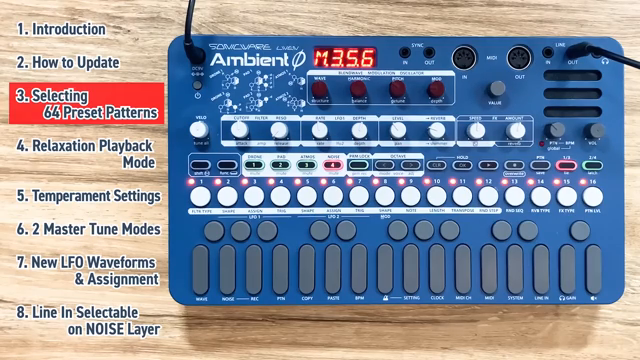
Beyond the update mechanics, v1.5 brings a significant expansion to the preset ecosystem. Users now have access to 64 factory patterns, organized into eight banks of sixteen, with a web-based tool for selective pattern transfer. The workflow for browsing and managing these patterns is demonstrated, showing how the Ambient Ø’s interface supports fast navigation across banks and patterns—an essential feature when working with a device designed for evolving, layered soundscapes. Sonicware’s approach here is pragmatic: backup reminders, non-destructive transfers, and a UI that keeps deep sound exploration within reach.
Microtonal Power: Per-Pattern Temperament and Tuning
One of the headline features in v1.5 is the ability to set temperament individually for each pattern, pushing the Ambient Ø into territory usually reserved for software or high-end modular systems. The temperament menu is accessed via a simple function-pattern shortcut, offering a range of tuning systems: equal temperament, pure major, pure minor, Pythagorean variants, Solfeggio, Chakra, and Planetary tunings. The video demonstrates how each temperament can be assigned and how their sonic differences manifest, especially when overlapping patterns—an approach that’s both educational and musically revealing.
Further deepening the microtonal toolkit, each layer within a pattern can have its own concert pitch, set via the layer button and value knob. The update also introduces two master tuning modes: tuning by cents or by hertz, with the latter now the default. This dual approach allows for both traditional and experimental workflows, and the ability to fine-tune in decimal increments (when using hertz) opens up nuanced sound design possibilities. The video is clear that while the manual is the best resource for temperament theory, the workflow itself is straightforward and encourages hands-on exploration.

"This one brings some brand new and exciting features, including the ability to set the temperament of the Ambient Zero on a per pattern basis."
© Screenshot/Quote: Sonicware (YouTube)
Relaxation Playback Mode: Seamless Pattern Transitions for Evolving Soundscapes
"This playback mode allows us to play multiple patterns in a row in an order of our choosing. And it's going to do a nice smooth transition between the patterns."
© Screenshot/Quote: Sonicware (YouTube)
Relaxation Playback Mode is a new performance tool aimed squarely at ambient and cinematic creators. By enabling users to chain multiple patterns in a custom order, with smooth fades between them, Sonicware has built a feature that supports long-form, evolving compositions without manual intervention. Entering the mode is as simple as a double-tap on the pattern button, and two key parameters—number of repeats per pattern and fade-out time—are easily dialed in.
The workflow is designed for flexibility: patterns are selected in sequence, and transitions are visually tracked on the sequencer. The fade-out time, adjustable from five to thirty seconds, ensures that transitions can be as subtle or dramatic as needed for the musical context. This mode is a clear nod to the needs of ambient performers who require both structure and fluidity in their live or studio sessions, and it’s implemented in a way that feels native to the Ambient Ø’s architecture.
LFO Evolution: New Shapes and Oscillator Level Modulation
The v1.5 update significantly expands the modulation architecture of the Ambient Ø. Three new LFO waveforms—long sine, long triangle, and long synchronized random—are introduced, each designed for ultra-slow, evolving modulations that are particularly suited to ambient textures. The video demonstrates how these shapes can be quickly accessed and how their slower cycles contribute to more organic movement in sound.
A standout addition is the new LFO assignment: oscillator level. Unlike the traditional level assignment, which modulates the overall layer volume, oscillator level allows for per-note modulation, creating shimmering, unsynchronized amplitude effects across polyphonic textures. The presenter illustrates how this can be used to mimic complex envelope behaviors, such as introducing decay and sustain stages, effectively expanding the sound design palette without requiring additional envelope generators. This architectural tweak is subtle but powerful, and it’s presented with clear, practical examples.
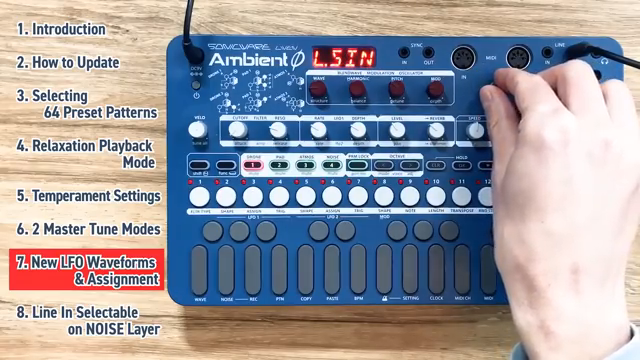
"We have the default sine shape, and if you go to the right, you'll see all of your old friends, but if you keep going, eventually you'll reach the new options, which are long sine wave, long triangle, and long synchronized random."
© Screenshot/Quote: Sonicware (YouTube)
Line-In Processing: Expanding the Ambient Ø’s Sonic Horizons
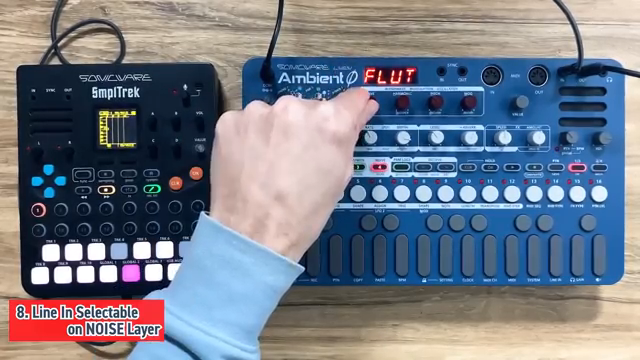
"And now, the noise layer is set up to do live processing of the audio that you're sending in through the line in of the Ambient Zero."
© Screenshot/Quote: Sonicware (YouTube)
Perhaps the most transformative addition in v1.5 is the ability to process external audio in real time via the noise layer’s new line-in mode. By selecting line-in at the end of the noise sample list, users can route external signals through the full suite of effects and modulation options available to the noise layer. The video walks through live manipulation of reverb, shimmer, filter, resonance, level, and panning, as well as LFO modulation of these parameters, demonstrating how external sources can be seamlessly integrated into ambient compositions.
There are some limitations—pitch and tune parameters are locked out, and the keyboard is deactivated for the noise layer in this mode—but the creative potential is substantial. The presenter shows how subtle LFO-driven tremolo or filter sweeps can radically transform incoming audio, opening up new workflows for live processing, resampling, or hybrid setups. For users seeking to blur the line between internal synthesis and external soundscapes, this feature marks a significant step forward for the Ambient Ø.
This article is also available in German. Read it here: https://synthmagazin.at/sonicware-ambient-o-v1-5-mikrotonale-expansion-und-workflow-verbesserungen/
Watch on YouTube:
Latest articles
Watch on YouTube:
Visit the channel:
https://www.youtube.com/SONICWARE
https://www.youtube.com/SONICWARE
Links from SONICWARE:
SONICWARE web: https://sonicware.jp
facebook: https://facebook.com/SONICWARE
Instagram: https://instagram.com/sonicware_inc
Dr. Yu Endo Official: https://dr.yuendo.jp
Sponsored links:
If you purchase via these links, we may earn a small commission – at no extra cost to you. The link opens an Amazon keyword search, and results may vary depending on availability.
Sonicware Liven Ambient Ø
🔗 Check price on Amazon
🔗 Check price on Amazon