ROLI, renowned for its expressive controllers, dives into the world of spatial performance with Airwave—a hand-tracking system designed to inject real-time nuance into Ableton Live sessions. In this official walkthrough, ROLI sound designer Marcus Levy-Chance demonstrates how Airwave’s five Dimensions of Air can be mapped to everything from arpeggiator rates to plugin parameters, all within a DAW-centric workflow. The focus is on practical integration: mapping gestures, recording automation, and editing expressive curves after the fact. If you’re curious about how digital gesture control can transform your production and performance workflow, this video offers a clear, hands-on look at Airwave’s creative potential.

5. January 2025
LYRA
ROLI Airwave: Unlocking Spatial Expression in Ableton Live
Ableton Live, Arturia Pigments, Baby Audio Transit 2, Output Exhale, Phase Plant, ROLI Airwave
Airwave: Dynamic Expression Inside Ableton Live
ROLI’s Airwave is introduced as a dynamic tool for enhancing expressiveness within Ableton Live, aiming to bridge the gap between physical gesture and digital sound manipulation. The video opens with Marcus Levy-Chance, lead sound designer, outlining how Airwave’s hand-tracking capabilities are woven into his production workflow. This sets the stage for a session where spatial gestures become integral to shaping both musical phrasing and effects in real time.
From the outset, the focus is on practical DAW integration rather than abstract demonstration. Airwave’s five dimensions of movement are mapped to various parameters, allowing for a more tactile and immediate connection to the music. The workflow is presented as fluid and adaptable, with Airwave acting as a performance-driven extension of the DAW environment.
Hand Tracking in Action: Controlling Arps, Octaves, and Reverb
The first example dives into using Airwave to control a simple pluck sound in Phase Plant, paired with Ableton’s built-in arpeggiator. Here, the tilt of the left hand modulates the arpeggiator rate, while hand height dictates the octave sweep—demonstrating how spatial gestures can directly shape musical movement. Flexing the hand is assigned to the reverb wet level, adding another layer of expressive control.
This section highlights the immediacy of Airwave’s assignments, with MIDI mappings displayed in Ableton’s interface. The process of recording these gestures as automation is straightforward, and the resulting expressive data is fully editable post-performance. This flexibility is key for producers who want to refine their expressive input without re-recording entire takes.
Flexible MIDI Assignments: Precision Gesture Mapping
A core strength of Airwave, as demonstrated, is its ability to send all dimensions as MIDI CCs, making every gesture not only recordable but also non-destructive and tweakable. After capturing a performance, users can edit or redraw automation curves for any assigned parameter, such as the reverb swell, directly within Ableton’s MIDI editor. This ensures that expressive nuances can be fine-tuned to fit the musical context, even after the fact.
The video also showcases how minimum and maximum value ranges can be set for each MIDI assignment. For example, when mapping hand raise to a filter cutoff in Arturia Pigments, the range is deliberately constrained to avoid unwanted silence or abrupt jumps. This level of control empowers users to tailor Airwave’s response to the musical and technical demands of each patch.
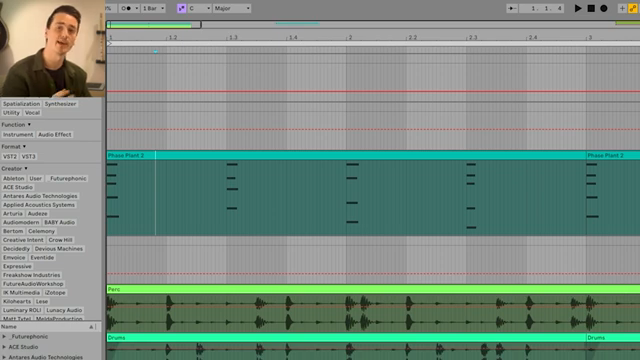
"As all of the dimensions are sent as CCs they're fully editable after the fact."
© Screenshot/Quote: Weareroli (YouTube)
Real-Time Performance: Layering Vocals and Seamless Transitions
The workflow expands as Marcus layers in chords using Pigments, mapping hand gestures to plugin-specific parameters like filter cutoff and distortion. This demonstrates Airwave’s flexibility in controlling both DAW-native and third-party plugin parameters, opening up a wide palette for sound design and performance.
Next, vocal textures are integrated using Output’s Exhale, with hand raise mapped to a formant shifter and tilt to effect wetness. The ability to solo tracks and visualize automation makes it easy to hear and see how subtle variations are introduced in real time. Notably, Airwave allows for precise control over transitions—such as bringing in delay only at specific moments, preventing sonic clutter and supporting musical intent.
To round out the workflow, Airwave is used to trigger transitions and effects on the master bus via Baby Audio’s Transit 2 plugin. Multiple instances are mapped to different gestures, enabling intuitive, on-the-fly manipulation of transitions without the need to manually draw automation. This hands-on approach is particularly appealing for live performance or DAWless-style jamming, where immediacy and fluidity are paramount.
Creative Potential: Encouraging Exploration
"We're really only scratching the surface of what's possible here but hopefully it's given you some ideas."
© Screenshot/Quote: Weareroli (YouTube)
The video concludes by encouraging viewers to explore Airwave’s creative possibilities, emphasizing that the demonstrations only scratch the surface of what’s achievable. ROLI positions Airwave as a tool for unlocking new levels of expression and invites users to experiment further, hinting at future walkthroughs and deeper dives into advanced workflows.
This article is also available in German. Read it here: https://synthmagazin.at/roli-airwave-raeumliche-expression-in-ableton-live-entfesseln/
Watch on YouTube:
Latest articles
Watch on YouTube:
Visit the channel:
https://www.youtube.com/WeAreROLI
https://www.youtube.com/WeAreROLI
Links from WeAreROLI:
website: https://roli.com
instagram: https://www.instagram.com/we.are.roli
twitter: https://twitter.com/WeAreROLI
facebook: https://www.facebook.com/ROLI
Sponsored links:
If you purchase via these links, we may earn a small commission – at no extra cost to you. The link opens an Amazon keyword search, and results may vary depending on availability.
Ableton Live
🔗 Check price on Amazon
🔗 Check price on Amazon
Arturia Pigments
🔗 Check price on Amazon
🔗 Check price on Amazon
Baby Audio Transit 2
🔗 Check price on Amazon
🔗 Check price on Amazon
Output Exhale
🔗 Check price on Amazon
🔗 Check price on Amazon
Phase Plant
🔗 Check price on Amazon
🔗 Check price on Amazon
ROLI Airwave
🔗 Check price on Amazon
🔗 Check price on Amazon