Rapid Flow’s Erik is back in the lab, flinging presets at the Zensphere V2 like a man possessed. No scripts, no fluff—just raw, unscripted knob-twiddling and a deep dive into what makes a techno or house synth sound pop in a real mix. If you want to see how reverb, delay, and sidechain can turn dry noodles into club bangers, this one’s for you. Don’t expect a bedtime story—expect real workflow, cheeky tricks, and a walkthrough that’s as useful as it is unfiltered.
29. June 2026
SPARKY
Rapid Flow Dials In: Dirty House Presets on the Zensphere V2
Preset Alchemy: Zensphere V2 Gets the Rapid Flow Treatment
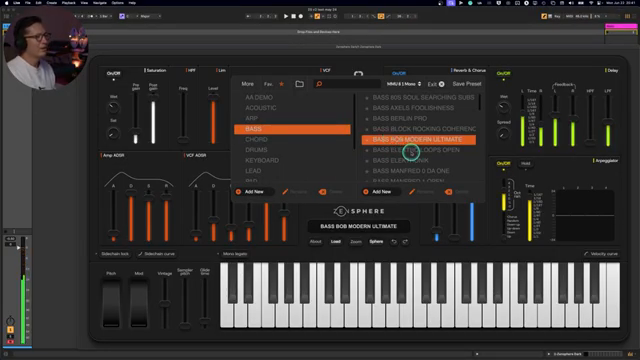
Erik of Rapid Flow jumps straight into the fire, showcasing his no-nonsense approach to crafting presets for the Zensphere V2. There’s no script, no hand-holding—just pure sound design chaos as he tweaks, demos, and tears through freshly-minted patches. Acoustic sounds get the spotlight first, with Erik previewing the results of his latest sonic experiments and laying down the law for what makes a preset worthy of your attention.
The workflow here is refreshingly unfiltered: play, tweak, compare, repeat. Erik’s style is all about showing the real process, warts and all, so you see exactly how a preset morphs from bland to banging. The Zensphere V2’s new features, like upgraded reverb and chorus, become the playground for these transformations. If you’re tired of sterile preset walkthroughs, this one’s got more grit than a warehouse floor after a 12-hour rave.
Reverb, Sidechain, and the Art of the Club-Ready Patch
Rapid Flow isn’t shy about throwing effects at a sound, but there’s method to the madness. Reverb gets the first nod, adding depth and stereo width that takes thin presets and turns them into room-filling monsters. Erik demonstrates how toggling reverb and delay can instantly transform acoustic and arp sounds—sometimes dry is right, but when it’s time to get lush, Zensphere V2 steps up with impulse responses and tail design that actually matter.
Sidechain comes in next, and this isn’t just for the sake of a pumping kick—Erik uses it to inject movement into pads, giving them that essential house and techno groove. He shows how sidechain and stereo spread can be dialled in for subtle or dramatic effect, turning static patches into living, breathing synth parts. It’s all about giving your sounds a pulse without turning the mix into a soup. Effects here aren’t just tacked on; they’re dialled in with intention and a bit of punk attitude.
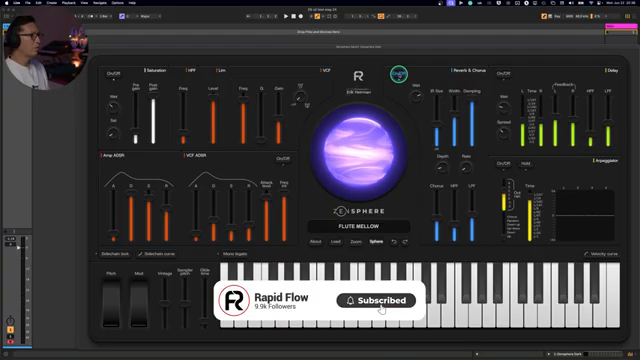
"Let me show you what it sounds like without the reverb."
© Screenshot/Quote: Rapidflow Shop (YouTube)
Keeping It Clean: Clarity in the Chaos
"So you hear that delay is kind of there giving it life, but it's not getting in the way of your mix."
© Screenshot/Quote: Rapidflow Shop (YouTube)
With all this processing, it would be easy to drown your mix in mud—but Rapid Flow makes sure that doesn’t happen. Erik’s approach keeps the basses tight, the pads breathing, and the reverb from swallowing everything whole. He’s quick to dial back high or low ends in the effects, ensuring every patch leaves plenty of space for the rest of your track. The message is clear: effects should lift a sound, not bury it under a landslide of noise.
Practical Hacks for Better Synth Sounds
If you’re after quick wins, Erik’s walkthrough is packed with practical tricks—think layering, adjusting release, and using chorus or sidechain with surgical precision. The tweaks here are all about making presets that actually fit in a real-world mix, not just sound massive in solo. Add a bit of chorus, dampen the reverb, or name your pads with a sidechain cue so you don’t forget what’s going on later. It’s workflow gold for the busy producer.
Why You Need to Watch It: Workflow in Motion
Let’s be honest—reading about sound design is like describing a rave to your nan. The real juice is in the video: you see the live tweaks, hear the before/after, and get a sense for how a professional preset maker thinks in real time. If you want your own Zensphere V2 patches to slap, this walkthrough is essential viewing. Don’t just take my word for it—watch Rapid Flow in action and nick some tricks for your next track.
This article is also available in German. Read it here: https://synthmagazin.at/rapid-flow-schraubt-dreckige-house-presets-auf-dem-zensphere-v2/
More articles about these products:
Watch on YouTube:
Latest articles
Watch on YouTube:
Visit the channel:
https://www.youtube.com/RapidFlow_Shop
https://www.youtube.com/RapidFlow_Shop
Links from RapidFlow_Shop:
Rapid Flow Store: https://rapidflow.shop
Instagram: https://www.instagram.com/rapidflow_shop/
Facebook: https://facebook.com/SetsunaMusic
Sponsored links:
If you purchase via these links, we may earn a small commission – at no extra cost to you. The link opens an Amazon keyword search, and results may vary depending on availability.
Zensphere V2
🔗 Check price on Amazon
🔗 Check price on Amazon