Ever felt like your drum loops are as bland as cold pizza? Pick Yourself is here to flip that script with a granular processing trick that’ll make your beats slap harder than a late-night taco run. In this video, Pick Yourself breaks down a three-step method to turn any tired percussion loop into a groove that’s dripping with character. We’re talking about taking your basic Splice fodder and morphing it into something that sounds like it crawled out of a Berlin warehouse at 4am. If you’re ready to ditch the cookie-cutter drums and add some real sauce to your tracks, keep reading—this one’s got the secret recipe.
31. December 2025
RILEY
Pick Yourself’s Granular Drum Hack: Turning Boring Loops Into Street Gold
Granular Processing: The Secret Sauce
Pick Yourself kicks things off by showing just how stale your average drum loop can sound—until you hit it with a granular processing technique that’s been making waves in contemporary techno. This isn’t your grandma’s EQ trick; we’re talking about slicing audio into tiny grains and reassembling them like a sonic jigsaw puzzle. The result? Textures that sound nothing like the original loop, but still keep that rhythmic backbone.
Granular processing is basically the street food of sound design: cheap ingredients, wild flavors, and endless ways to remix the basics. Pick Yourself’s approach is all about taking those bland loops and giving them a new identity, so your drums don’t just sit in the mix—they swagger through it. If you want your beats to stand out in a sea of Splice clones, this is the move.
"The secret here is a granular processing technique that I've been using for my sound installations for years."
© Screenshot/Quote: Pickyourselfofficial (YouTube)
Three Steps to Drum Alchemy
"You just have to download it and install that Max For Life device. Super easy to do and then there's like a whole new world opening up for you."
© Screenshot/Quote: Pickyourselfofficial (YouTube)
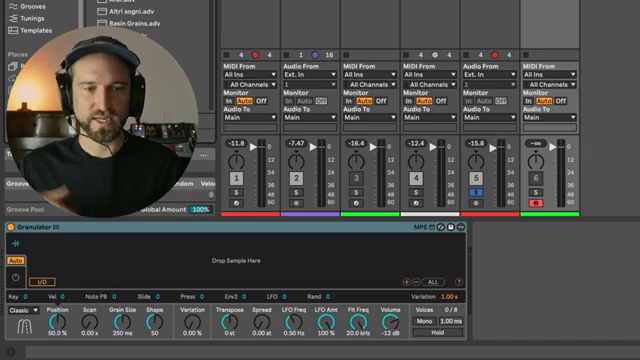
The magic happens in three steps: first, you dig through your library for a percussion loop with potential. Doesn’t have to be fancy—just something with a vibe. Next, you load it into Ableton’s Granulator (free with Suite, by the way—no need to pawn your gear for this one) and start hunting for those tasty textures by tweaking grain position, size, and variation. This is where you find the weird, the crunchy, the stuff that makes your loop sound like it’s been run through a meat grinder—in a good way.
Step two is all about building the groove. Pick Yourself prefers using a sequencer to trigger slices of the granulated loop, dialing in density and algorithm settings until the beat starts to bounce. Pro tip: always check your groove in context with the kick and bass. If it doesn’t make your head nod, keep tweaking. The end result is a groove that’s got more personality than half the DJs at your local club.
Texture Is King: Picking the Right Source
Here’s the real talk: your results are only as good as your source material. Pick Yourself stresses the importance of finding interesting textures in your audio before you even touch a knob. Don’t just grab the first loop you see—hunt for those little moments that pop. This is the difference between a beat that sounds like everyone else’s and one that makes people ask, “Yo, what is that?” Sound design isn’t about luck; it’s about having an ear for the gold hiding in your samples.
Modulation: Bringing Your Drums to Life
Once you’ve got your groove, it’s time to animate it. Pick Yourself dives into modulation—using LFOs and envelopes to make your drums evolve over time. You can map these modulators to parameters like grain position and shape, so your loop never stays static. The trick is to let the LFO cycle through different grains, creating subtle (or wild) changes every time the pattern loops. It’s like giving your drums a shot of espresso—suddenly, they’re alive and unpredictable.
The beauty of this technique is how it lets you morph both the rhythm and the timbre throughout your track. Want a breakdown that feels like it’s melting? Automate grain size and reverb. Need a drop that punches? Snap those envelopes tight. Pick Yourself shows how a few minutes of modulation can turn a basic loop into a full-on journey. But trust me, the real flavor is in the video—these transitions are best heard, not just read about.
Why You Gotta Watch the Video
Look, I can spill the beans on the steps, but you gotta see (and hear) Pick Yourself’s workflow in action to really get it. The video is packed with live demos, sound flips, and those little tweaks that make all the difference. If you want to level up your drums and actually hear what these granular tricks can do, don’t sleep on the original video. Sometimes, words just can’t capture how hard a groove can slap.
This article is also available in German. Read it here: https://synthmagazin.at/pick-yourselfs-granular-drum-hack-aus-langweiligen-loops-wird-strassen-gold/
Watch on YouTube:
Latest articles
Watch on YouTube:
Visit the channel:
https://www.youtube.com/pickyourselfofficial
https://www.youtube.com/pickyourselfofficial
Links from pickyourselfofficial:
Work with me: https://pickyourself.com/coaching/
FREE Guide: https://pickyourself.com/framework/
Sponsored links:
If you purchase via these links, we may earn a small commission – at no extra cost to you. The link opens an Amazon keyword search, and results may vary depending on availability.
Ableton Live Suite
🔗 Check price on Amazon
🔗 Check price on Amazon
Granulator
🔗 Check price on Amazon
🔗 Check price on Amazon