OXI Instruments, renowned for their forward-thinking sequencer designs, take center stage with a focused tutorial on the OXI One’s Chord Mode. This video isn’t just a surface-level preset parade—it’s a hands-on walkthrough of how Chord Mode empowers both theory geeks and absolute beginners to craft rich chord progressions with speed and intent. From auto voicing to user chord banks, OXI’s approach is all about making complex harmonic structures accessible and tweakable in real time. We dig into the architecture, performance tools, and creative shortcuts that define this sequencer’s chord workflow.
6. June 2024
LYRA
OXI Instruments OXI One: Chord Mode Demystified – A Workflow-Driven Deep Dive
A Sequencer for All: OXI One’s Chord Mode Unveiled
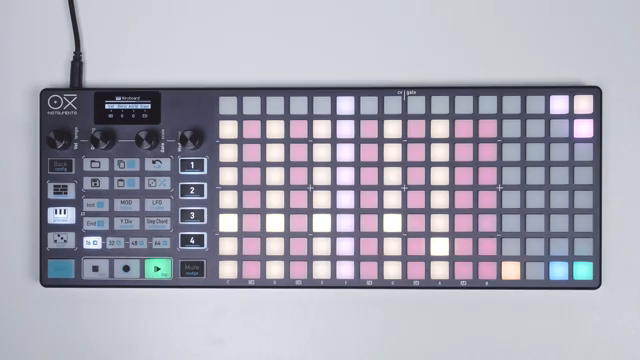
OXI Instruments positions the OXI One as a versatile MIDI/CV sequencer, and this tutorial wastes no time highlighting its innovative Chord Mode. The device is pitched as a tool for users at any skill level, with the Chord Mode designed to make harmonic exploration both fast and intuitive. Each step in Chord Mode can trigger up to eight-note chords, and the grid layout visually maps scale degrees, making it easy to build progressions without deep theory knowledge.
This approach transforms the OXI One from a traditional step sequencer into a harmonic playground. Whether you’re after simple triads or more adventurous voicings with tension and inversions, the system encourages experimentation. The inclusion of two chord banks (A and B) further broadens the palette, with Bank A focusing on more accessible chords and Bank B offering advanced, dissonant options for those ready to push boundaries.
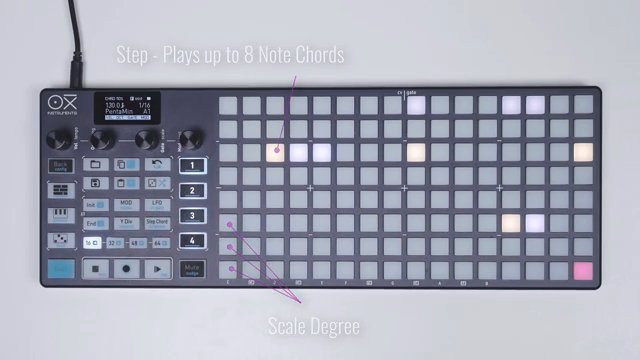
"You'll be playing cards progressions fast and in a fun inspiring way."
© Screenshot/Quote: Oxiinstruments (YouTube)
Effortless Chord Construction: Auto Voicing, Transposition, and the Chord Keyboard
"The auto voicing engine is turned on by default which will assign the best possible voicings to every card to get the least voice movement."
© Screenshot/Quote: Oxiinstruments (YouTube)
Chord Mode’s workflow is anchored by features that streamline both composition and performance. The auto voicing engine, enabled by default, intelligently assigns voicings to minimize unnecessary voice movement, making progressions sound smooth and musical. Transposition is handled with a simple gesture—hold a sequencer button and tap a pad to shift the entire progression up or down, allowing for rapid harmonic shifts without menu diving.
Perhaps the most striking interface element is the dedicated chord keyboard. This grid-based layout splits into performance and configuration zones, letting users trigger chords by root note and tweak type, voicing, and spread on the fly. The keyboard’s design caters to both seasoned musicians and beginners, with scale filtering and octave navigation built in. Even disabled notes are handled gracefully, snapping to the nearest scale tone, ensuring that every action remains musical and frustration-free.
Step-by-Step Customization: Editing Parameters for Expressive Progressions
Beyond just triggering chords, the OXI One’s Chord Mode allows for deep step-level editing. By holding one or more pads, users can access a parameters page to adjust velocity, octave, gate length, and modulation for each chord step. This hands-on approach means that every chord in a progression can have its own expressive nuance, from subtle dynamics to dramatic octave jumps.
Modulation is flexible, with the ability to assign different CCs beyond the default mod wheel, opening up creative possibilities for those integrating external synths or software instruments. The step chord menu further expands control, letting users tweak spread (which repeats chord notes in higher octaves), select chord types from simple to complex, and set inversions or voicings—all per step. This granular editing supports both detailed composition and spontaneous performance tweaks.
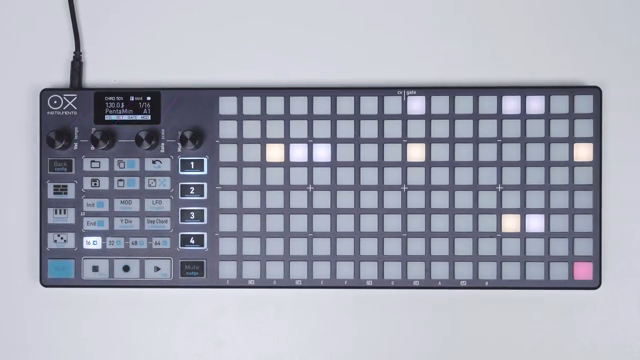
"You can change velocity, octave, gate and modulation amount by turning the respective encoder."
© Screenshot/Quote: Oxiinstruments (YouTube)
Creative Shortcuts: Pick and Place, User Chords, and Workflow Enhancers
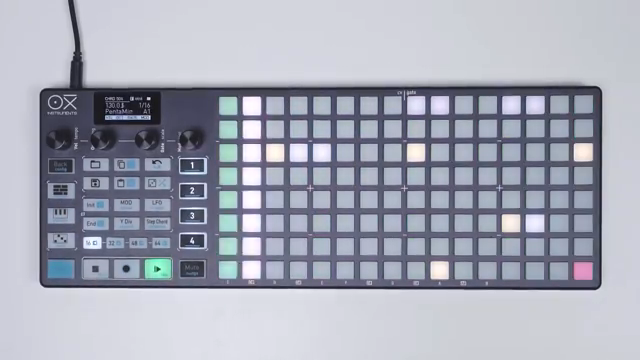
"Oxy remembers the last chord you played and you'll pass it on the step you want."
© Screenshot/Quote: Oxiinstruments (YouTube)
OXI Instruments introduces workflow enhancements that make Chord Mode genuinely fun and efficient. The pick and place method allows users to audition chords on the keyboard, then instantly assign them to steps in the sequencer—no need to remember fingerings or menu locations. This feature turns harmonic exploration into a tactile, immediate process.
User-defined chords take customization further. With version 4 firmware, favorite chords—complete with root, type, inversion, and spread—can be stored in dedicated slots on the top row of the keyboard. Storing or clearing a chord is a simple hold gesture, and these user chords behave like any other: they can be arpeggiated, sequenced, and recalled at will. This system encourages building a personal harmonic vocabulary, ready for instant deployment in any project.
Global Chord Menu: Sculpting the Sequence as a Whole
For those who want to shape their entire sequence at once, the global chord menu is a powerful tool. Accessed by holding the step chord button in keyboard view, this menu offers four parameters—spread, type, voicing, and bass—that apply across the whole sequence. Adjusting spread globally increases the number of voices per chord, while type and voicing can offset chord characteristics step by step, creating evolving harmonic textures.
The bass parameter adds a lower octave root note to every chord, with intelligent voice allocation to respect the eight-note polyphony limit. These global controls make it possible to morph the harmonic landscape of a sequence in real time, supporting everything from subtle shifts to dramatic transformations. It’s a fitting capstone to a mode designed for both immediacy and depth, inviting users to explore complex soundscapes without getting lost in submenus.
This article is also available in German. Read it here: https://synthmagazin.at/oxi-instruments-oxi-one-chord-mode-entschluesselt-ein-workflow-orientierter-deep-dive/
Watch on YouTube:
Latest articles
Watch on YouTube:
Visit the channel:
https://www.youtube.com/oxiinstruments
https://www.youtube.com/oxiinstruments
Links from oxiinstruments:
website: https://oxiinstruments.com
instagram: https://www.instagram.com/oxiinstruments
facebook: https://www.facebook.com/oxiinstruments/
support: https://oxiinstruments.com/support
Sponsored links:
If you purchase via these links, we may earn a small commission – at no extra cost to you. The link opens an Amazon keyword search, and results may vary depending on availability.
Oxi One
🔗 Check price on Amazon
🔗 Check price on Amazon