Novation’s latest offering, Play, is a virtual instrument that aims to bridge the gap between tactile hardware and flexible software. Designed exclusively for the Launchkey MK4, Play operates as both a standalone app and a plugin, promising immediate inspiration and hands-on control. With a sound palette sampled from iconic synths and a workflow that tightly integrates with Launchkey’s encoders and pads, Novation Play is positioned as a creative catalyst for producers and performers alike. In this walkthrough, Novation demonstrates how Play’s architecture and hardware mapping can streamline music production, from beat creation to expressive sound design.
3. October 2025
LYRA
Novation Play: Seamless Soundcraft with Launchkey MK4
Play Meets Launchkey: Integrated from the Ground Up
Novation Play is introduced as a software instrument purpose-built for the Launchkey MK4, emphasizing a workflow that feels both immediate and instrument-like. The video highlights that Play can function as a standalone desktop application or as a plugin within any DAW, providing flexibility for different production environments. This dual-mode operation is key for users who want seamless transitions between sketching ideas and arranging full tracks.
Upon launching Play in standalone mode, the software automatically maps the Launchkey’s hardware controls, eliminating setup friction and allowing users to dive straight into sound exploration. The browser interface sits prominently at the top, making it easy to cycle through available sounds. This tight integration is clearly designed to minimize menu-diving and maximize hands-on creativity, a hallmark of Novation’s approach to hybrid workflows.
A Curated Sound Library: Presets from Synth Royalty
Play’s sonic arsenal is built from over 80 presets, each sampled from a roster of legendary synthesizers including the Novation Peak, Bass Station II, Nova, Sequential Prophet 6, Prophet Rev 2, and Oberheim OB-6. The video demonstrates the breadth of this collection, with categories spanning leads, basses, pads, keys, sound effects, and a dedicated drum library. This curated selection aims to provide instant access to classic and contemporary tones without the need for deep synthesis programming.
The browsing experience is streamlined, with presets organized for quick auditioning and selection. Novation’s focus here is on delivering quality and variety, ensuring that users can find inspiring sounds for any genre or mood. The inclusion of drums alongside melodic presets further expands Play’s versatility, making it suitable for everything from beatmaking to full song production.
Performance Macros and Effects: Real-Time Sound Shaping
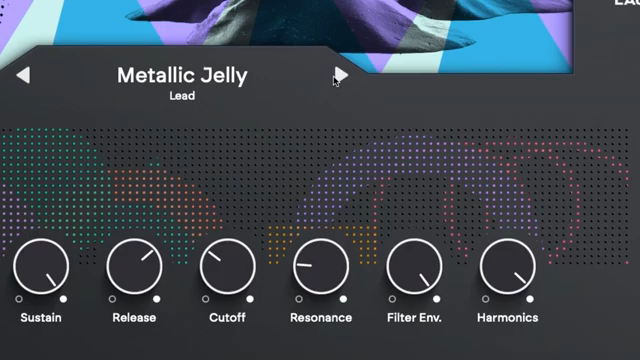
Every preset in Play comes equipped with eight macro controls, mapped directly to the Launchkey’s encoders for immediate tactile manipulation. The first six macros are standardized across presets, granting instant access to envelope and filter parameters—crucial for real-time sound sculpting. The remaining two macros are tailored to each preset, offering unique tweaks that highlight the character of the chosen sound.
Global effects such as reverb, delay, and a compressor are available for each sound, with dedicated controls for quick adjustments. The Launchkey’s colored pads trigger four creative effects—chorus, cassette, spinner, and freeze—which can be applied live for added texture and movement. This setup encourages users to experiment with sound design on the fly, capturing spontaneous changes and evolving performances.
The video underscores how these performance tools are not just for static tweaking but are designed to be recorded and automated within a DAW. Macro adjustments made during play are captured with the MIDI clip, allowing for dynamic sound changes that become part of the musical arrangement. This workflow blurs the line between sound design and performance, aligning with Novation’s ethos of hands-on creativity.
"The last two macro knobs are customised per preset and let you tweak specific aspects of the sound that you've chosen."
© Screenshot/Quote: Novationtv (YouTube)
DAW Integration: From Sketch to Track
Novation Play’s integration with DAWs, particularly Ableton Live Lite (included with Launchkey), is showcased as a core strength. The walkthrough demonstrates building a beat by browsing drum presets, adjusting pitch, gain, and pan for individual pads, and capturing performances directly into the DAW. This level of control allows for nuanced beat programming and immediate feedback.
The workflow extends to melodic elements, with users selecting bass and keys presets, shaping them via macros, and utilizing features like chord map mode for one-finger chord triggering. The arpeggiator on the Launchkey adds further creative potential, while DAW mode enables clip launching and real-time recording. The result is a tightly integrated system where hardware and software work in concert to facilitate complex arrangements with minimal friction.
Immediate Inspiration, Exclusive Access
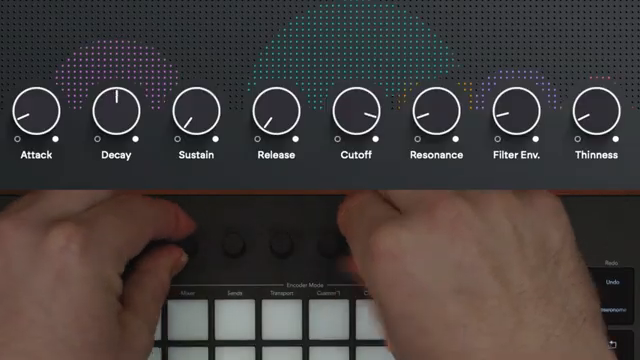
"It's a really intuitive way to quickly find sounds for your track and lets you focus on moving forward and making the music."
© Screenshot/Quote: Novationtv (YouTube)
Novation Play is positioned as a tool for instant creativity, allowing users to quickly find and shape sounds that fit their musical ideas. The video emphasizes the intuitive workflow, where sound discovery and performance are tightly linked, reducing barriers between inspiration and execution.
Exclusively available to Launchkey MK4 owners, Play is accessed via the user’s Novation account, reinforcing its role as a value-add for the hardware ecosystem. While the walkthrough showcases a fluid and inspiring workflow, it remains to be seen how Play performs in more demanding or unconventional setups—a question for future, hands-on testing.
This article is also available in German. Read it here: https://synthmagazin.at/novation-play-nahtlose-klangarchitektur-mit-dem-launchkey-mk4/
Watch on YouTube:
Latest articles
Watch on YouTube:
Visit the channel:
https://www.youtube.com/NovationTV
https://www.youtube.com/NovationTV
Links from NovationTV:
website: https://novationmusic.com
instagram: https://instagram.com/wearenovation
twitter: https://twitter.com/WeAreNovation
facebook: https://facebook.com/NovationMusic
Sponsored links:
If you purchase via these links, we may earn a small commission – at no extra cost to you. The link opens an Amazon keyword search, and results may vary depending on availability.
Novation Launchkey MK4
🔗 Check price on Amazon
🔗 Check price on Amazon
Novation Play
🔗 Check price on Amazon
🔗 Check price on Amazon