Novation returns with a hands-on demonstration of the Launchkey’s Scale Mode and Chord Map, two features designed to turn creative sparks into full-fledged musical ideas. In this official walkthrough, Dylan guides us through the process of generating chords, leads, and basslines that stay harmonically locked, all from the Launchkey’s streamlined interface. As is typical for Novation’s artist-focused approach, the video is less about menu-diving and more about immediate, tactile music-making—showing how these digital tools can help both beginners and seasoned producers break through creative blocks. If you’re curious about how Launchkey’s integrated modes can accelerate song creation and arrangement, this is a concise but revealing look.
12. September 2025
LYRA
Novation Launchkey: Sparking Creative Flow with Scale Mode and Chord Map
From Blank Slate to Song Sketch: Launchkey’s Creative Engine
The video opens with Dylan at the helm of a Novation Launchkey, working within Ableton Live, and immediately frames the keyboard as a catalyst for musical ideation. Novation’s Launchkey isn’t just a MIDI controller—it’s positioned here as a creative partner, thanks to its integrated Scale Mode and Chord Map features. The focus is on generating song ideas from scratch, rather than simply triggering notes or loops.
Dylan outlines a workflow that starts with finding a musical key, then building chords, and finally layering in lead and bass parts—all while staying harmonically coherent. This approach is emblematic of Novation’s philosophy: tools that help you move from inspiration to arrangement without friction. The Launchkey’s design, as demonstrated, is all about reducing technical barriers so that users can focus on actual music-making, not just programming.
Scale Mode: Stay in Key, Stay in Flow
Scale Mode is introduced as a foundational feature for keeping your playing musically grounded. By mapping any selected scale to the Launchkey’s white keys, it effectively removes the risk of hitting out-of-key notes, letting users explore with confidence. Dylan quickly shifts from C major to D mixolydian, showing how easy it is to experiment with different tonalities.
This mode isn’t just a training wheel for beginners—it’s a workflow accelerator for anyone looking to sketch ideas quickly. The tactile immediacy of Scale Mode means you can focus on musicality rather than finger gymnastics, which is particularly valuable in fast-paced production or live settings.
Chord Map: Navigating Harmonic Terrain
Chord Map is where the Launchkey’s digital architecture really shines. By holding shift and entering Chord Map mode, users are presented with a grid of eight chords mapped to the blue pads, all tailored to the selected scale. Dylan demonstrates how the ‘adventure’ and ‘explore’ knobs let you traverse a wide palette of chord options, from safe and familiar to more adventurous and complex harmonies.
Adjustable parameters like ‘width’ (which spreads chord notes for a fuller sound) and ‘roll’ (which arpeggiates the chord notes for a more expressive feel) add further depth. The workflow here is about quick exploration: you can audition and select chords on the fly, making it easy to stumble upon progressions that might not have emerged from traditional playing. This grid-based approach is a nod to Novation’s Launchpad heritage, but here it’s all about harmony rather than rhythm.
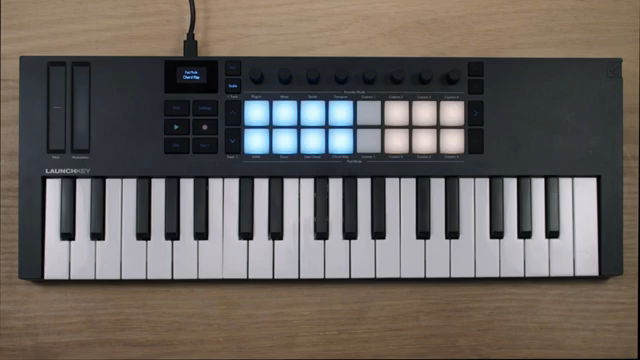
"Chord map gives you a grid of eight chords on the blue pads, and you can use adventure and explore to navigate the wide selection of chords that fit in that scale."
© Screenshot/Quote: Novationtv (YouTube)
Basslines and Leads: Building Layers in Context
"Because I'm in scale mode, all the white keys are going to match the key of the chords that I just put down."
© Screenshot/Quote: Novationtv (YouTube)
With chords established, Dylan moves to constructing basslines and melodic leads, both of which are instantly locked to the chosen scale thanks to Scale Mode. Switching tracks in Ableton, he demonstrates how the Launchkey’s consistent key mapping ensures that every note played supports the harmonic foundation already laid down.
For leads, the video spotlights a practical performance trick: mapping the modulation wheel to the filter cutoff of a synth (in this case, Ableton’s Drift), allowing for expressive, one-handed play. This segment underscores how Launchkey’s features aren’t just about note entry—they’re about enabling nuanced, real-time musical expression that fits seamlessly into a DAW workflow.
Alternate Chords and Song Development: Evolving the Idea
To demonstrate how a track can evolve, Dylan returns to the Chord Map to create alternate chord sequences, effectively sketching out a new section for the song. By tweaking the adventure and explore parameters, he finds new harmonic territory that shifts the mood and direction of the piece.
This iterative process—cycling between chords, bass, and leads—highlights how the Launchkey’s integrated features support not just quick idea generation, but also the development of more complex arrangements. The workflow encourages experimentation, making it easy to branch out from an initial motif into full song sections.
Recap: Inspiration Engine for Modern Producers
The video closes with a succinct recap: Scale Mode and Chord Map are not just convenience features—they’re tools for unlocking creativity and accelerating the songwriting process. By keeping everything in key and providing a playground of chords and progressions, Launchkey helps users move from a blank session to a structured musical idea with minimal friction.
Novation’s approach, as always, is about empowering producers to focus on musical decisions rather than technical hurdles. While the video doesn’t delve into every menu or advanced setting, it makes a strong case for the Launchkey as an inspiration engine for both beginners and seasoned creators.
"Hopefully that gives you some ideas about how you can use scale mode and the chord map to develop your own musical ideas."
© Screenshot/Quote: Novationtv (YouTube)
This article is also available in German. Read it here: https://synthmagazin.at/novation-launchkey-kreativer-flow-mit-scale-mode-und-chord-map/
Watch on YouTube:
Latest articles
Watch on YouTube:
Visit the channel:
https://www.youtube.com/NovationTV
https://www.youtube.com/NovationTV
Links from NovationTV:
website: https://novationmusic.com
instagram: https://instagram.com/wearenovation
twitter: https://twitter.com/WeAreNovation
facebook: https://facebook.com/NovationMusic
Sponsored links:
If you purchase via these links, we may earn a small commission – at no extra cost to you. The link opens an Amazon keyword search, and results may vary depending on availability.
Novation Launchkey
🔗 Check price on Amazon
🔗 Check price on Amazon