Novation’s Circuit Tracks is more than just a groovebox—it’s a digital playground for synth architects and beatmakers alike. In this official NovationTV walkthrough, Dylan dives into the synth engine’s architecture, revealing how Components software unlocks detailed patch creation, macro mapping, and modulation possibilities. The video doesn’t just skim presets; it demonstrates hands-on sound design, parameter mapping, and real-world workflow integration. For those curious about how Circuit Tracks bridges hardware immediacy with digital depth, this is a revealing look at its creative potential and the practicalities of sculpting your own sonic identity.
4. July 2025
LYRA
Novation Circuit Tracks: Deep Patch Design and Macro Mapping Unpacked
Circuit Tracks: The Groovebox as Synth Lab
The video opens with Dylan introducing the Novation Circuit Tracks as his central tool for building a new tune. While Circuit Tracks is often celebrated for its standalone groovebox workflow, Dylan highlights its hidden depth: a robust synth engine accessible both from the hardware and, crucially for this session, via the Components software on a computer. This duality—immediate hardware jamming versus detailed digital editing—sets the stage for the exploration.
He points out that, although the hardware excels at DAWless creation, using Components over USB unlocks the full synth architecture. This includes not just preset browsing but also deep access to synthesis parameters, macro assignments, and modulation routing. The approach is practical: Circuit Tracks can be a self-contained sketchpad or a programmable synth, depending on how far you want to go.
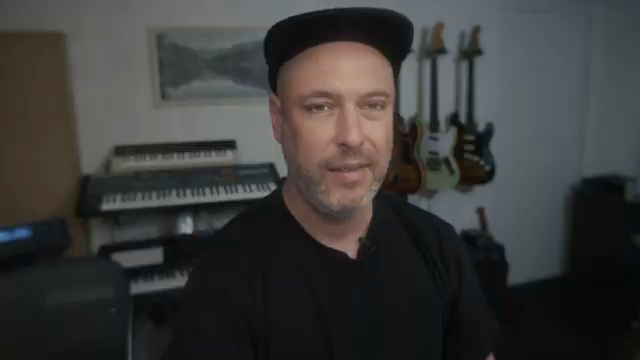
"It's quite a capable synth and it has macro mapping, it has effects and quite a detailed modulation matrix which means you can really craft your own sounds for the unit."
© Screenshot/Quote: Novationtv (YouTube)
Patch Creation in Components: Macro Mapping and Mod Matrix
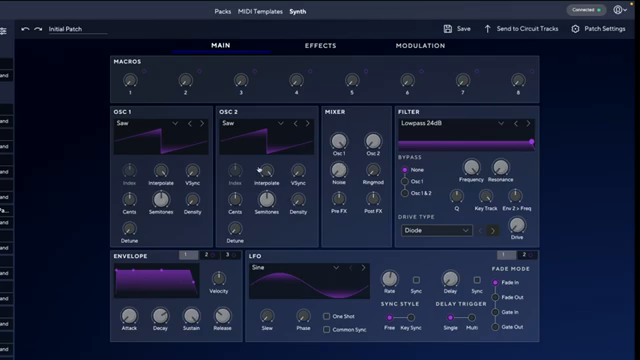
"You can actually map those knobs to whatever you want but I find it useful to stick with the pattern of mapping that's labelled on the hardware so I don't have to think about what each knob does."
© Screenshot/Quote: Novationtv (YouTube)
Dylan demonstrates the process of crafting a custom patch from scratch using Components. He starts by initializing a blank patch, naming it ‘init’, and sending it to a specific slot on the Circuit Tracks. This workflow ensures a clean slate, with no pre-mapped controls, allowing for total customization. The synth engine’s structure is revealed: users can assign hardware macro knobs to virtually any parameter, from oscillator blends to envelope shapes, filter settings, and effects.
He keeps his mappings logical and consistent with the hardware’s labeling, making it easier to remember what each knob does during performance. For example, macro knob one is mapped to blend in oscillator two as a sub, while knob two is assigned to detune the second oscillator. The mapping is visually intuitive in Components, with drag-and-drop assignments and adjustable depth for each macro. Dylan also showcases mapping filter frequency and resonance, as well as amplitude and filter envelopes, demonstrating the flexibility of the modulation matrix.
While the video focuses on a straightforward sound, Dylan notes that the synth engine supports much deeper modulation and effects routing. Many factory presets leverage this, but even simple custom mappings can yield expressive, performance-ready patches. The process is transparent and encourages experimentation, with Components acting as both a librarian and a sound design playground.
Hardware Macro Mapping: Streamlining Sound Design
A key takeaway from Dylan’s workflow is the importance of mapping hardware macro knobs to parameters that matter most for performance and sound shaping. By assigning controls like sub oscillator blend, detune, envelope length, and filter modulation to the eight macro knobs, he creates a patch that’s both expressive and easy to tweak on the fly.
This mapping strategy not only speeds up sound design but also enhances playability. With each knob dedicated to a logical function, users can morph between timbres, adjust envelopes, and dial in effects without menu diving. The result is a workflow that bridges the gap between deep digital synthesis and hands-on, hardware-centric control.
From Patch to Pattern: Integrating Sounds into Music
Dylan moves from patch design to practical application by sending the updated patch to Circuit Tracks and recording a pattern. He demonstrates how the mapped macro knobs can be manipulated in real time while recording, allowing for evolving, dynamic sequences. This hands-on approach turns even a basic patch into a living, breathing part of the composition.
The workflow efficiency is clear: sound design, patch management, and pattern recording are tightly integrated. Circuit Tracks enables users to quickly move from crafting a sound to embedding it in a musical context, making the device suitable for both studio sketching and live performance scenarios.

"By recording and modulating those parameters that I designed by turning the knobs while it's recording, I can take quite a simple synth sound and make a fairly long evolving pattern out of it."
© Screenshot/Quote: Novationtv (YouTube)
Evolving Soundscapes: Creative Potential Unleashed
The video concludes by emphasizing how even simple patches, when paired with thoughtful macro mapping and parameter automation, can yield complex, evolving soundscapes. Dylan demonstrates this by modulating parameters during playback, transforming a straightforward synth sound into a textured, evolving element within the track.
This approach underlines Circuit Tracks’ potential as more than a preset machine—it’s a platform for creative exploration. With Components and macro mapping, users can push beyond factory sounds, crafting unique voices that respond dynamically in both studio and live settings.
This article is also available in German. Read it here: https://synthmagazin.at/novation-circuit-tracks-tiefgehendes-patch-design-und-macro-mapping-entschluesselt/
Watch on YouTube:
Latest articles
Watch on YouTube:
Visit the channel:
https://www.youtube.com/NovationTV
https://www.youtube.com/NovationTV
Links from NovationTV:
website: https://novationmusic.com
instagram: https://instagram.com/wearenovation
twitter: https://twitter.com/WeAreNovation
facebook: https://facebook.com/NovationMusic
Sponsored links:
If you purchase via these links, we may earn a small commission – at no extra cost to you. The link opens an Amazon keyword search, and results may vary depending on availability.
Novation Circuit Tracks
🔗 Check price on Amazon
🔗 Check price on Amazon