Novation’s Launchkey 25 meets Ableton Live 12 in a hands-on exploration of next-gen music-making. In this official NovationTV walkthrough, the Launchkey is positioned not just as a MIDI controller, but as a tactile extension of Live’s new synths, effects, and creative tools. From granular sound design with Granulator III to custom MIDI workflows and microtonal adventures, the video demonstrates how hardware and software can merge for a more intuitive, experimental process. We break down what’s actually shown, how the Launchkey’s interface supports these new features, and where the real creative potential lies.
27. April 2024
LYRA
Novation and Ableton Live 12: Workflow Synergy Unleashed
A Match Made for Modern Music-Making
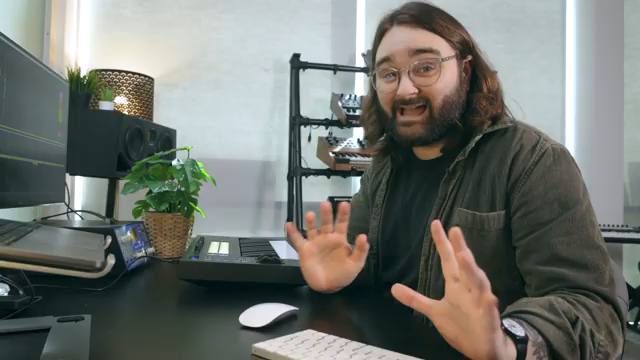
Novation opens the video by framing the Launchkey 25 as the ideal partner for Ableton Live 12, emphasizing how the controller’s physical interface complements the DAW’s new suite of instruments and effects. The approach is casual and exploratory, with the presenter highlighting the abundance of creative tools in Live 12 and the importance of having a tangible device for real-time interaction. This isn’t just about triggering notes—Novation positions the Launchkey as a workflow enhancer, designed to keep users in the creative zone without constant mouse and keyboard interruptions.
The video’s tone is consistent with Novation’s artist-focused ethos: practical, hands-on, and aimed at both newcomers and seasoned producers. By starting with the Launchkey’s compatibility across the entire range and immediately diving into Live 12’s new features, Novation sets the stage for a demonstration that’s all about bridging tactile control with digital innovation.
Granulator III: Granular Sound Design at Your Fingertips
The walkthrough quickly moves to Granulator III, Ableton’s updated granular synthesizer, with the Launchkey taking center stage as the control surface. By mapping the Launchkey’s eight pots to Granulator parameters via device mode, the presenter demonstrates how users can manipulate sample position, scan, grain size, and more—all without touching the mouse. Cycling through parameter banks is handled by holding Device Select, with clear on-screen feedback showing which parameter is currently mapped. This physical interaction is presented as a key advantage, letting users shape sounds in a more instinctive, performance-oriented way.
A practical example follows: a coffee cup sample is loaded, and the presenter tweaks settings to sculpt a playable instrument, adjusting volume and tuning by ear. The workflow is fluid—recording a melody directly after sound design, all from the Launchkey. Novation’s point is clear: hands-on control not only speeds up the process but encourages experimentation, making granular synthesis more accessible and musical.

"If you're making music and you're in a creative flow and you're doing this five or six times over and you're making different instruments and you really just want to get into making music, what I find is really nice is having a physical way of controlling these parameters and just really being able to feel it rather than see it."
© Screenshot/Quote: Novationtv (YouTube)
Custom Modes and MIDI Editing: Building Creative Workflows
"This is a really cool and easy way of basically making poly rhythms with not much understanding of how poly rhythms work."
© Screenshot/Quote: Novationtv (YouTube)
The video shifts focus to Live 12’s enhanced MIDI editing tools and how the Launchkey’s custom modes can be harnessed to streamline complex tasks. After a quick demonstration of new MIDI features—like dividing notes for polyrhythms using keyboard shortcuts—the presenter shows how to replicate these functions on the Launchkey itself. Using Novation Components, a custom pad mode is programmed to send keystrokes for note division and navigation, color-coded for clarity. This transforms the Launchkey from a generic controller into a personalized workflow hub, tailored to the user’s production style.
The process is methodical: pads are assigned to specific shortcuts, saved, and uploaded to the controller. The result is a MIDI editing workflow that bypasses the computer keyboard entirely, enabling rapid, repeatable actions from the Launchkey’s surface. Novation underscores that this level of customization has always been possible, but Live 12’s new tools make it more relevant than ever. The message is that users can adapt their hardware to evolving software features, keeping their workflow efficient and hands-on.
Microtonal Exploration: Tuning Systems on the Launchkey
Diving into Ableton Live 12’s expanded tuning systems, the video highlights how the Launchkey adapts to microtonal and alternative scales. The presenter demonstrates switching from standard 12-TET to 24 Helmholtz temperament, revealing how the keyboard’s mapping changes to accommodate the new tuning. Playing a C major chord in this context requires relearning finger positions, as the physical keys no longer correspond directly to familiar intervals. While this is admittedly a niche feature, Novation presents it as an invitation to experiment—encouraging users to break out of Western tuning conventions and explore new harmonic territory.
The Launchkey’s ability to reflect these changes in real time, with note assignments updating on the fly, showcases its flexibility as a controller for unconventional music-making. The workflow implications are significant for those interested in microtonality, though the video is clear that mastering these systems will require dedication and a willingness to rethink established habits.

"If you want to put the time in, as I say, and learn how to play some of these chords on the keyboard, then you might be able to create some really interesting, almost unheard music, especially when it comes to the context of Western pop music."
© Screenshot/Quote: Novationtv (YouTube)
Synergy in Action: Encouraging Creative Discovery
The video concludes by reinforcing the synergy between Ableton Live 12 and the Novation Launchkey. Novation’s message is one of empowerment: with the right hardware–software pairing, users can unlock new creative possibilities and workflows that might otherwise remain unexplored. The Launchkey is shown as more than just a MIDI keyboard—it’s a customizable, adaptable interface that grows with the DAW, supporting everything from granular sound design to advanced MIDI editing and microtonal performance.
Novation wraps up with a practical note: every Launchkey comes bundled with Ableton Live Lite, ensuring that even new users can start experimenting immediately. The invitation is clear—dive in, try new features, and share discoveries with the community. The focus remains on hands-on creativity, with the Launchkey positioned as a central tool in the evolving landscape of digital music production.
This article is also available in German. Read it here: https://synthmagazin.at/novation-und-ableton-live-12-workflow-synergie-entfesselt/
Watch on YouTube:
Latest articles
Watch on YouTube:
Visit the channel:
https://www.youtube.com/NovationTV
https://www.youtube.com/NovationTV
Links from NovationTV:
website: https://novationmusic.com
instagram: https://instagram.com/wearenovation
twitter: https://twitter.com/WeAreNovation
facebook: https://facebook.com/NovationMusic
Sponsored links:
If you purchase via these links, we may earn a small commission – at no extra cost to you. The link opens an Amazon keyword search, and results may vary depending on availability.
Ableton Live 12
🔗 Check price on Amazon
🔗 Check price on Amazon
Novation Launchkey 25
🔗 Check price on Amazon
🔗 Check price on Amazon