Moog Music’s Muse isn’t just another synth—it’s a digital playground for sound designers who crave both structure and flexibility. In this official walkthrough, Moog demonstrates how Muse’s advanced bank and preset management systems empower users to copy, rename, and organize patches without fear of overwriting their sonic gems. The video methodically explores the Programmer section, showcasing how to manipulate timbres, initialize sounds, and even lock patches to sequences for tailored performance setups. As always with Moog, the focus is on intuitive controls and workflow efficiency, making Muse accessible for both newcomers and seasoned synth architects.

13. September 2024
LYRA
Moog Music’s Muse: Navigating Preset Management and Creative Workflows
Muse: A Digital Playground for Preset Architects
Moog Music introduces the Muse as a synthesizer designed for users who demand a robust and flexible approach to bank and preset management. The video sets the stage by highlighting Muse’s capacity to serve a wide spectrum of creative workflows, from patch collectors to experimental sound designers.
Right from the outset, the focus is on the Programmer section, where users can interact with banks and presets in a hands-on, visually clear manner. This isn’t just about storing sounds—it’s about giving users granular control over how patches are organized, copied, and manipulated, which is essential for anyone building a personal library or preparing for live performance.

"We're going to look at some of the bank and preset management systems on Muse."
© Screenshot/Quote: Moogsynthesizers (YouTube)
Copy, Rename, and Save: Preset Management Demystified
"Copying doesn't finalize any changes."
© Screenshot/Quote: Moogsynthesizers (YouTube)
The core workflow begins with copying an existing patch, ensuring that users can experiment freely without risking their original creations. Muse’s interface prompts users through each step: selecting the source patch, choosing whether to copy the entire patch or just a single timbre, and designating a new storage location—complete with visual feedback and safeguards against accidental overwrites.
Once a patch is copied, the save process offers further flexibility. Users can rename patches using a combination of select and value knobs, insert or delete characters, and even generate random names at the touch of a button. This naming system is both practical and playful, supporting everything from meticulous cataloging to spontaneous inspiration. The system’s non-destructive approach—changes aren’t finalized until explicitly saved—encourages exploration without anxiety.
Timbre Editing: Sculpting Sounds with Surgical Precision
Muse’s patch structure allows for detailed editing of individual timbres within a preset, greatly expanding sound design possibilities. The video demonstrates how users can initialize a single timbre (such as Timbre B) without affecting the rest of the patch, and how changes remain non-destructive until saved. The arrangement view further streamlines the process, letting users load timbres from other patches with ease, swap between A and B slots, and audition new combinations—all from a centralized interface. This modular approach to timbre management is a boon for those who like to mix, match, and iterate quickly.

"It's non-destructive until you save the patch."
© Screenshot/Quote: Moogsynthesizers (YouTube)
Sequencer Integration: Patches and Sequences, Together but Independent
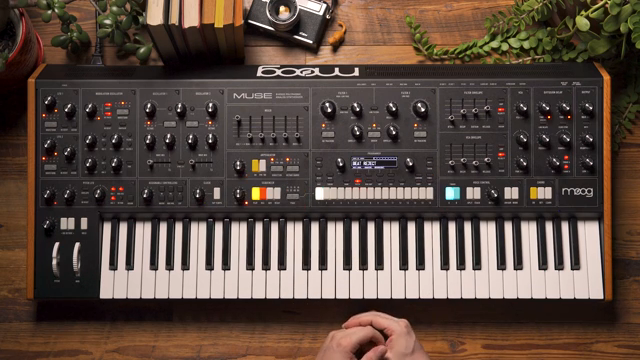
"The patch and the sequence exist as two separate entities inside the system."
© Screenshot/Quote: Moogsynthesizers (YouTube)
A key architectural feature of Muse is the clear separation between patch and sequence data. The video emphasizes that saving a patch does not automatically save the associated sequence, and vice versa, allowing for flexible pairing and re-pairing of sounds and patterns. The sequencer interface mirrors the patch management workflow, with intuitive bank selection and the ability to lock specific patches to sequences.
This lock function enables users to tie a particular sound to a sequence for performance consistency, while still retaining the freedom to mix and match as needed. The system prompts the user when switching sequences, offering the choice to load the associated patch or keep the current one—an elegant solution for live sets or evolving studio sessions. Moog’s approach here is all about giving performers control without unnecessary coupling or complexity.
Accessible Complexity: Muse’s User Experience Philosophy
Moog positions Muse as an instrument that balances depth with accessibility. The video closes by underscoring the intuitive controls and streamlined workflows that make complex patch and sequence management approachable for users at any skill level. Whether you’re crafting intricate soundscapes or just organizing your favorite presets, Muse’s interface is designed to keep creative momentum high and technical friction low.
This article is also available in German. Read it here: https://synthmagazin.at/moog-music-muse-preset-architektur-und-workflow-im-ueberblick/
Watch on YouTube:
Latest articles
Watch on YouTube:
Visit the channel:
https://www.youtube.com/MoogSynthesizers
https://www.youtube.com/MoogSynthesizers
Links from MoogSynthesizers:
website: https://moogmusic.com
instagram: https://instagram.com/moogsynthesizers
facebook: https://www.facebook.com/moogmusicinc
twitter: https://twitter.com/moogmusicinc
Sponsored links:
If you purchase via these links, we may earn a small commission – at no extra cost to you. The link opens an Amazon keyword search, and results may vary depending on availability.
Moog Muse
🔗 Check price on Amazon
🔗 Check price on Amazon