Modal Electronics takes a deep dive into their new ELEMENT One, an 8-voice virtual-analog synthesizer designed to bridge hands-on performance and deep sound design. In this official walkthrough, Modal demonstrates how the MODALapp software companion transforms the instrument, opening up advanced editing, modulation, and patch management capabilities that go well beyond the front panel. For synth nerds and stage performers alike, this video is a guided tour through the ELEMENT One’s layered architecture, modulation matrix, and effects—showing both the tactile immediacy of the hardware and the architectural transparency of the app. If you’re curious how Modal’s design philosophy translates into real-world workflow, this is a revealing look inside.
19. June 2026
LYRA
Modal Electronics unlocks the ELEMENT One’s digital core with MODALapp
Performance Meets Depth: ELEMENT One’s Dual Identity
The ELEMENT One is introduced as an 8-voice virtual-analog synthesizer with a performance focus but a deep sound-sculpting engine under the hood. Modal Electronics positions the instrument as a platform for both stage and studio use, emphasizing its versatile 37-note keyboard with velocity and aftertouch, and a control surface that supports immediate, expressive play.
However, the video makes clear that the hardware’s tactile controls are just the entry point. For those who want to go further, ELEMENT One is designed to connect seamlessly with MODALapp, Modal’s software editor. This dual approach means users can stick with hands-on tweaking for fast results or dive into digital detail for advanced sound design, modulation, and management tasks.
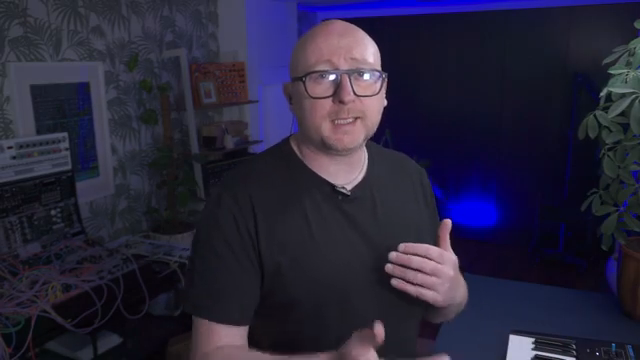
"The front panel of Element 1 provides you with all the things that you need to be able to play with your sound when you're performing and when you're on stage or when you're in the studio, but the modal app allows you to go in deeper if you want to."
© Screenshot/Quote: Modalelectronics (YouTube)
MODALapp: Visual Sound Design and Deep Editing
Once ELEMENT One is connected via USB-C and MODALapp is launched, users are greeted with a comprehensive, visual overview of the current patch. The app replicates all the hardware controls and adds access to deeper editing parameters that aren’t directly available on the front panel.
The MODALapp interface is structured for clarity: arpeggiator, oscillator, filter, envelopes, modulation, effects, and performance assignments are all laid out for quick navigation. Importantly, the app also hosts the preset manager, detailed LFO controls, keyboard mapping, and access to granular device settings—supporting both visual learners and those who prefer to structure their patches with architectural precision.
Arpeggiators, Oscillators & Effects: Advanced Features in Action
The walkthrough highlights the arpeggiator’s expanded parameter set within MODALapp, where users can manipulate divisions, playback direction, swing, glide, and octave range—all with immediate visual feedback. The video demonstrates how these options are more accessible in the app, allowing for precise creative control compared to the hardware alone.
Oscillator editing is shown in depth: users can modify algorithms, mix levels, sync, tuning, and drift—and each change is reflected in real time. The app makes it simple to swap between the 34 oscillator algorithms, adjust sub-oscillator frequencies, and experiment with wavefolding and sync, encouraging exploration of sound design possibilities that go far beyond traditional analog architectures.
The effects section is equally robust, with three slots supporting a variety of processors: delays, choruses, phasers, flangers, drive types, reverbs, EQ, compression, and more. The video demonstrates how effect parameters like dry/wet mix, timing, feedback, and frequency filtering can be dialed in directly within the app, making it easy to sculpt complex, polished sounds or audition entirely new sonic textures in seconds.
Hardware–Software Synergy: Real-Time Bi-Directional Control
"Now the brilliant thing about using this app is that it gives you full feedback either way that you're using it."
© Screenshot/Quote: Modalelectronics (YouTube)
A standout feature of the ELEMENT One and MODALapp pairing is the real-time feedback loop: any parameter change on the hardware is instantly mirrored in the app, and vice versa. This bi-directional communication ensures that users always know the true state of every control, eliminating guesswork and supporting a seamless workflow whether editing from the synth, the computer, or both simultaneously.
This integration is especially valuable for complex modulation and performance setups, where seeing the full modulation matrix or effects routing visually can make otherwise hidden interactions transparent. For those building intricate patches or performing live tweaks, this synergy fosters confidence and creative flow.
Randomization: Creative Catalyst for the Modern Synthesist
MODALapp’s randomization function stands out as a powerful tool for sparking new ideas. With a single button press, the app generates a fresh patch by altering parameters based on the current sound, offering a stream of unexpected results rooted in the existing architecture.
This feature is positioned as equally useful for beginners—who can learn synthesis by reverse-engineering random patches—and for experienced users looking to break creative ruts or rapidly prototype new sounds. The randomizer’s integration with the app’s preset management means that any inspiring accident can be quickly saved and recalled, keeping the workflow fast and experimental.
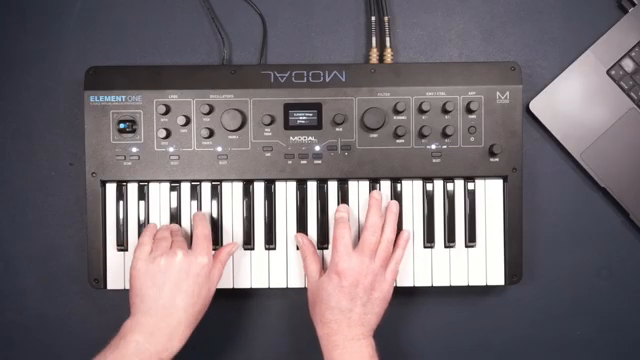
"Now one of my favourite things about the modal app is that there is a random button, and if we hit this up here where we can choose our different presets, and we can also save our presets, if we hit random it will offer us something new."
© Screenshot/Quote: Modalelectronics (YouTube)
More articles about these products:
Watch on YouTube:
Latest articles
Watch on YouTube:
https://www.youtube.com/ModalElectronics
Links from ModalElectronics:
Sponsored links:
If you purchase via these links, we may earn a small commission – at no extra cost to you. The link opens an Amazon keyword search, and results may vary depending on availability.
🔗 Check price on Amazon
🔗 Check price on Amazon