Ever tried chopping samples on an MPC Live and felt like you were wrestling a bag of cats? MALO BEATS is here to show you how to turn those wild slices into buttery smooth grooves using nothing but your fingers, some encoders, and a touch strip that’s slicker than a fresh pair of kicks. This video isn’t just about button-pushing—it’s about making the process slap, not just the end product. If you’re after real-world workflow hacks and want to see a beatmaker who’s all about fun over fuss, you’re in the right spot. Grab a cheap beer, hit play, and let’s see how MALO BEATS keeps the vibe alive in the home studio.
17. December 2025
RILEY
MALO BEATS Flips the Script: MPC Live Encoder Hacks That Chop Like a Chef’s Knife
Slice and Dice: Sample Chopping on the MPC Live
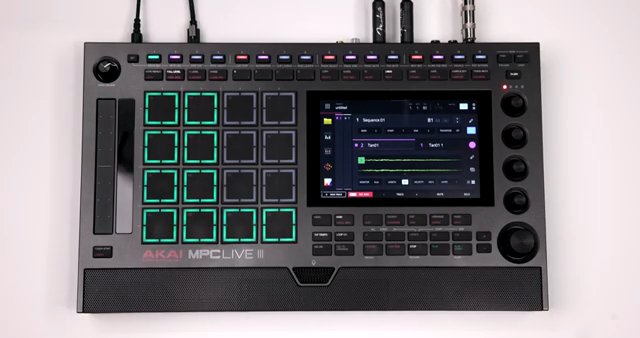
MALO BEATS jumps straight into the deep end, showing off some creative ways to chop samples on the MPC Live. Forget endless menu diving—this is about getting hands-on and letting the groove guide your workflow. The focus is on practical, real-world techniques that make slicing up records feel more like cooking up street food than running a science experiment. If you’ve ever wanted to chop samples without losing your flow, this is the kind of approach that keeps the beat moving and the process fun.
Twist, Zoom, Chop: Encoders Make It Easy
The real sauce here is how those physical encoders and Q-links turn sample editing into a tactile playground. MALO BEATS breaks down how you can zoom in, adjust start and end points, and get surgical with your slices—all with a twist of a knob. No more squinting at tiny waveforms or stabbing at the touchscreen like you’re playing Whac-A-Mole.
It’s all about that fluid workflow: you hold down Q-link, see what each knob does, and suddenly you’re chopping samples faster than your grandma dices onions. The combo of the dial knob and zoom function means you can fine-tune every slice without breaking a sweat. This is the kind of hands-on control that makes you want to chop records all day, and honestly, it’s way more fun than clicking around with a mouse.
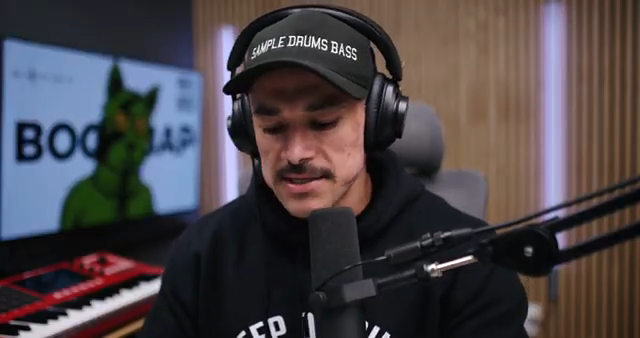
"I could use this dial knob and the zoom knob right here to precisely adjust the start point of each slice."
© Screenshot/Quote: Malobeats (YouTube)
Touch Strip Tricks: Customizing for Beatmaking Bliss
"You could configure this touch strip to do whatever you want. Well, not anything, but you can make it do some pretty interesting stuff."
© Screenshot/Quote: Malobeats (YouTube)
Now, let’s talk about that touch strip—MALO BEATS drops some serious gems here. Instead of bouncing around menus just to tweak your mix, you can reassign the touch strip to control track or pad levels. That means less menu hopping and more time actually making music. If you’re laying down drums and the hi-hats are screaming louder than a busted subway speaker, just swipe the touch strip and dial it back. It’s that easy.
The beauty is in the customization: you can switch the strip’s function on the fly, giving you fader-like control over whatever you need. Whether you’re rough-mixing drums or nudging a snare, this trick keeps your hands on the groove and your eyes off the screen. It’s a workflow hack that feels like it was designed for beatmakers who want to stay in the zone, not get lost in the menus.
It’s About the Journey, Not Just the Beat
MALO BEATS gets real about why the process matters more than just the final track. It’s not just about stacking drums and calling it a day—it’s about enjoying every tweak, every happy accident, and every new trick you pick up along the way. Sometimes the beat doesn’t even slap as hard as you hoped, but if you had fun making it, that’s what counts. That’s the kind of attitude that keeps you coming back to the pads, hungry for the next session.

"At least for me, I enjoy the process of making music more than just listening to the end result."
© Screenshot/Quote: Malobeats (YouTube)
See It, Don’t Just Read It: Why You Gotta Watch
Look, you can read about encoder hacks all day, but nothing beats seeing MALO BEATS work his magic in real time. The video is packed with live demonstrations, from sample slicing to beat construction, and there’s a vibe you just can’t get from text alone. If you want to catch every finger flick, knob twist, and workflow shortcut, do yourself a favor and watch the full session. Trust me, your next beat will thank you.
This article is also available in German. Read it here: https://synthmagazin.at/malo-beats-dreht-auf-mpc-live-encoder-hacks-die-schneiden-wie-ein-chefmesser/
Watch on YouTube:
Latest articles
Watch on YouTube:
Visit the channel:
https://www.youtube.com/malobeats
https://www.youtube.com/malobeats
Links from malobeats:
Extras on Patreon: https://patreon.com/malobeats
Instagram: https://instagram.com/malo_beats/