Make Noise, the Asheville-based maestros of modular mischief, dive deep into the less obvious corners of their PoliMATHS module in this exploratory video. The focus here is on how PoliMATHS can be more than just a modulation workhorse: it’s shown as a flexible audio-rate oscillator, a clever submixer, and a source of layered, complex signals. If you’ve ever wondered how to wrangle eight function generators into something more than the sum of their parts—or how to patch up a storm without a tangle of cables—this walkthrough is a must-watch for the patch-hungry and the curious alike.

6. November 2025
MILES
MAKEN0ISE PoliMATHS: Oscillation, Submixing, and Audio-Rate Adventures
PoliMATHS: Not Just Another Modulator
The video opens with Make Noise addressing a recurring question: where exactly is the sound coming from in their recent demos? While the Multi-Wave often takes centre stage as the audio source, this time the spotlight is firmly on PoliMATHS. The module is introduced as a versatile tool, capable of operating both independently and in conjunction with other modules like QXG and Multi-Wave.
PoliMATHS isn’t just about modulation; its design allows it to step into the role of a sound source, thanks to its combination of two-stage function generators and dedicated oscillation sections. The amplitude of these oscillations is governed by the function generator, and the resulting signal is available at the output jacks. This flexibility means PoliMATHS can be patched into a variety of roles, whether controlling amplitude elsewhere in the system or generating signals for further processing.
Eight Voices, Audio-Rate: Oscillation Unleashed
A standout feature demonstrated is PoliMATHS’s ability to act as an eight-voice sound source, with each channel capable of running oscillations at audio rate. By disengaging from the QXG and patching directly, users can access these oscillations for audio duties, not just slow modulation. The oscillators are positive-going by default, making them suitable for function generation, but a long press on the mode button transforms them into bipolar oscillators—ideal for audio-rate applications.
The shape control morphs the waveform from saw to triangle to ramp, with saw and ramp sounding nearly identical when monitored directly. In this bipolar mode, the oscillators also track one volt per octave, opening up melodic and harmonic possibilities. The video demonstrates how these features allow PoliMATHS to step out of the shadows as a mere utility and become a full-fledged audio source, capable of complex, layered textures.
"Now, if we monitor these oscillations directly, we'll hear that they go right up into audio rate."
© Screenshot/Quote: Maken0Isemusic (YouTube)
Submixing: Custom Blends Without the Patch Cable Tangle
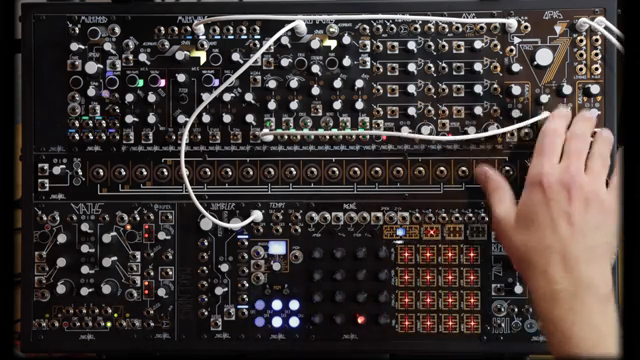
"This is one place where polymaths submixing options could come in handy."
© Screenshot/Quote: Maken0Isemusic (YouTube)
Submixing is where PoliMATHS flexes its muscles in a crowded rack. By holding two buttons, users activate submixing mode—indicated by green windows—which changes the behaviour of the outputs. Instead of each output carrying a single channel, outputs now provide mixes of channels based on which jacks are patched. For example, output two delivers channels one and two if output one is unpatched, and output eight sums all eight channels unless earlier outputs are tapped.
This clever system allows for custom mixes without a mess of external mixers or tangled patch cables. Patching into any output to the left of a current submix breaks out those channels, creating new submixes and freeing up the remaining outputs for further routing. The result is a highly adaptable module that can provide anything from single-channel signals to complex, layered mixes—all from the front panel, no extra hardware required.
Practical Patchwork: Filters, Layers, and Signal Complexity
The practical applications of PoliMATHS’s design are explored through a series of patch examples. One approach is to use its outputs to modulate filter frequencies, such as sending a channel to control the QPOS filter’s cutoff. By leveraging the submixing options, users can create temporal layers and overlapping modulations, crafting evolving soundscapes or intricate FM textures.
When output levels are pushed beyond their maximum, the oscillators fold over, generating more complex signals—ideal for those seeking a bit of sonic chaos. The video also demonstrates using different output combinations (like outputs 2 and 6) to modulate separate destinations at audio rate, resulting in rich, dynamic textures. These features make PoliMATHS not only a modulation powerhouse but a tool for creative signal routing and sound design, well-suited for adventurous patchers looking to push their systems beyond the obvious.

"Sub-mixing and bipolar oscillations are great for using polymaths outside of the QXG context, but probably also for things we haven't thought about, maybe even using them with QXG."
© Screenshot/Quote: Maken0Isemusic (YouTube)
This article is also available in German. Read it here: https://synthmagazin.at/maken0ise-polimaths-oszillation-submixing-und-audio-abenteuer/
Watch on YouTube:
Latest articles
Watch on YouTube:
Visit the channel:
https://www.youtube.com/MAKEN0ISEMUSIC
https://www.youtube.com/MAKEN0ISEMUSIC
Links from MAKEN0ISEMUSIC:
website: https://www.makenoisemusic.com
instagram: https://www.instagram.com/makenoisemusic
twitter: https://twitter.com/makenoisemusic
facebook: https://www.facebook.com/makenoiseco
Sponsored links:
If you purchase via these links, we may earn a small commission – at no extra cost to you. The link opens an Amazon keyword search, and results may vary depending on availability.
Multi-Wave
🔗 Check price on Amazon
🔗 Check price on Amazon
PoliMATHS
🔗 Check price on Amazon
🔗 Check price on Amazon
QPOS
🔗 Check price on Amazon
🔗 Check price on Amazon