Ever dialled a phone and thought, “that’s a patchable sound source”? MAKEN0ISE’s latest video, hosted by Pete, dives straight into the sonic archaeology of the Touch Tone era. Using classic modular techniques and a handful of familiar modules, Pete demonstrates how to recreate those iconic dial tones, ringbacks, and even the screech of a dial-up modem—all with gear you might already have in your rack. The focus here is on tuning, oscillator interplay, and creative patching, with a healthy dose of nostalgia and practical tips for integrating these sounds into modern workflows. If you’ve ever wondered how to turn a phone call into a modular performance, this is your blueprint.
28. August 2025
MILES
MAKEN0ISE and the Touch Tone Time Machine: Synthesising Nostalgia in Eurorack
Touch Tone Synthesis: A Modular Archaeology
The video opens with Pete, Make Noise’s resident Instagram wizard, introducing a series of patches inspired by the unmistakable sounds of the Touch Tone telephone. These tones, instantly recognisable to anyone who’s ever dialled a number, are presented as a musical matrix—each button on the phone corresponding to a unique frequency pair. Pete frames the act of dialling as a kind of performance, where playing a phone is akin to playing a song, and sets out to recreate these sounds using modular gear.
The initial patch uses the O-Control and O-Coast, with just a handful of patch cables and a focus on two oscillators. By cycling the slope section and carefully balancing oscillator settings, Pete demonstrates how to generate the dual-frequency tones at the heart of Touch Tone synthesis. The setup is straightforward, but the result is a convincing emulation of the classic phone keypad, laying the foundation for further sonic exploration.
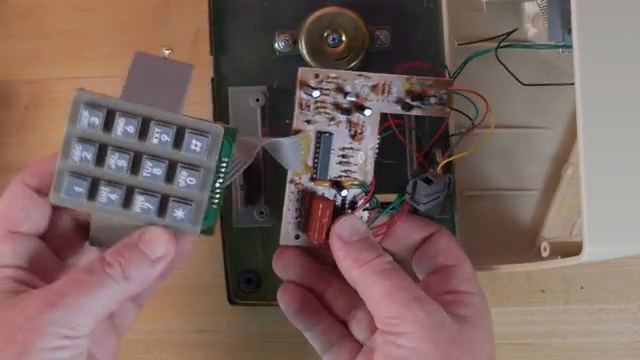
"Dialing a phone is playing a song."
© Screenshot/Quote: Maken0Isemusic (YouTube)
Dial Tones, Ringbacks, and the Modem Scream: Techniques in Action
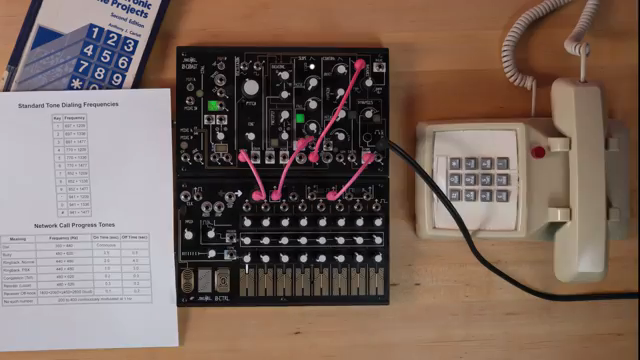
"Finally, we have the dreaded busy tone."
© Screenshot/Quote: Maken0Isemusic (YouTube)
Pete moves through the core sounds of the Touch Tone era, starting with the dial tone—a simple drone of 350 Hz and 440 Hz, played continuously. By tuning two oscillators to these frequencies and letting them run, the familiar pre-dial hum emerges. The video then shifts to the ringback tone, achieved by alternating 440 Hz and 480 Hz in a two-seconds-on, four-seconds-off pattern, capturing the anticipation of a call connecting. The busy tone follows, with 480 Hz and 620 Hz pulsed in half-second intervals, signalling a line already in use.
To add realism, Pete manipulates the dynamics control as a makeshift low-pass filter, tailoring the timbre to mimic different phone models. He also demonstrates patching variations, such as rerouting the touch gate to contour for subtle changes in envelope and articulation. The tutorial doesn’t stop at tones—Pete patches a microphone through a Doepfer A119 preamp and into a ring modulator, then filters the result with a fixed filter bank. This simulates the lo-fi, band-limited sound of a voice transmitted through a handset, using high-frequency oscillators and careful routing to achieve that classic, slightly metallic telephone quality.
For the grand finale, Pete tackles the dial-up modem—an iconic soundscape of the early internet. While he admits to not fully replicating its chaotic complexity, he offers a vibes-based patch using the O-Coast’s arpeggiator mode, clocked at audio rate. By feeding MIDI chords into the O-Coast and letting the arpeggiator cycle through them rapidly, he conjures a timbral swirl reminiscent of modem handshakes. The approach is more impressionistic than forensic, but it captures the spirit of the era’s digital cacophony.
Tuning: The Secret Ingredient
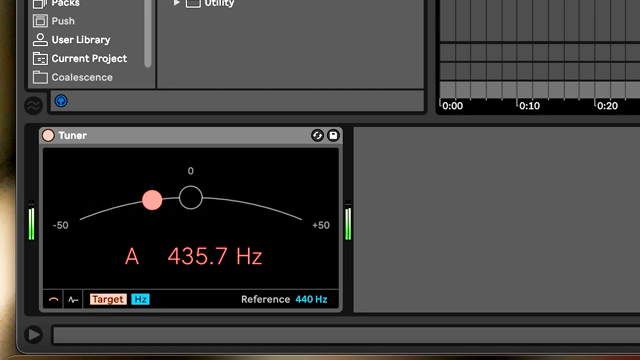
A recurring theme in Pete’s demonstration is the importance of precise tuning. To authentically recreate Touch Tone sounds, matching the original frequencies is essential. Pete suggests using a DAW tuner—such as Ableton’s, set to display Hertz—to dial in the exact values for each oscillator. This attention to detail ensures that the resulting tones aren’t just reminiscent of phones, but are spot-on recreations.
The process is methodical: reference the frequency matrix, adjust oscillator pitches accordingly, and use the tuner to verify accuracy. This discipline in tuning not only anchors the patches in historical authenticity but also sharpens one’s ear for frequency relationships—a valuable skill for any modular enthusiast.
"That's the number we want to match when tuning."
© Screenshot/Quote: Maken0Isemusic (YouTube)
From Nostalgia to Modern Workflows
Beyond mere imitation, Pete encourages viewers to see these techniques as tools for crafting evocative soundscapes. The recreated phone tones can serve as nostalgic textures in contemporary music, or as playful sonic motifs in live modular sets. The modular approach allows for endless variation—envelopes, filtering, and modulation can all be tweaked to taste, transforming utilitarian signals into expressive musical elements.
Integrating these patches into a modern workflow is straightforward, especially with MIDI control and arpeggiator tricks as shown in the modem example. The video subtly suggests that the boundary between retro sound design and forward-thinking synthesis is thinner than it appears—sometimes, all it takes is a patch cable and a bit of curiosity.
Share Your Touch Tone Tales
Pete wraps up by inviting the community to share their own memories and patches inspired by the Touch Tone era. Whether you’re chasing nostalgia or just looking for new sonic territory, the video positions these classic sounds as fertile ground for experimentation. The spirit is open-ended—try these techniques, tweak them, and see where your patch cables lead you.
This article is also available in German. Read it here: https://synthmagazin.at/maken0ise-und-die-touch-tone-zeitmaschine-nostalgie-synthese-im-eurorack/
Watch on YouTube:
Latest articles
Watch on YouTube:
Visit the channel:
https://www.youtube.com/MAKEN0ISEMUSIC
https://www.youtube.com/MAKEN0ISEMUSIC
Links from MAKEN0ISEMUSIC:
website: https://www.makenoisemusic.com
instagram: https://www.instagram.com/makenoisemusic
twitter: https://twitter.com/makenoisemusic
facebook: https://www.facebook.com/makenoiseco
Sponsored links:
If you purchase via these links, we may earn a small commission – at no extra cost to you. The link opens an Amazon keyword search, and results may vary depending on availability.
Doepfer A-119
🔗 Check price on Amazon
🔗 Check price on Amazon
Make Noise O-Coast
🔗 Check price on Amazon
🔗 Check price on Amazon
Make Noise O-Control
🔗 Check price on Amazon
🔗 Check price on Amazon