Intellijel’s Multigrain module lands firmly in the creative sandbox for modular heads, offering a stereo morphing granular sampler that’s all about hands-on sound manipulation. In their typically clear and practical style, Intellijel’s official walkthrough takes us from panel tour to patching tricks, showing how Multigrain’s grain controls, scene morphing, and modulation options open up a world of evolving textures. This article unpacks the video’s key demonstrations, focusing on what Multigrain brings to a real rack: from tactile sound selection and granular shaping to external modulation and sample workflows. If you’re curious about how this module might slot into your own patching ecosystem, read on for the full breakdown.

12. April 2025
MILES
Intellijel Multigrain: Morphing Granular Sampler in Eurorack – A Deep Dive
Intellijel 4U Palette Case 62HP, Intellijel Duatt 1U, Intellijel FSR 1U, Intellijel MultiGrain, Intellijel Planar 2, Intellijel Plonk, Intellijel Quadrax, Intellijel Stereo I/O 1U, Intellijel VCO 1U, Intellijel XY I/O 1U
First Impressions: Multigrain’s Morphing Granular Playground
Intellijel introduces the Multigrain as a stereo morphing granular sampler module, designed to bring creative sound manipulation to the Eurorack format. The video opens with a concise panel tour, highlighting the module’s layout: eight sound buttons for sample selection, a row of function buttons for modulation assignment, and a pair of scene buttons flanking a morph fader. This fader is central to the module’s unique approach, allowing users to interpolate between two distinct parameter sets, or “scenes.”
The top of the panel houses stereo audio I/O, gate and next inputs for external triggering, and assignable modulation inputs and outputs. There’s also a dedicated CV input for the morph fader, a sync input for clocking grains, and a micro SD card slot for storing projects and samples. The overall design is clearly aimed at hands-on, performance-oriented workflows, with enough patch points to keep even the most cable-happy modular user satisfied.
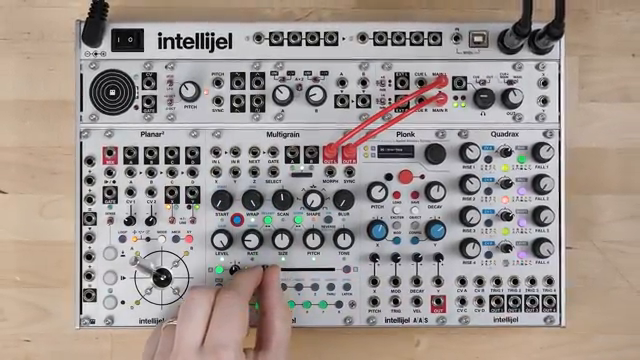
"MultiGrain is a stereo morphing granular sampler module."
© Screenshot/Quote: Intellijel (YouTube)
Granular Controls, Effects, and Sound Shaping
"The next three controls, Rate, Size, and Pitch, are linked together by default using these two buttons."
© Screenshot/Quote: Intellijel (YouTube)
The Multigrain’s core feature set revolves around granular synthesis, with grains defined as tiny slices of audio extracted from longer samples. Users can select from up to eight sound sources, triggering grains via the sound buttons or latching them for continuous playback. Notably, while only one sound can be triggered at a time, grains from different sounds can overlap, enabling layered textures.
Granular controls include a reverse button for playback direction, a shape selector with seven envelope types, and knobs for level and tone. The tone control acts as a two-pole filter, sweeping from low-pass to high-pass. Pitch, size, and rate are linked by default, but can be unlinked for more experimental results—allowing, for example, pitch changes without affecting grain size or rate. The quantizer locks pitch to user-selected scales, and the blur effect adds a global reverb-like wash, with its send and decay controlled by a single knob.
Position controls—start, wrap, and scan—let users define which part of a sample is granulated. Start sets the initial point, scan moves the start point for each grain, and wrap defines the scanning boundary. This trio enables precise or wild sample slicing, with wrap looping the scan back to the start or vice versa. The video demonstrates how these controls interact, especially when paired with the granular engine’s flexibility.
Scenes and Morphing: Evolving Soundscapes on the Fly
A standout feature of Multigrain is its dual-scene system. Each sound has two parameter states—Scene A and Scene B—between which users can morph using the dedicated fader. This allows for seamless transitions between drastically different granular settings, or for subtle shifts in timbre and texture. The morph fader’s position is universal, affecting all sounds, and can be modulated externally for evolving soundscapes.
The video walks through copying scene settings, editing parameters in one scene, and morphing between them to hear the results. All ten granular controls and the reverse button are morphable, making this a powerful tool for live performance or generative patches. The ability to morph not just static parameters but also modulation assignments opens up a rich territory for evolving, layered sonic results.
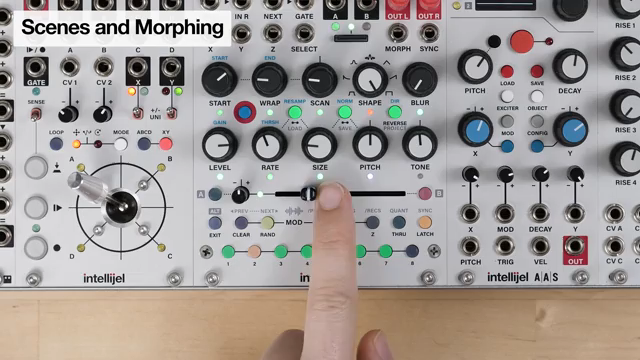
"Let's try a simple example of morphing to show you exactly how it works."
© Screenshot/Quote: Intellijel (YouTube)
Patching, Modulation, and Sample Recording: Multigrain in the Rack
Multigrain’s patch points enable deep integration with the rest of a modular system. Gate and next inputs allow for external triggering and sequential sound stepping, while the select input enables CV-based sound selection—ideal for sequencers or joystick controllers like Planar 2. The morph fader can be modulated via CV, and its position visualized with an LED, making it easy to automate complex scene transitions.
Assignable X, Y, and Z modulation inputs can be routed to any granular parameter, with per-control attenuverters for fine control. Modulation assignments are scene-dependent, so morphing can also interpolate between different modulation routings. There’s also an internal random modulation source, assignable per parameter, which can introduce effects like random panning. Sampling is straightforward: users can record from the stereo inputs, resample the output, or grab from a 32-second always-listening buffer. Assigning new samples is quick, supporting a fast-moving creative workflow.
Presets and Projects: Saving the Sonic Journey
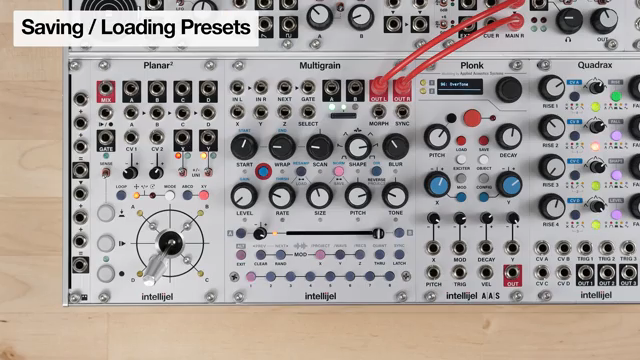
"The X, Y and Z buttons represent banks 1, 2 and 3."
© Screenshot/Quote: Intellijel (YouTube)
To support ongoing experimentation, Multigrain offers robust preset and project management. Users can save up to 48 presets per project, with 48 projects available on the module. The save and load process is visual and immediate, using the sound and modulation buttons to select banks and locations. There’s also an auto-save state to capture the latest settings, even if you forget to manually save.
Sample management is equally flexible: samples can be loaded from project folders, global WAV folders, or a chronological REX folder for recorded material. The video notes that Multigrain comes with demo projects and that more resources will be available online. This approach encourages users to build evolving libraries of sounds and setups, making Multigrain a strong candidate for both studio and live modular rigs.
This article is also available in German. Read it here: https://synthmagazin.at/intellijel-multigrain-morphender-granular-sampler-im-eurorack-ein-analytischer-ueberblick/
Watch on YouTube:
Latest articles
Watch on YouTube:
Visit the channel:
https://www.youtube.com/intellijel
https://www.youtube.com/intellijel
Links from intellijel:
website: https://intellijel.com
forum: https://forum.intellijel.com
instagram: https://instagram.com/intellijel
facebook: https://www.facebook.com/intellijel
Sponsored links:
If you purchase via these links, we may earn a small commission – at no extra cost to you. The link opens an Amazon keyword search, and results may vary depending on availability.
Intellijel 4U Palette Case 62HP
🔗 Check price on Amazon
🔗 Check price on Amazon
Intellijel Duatt 1U
🔗 Check price on Amazon
🔗 Check price on Amazon
Intellijel FSR 1U
🔗 Check price on Amazon
🔗 Check price on Amazon
Intellijel MultiGrain
🔗 Check price on Amazon
🔗 Check price on Amazon
Intellijel Planar 2
🔗 Check price on Amazon
🔗 Check price on Amazon
Intellijel Plonk
🔗 Check price on Amazon
🔗 Check price on Amazon
Intellijel Quadrax
🔗 Check price on Amazon
🔗 Check price on Amazon
Intellijel Stereo I/O 1U
🔗 Check price on Amazon
🔗 Check price on Amazon
Intellijel VCO 1U
🔗 Check price on Amazon
🔗 Check price on Amazon
Intellijel XY I/O 1U
🔗 Check price on Amazon
🔗 Check price on Amazon