Sonicware’s Liven Ambient Ø isn’t just another synth—it’s a purpose-built soundscape machine, engineered for ambient, cinematic, and experimental textures. In this official walkthrough, Daniel Beck Rose (aka SonicCartography) guides us through the architecture and workflow of the Ambient Ø, focusing on hands-on sound design rather than sequencer tricks. The video methodically explores the synth’s layered wavetable engine, modulation matrix, and unique structures for drone, pad, and atmospheric work. For anyone curious about how digital synth design translates into real-world ambient workflows, this is a revealing, architecture-focused tour straight from the source.

15. November 2024
LYRA
Inside Sonicware’s Liven Ambient Ø: A Deep Dive into Digital Soundscapes
A Purpose-Built Soundscape Synth Arrives
The Sonicware Liven Ambient Ø enters the scene as a digital synthesizer designed with ambient and soundscape creation at its core. Rather than offering a generic synth engine, Sonicware has architected this instrument around the needs of ambient musicians, providing multiple layers—drone, pad, atmosphere, and noise—that can each be sculpted independently. The video’s host, Daniel Beck Rose, makes it clear from the outset that the default sounds are intentionally raw, meant to be the starting point for deep sound design rather than polished presets.
Sonicware’s approach is refreshingly direct: the Ambient Ø is not about instant gratification but about giving users the tools to mold their own sonic environments. Each layer starts with a basic waveform, and the user is encouraged to explore the vast range of wavetables and harmonic variations. This architecture sets the stage for a workflow that rewards experimentation and careful listening, rather than quick patch browsing.
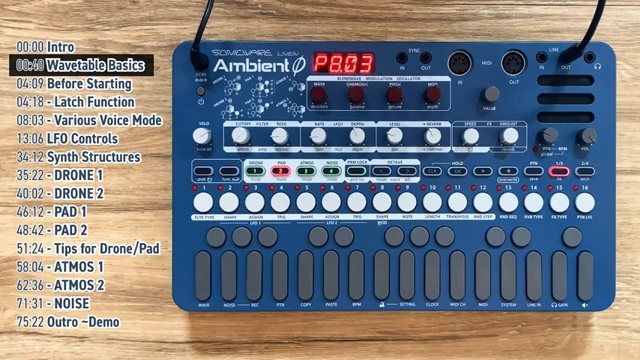
"It's meant to be raw sonic material that you mold and refine into what you want it to be, thus allowing you to design your own sounds from scratch."
© Screenshot/Quote: Sonicware (YouTube)
Wavetables, Voice Modes, and LFOs: The Heart of Sound Design
"To make it more interesting, we're going to have to introduce some movement. Movement is what brings our sound to life."
© Screenshot/Quote: Sonicware (YouTube)
The video dives deep into the essentials of sound design on the Ambient Ø, beginning with the wavetable engine. Each synth layer can access 32 wavetables, each containing 128 variations, allowing for a staggering palette of raw sonic material. The workflow is tactile: users select a wavetable and then dial through its variations using dedicated knobs, shaping the harmonic content of each layer. The noise layer, in contrast, is sample-based and operates differently, providing environmental textures or user-loaded samples.
A key workflow feature is the Latch function, which helps users keep track of parameter values and avoid abrupt jumps when tweaking knobs—a small but thoughtful interface detail. The guide then explores the various voice modes available: polyphonic, monophonic, legato, and unison. Each mode offers distinct behaviors, such as note cutoff, glide, or stacked voices with detuning, enabling nuanced performance and layering strategies. Notably, unison mode thickens the sound by stacking four voices, with adjustable detune for added movement.
LFOs are central to the Ambient Ø’s modulation architecture. Each layer gets two independent LFOs, assignable to a wide range of parameters including level, panning, filter cutoff, and even the rate or depth of another LFO. The video demonstrates how rate, depth, shape, and trigger settings interact, allowing for everything from subtle movement to wild, tempo-synced effects. The ability to modulate LFO parameters with another LFO introduces a modular-like flexibility, making complex, evolving textures possible without menu-diving.
Structures and Layer Manipulation: Sculpting Drones, Pads, and Atmospheres
The guide shifts focus to the six synth structures that define how each layer’s engine is internally routed and modulated. These structures—Drone 1, Drone 2, Pad 1, Pad 2, Atmos 1, and Atmos 2—determine oscillator configurations, modulation routings, and available parameters. For example, Drone structures use two oscillators with balance, pitch, detune, and a built-in modulator, while Pad structures introduce three-oscillator blends and more complex modulation schemes. The diagrams printed on the synth itself serve as a handy reference for these architectures.
Atmos structures depart from the norm, employing ring modulation (Atmos 1) and FM synthesis (Atmos 2) to generate complex, evolving timbres. The video provides practical demonstrations of how starting with simple waveforms like sine waves can help keep these structures manageable, as their inherent complexity can quickly lead to noisy or chaotic results. Throughout, the host emphasizes the importance of parameter interplay—adjusting balance, pitch, detune, and modulator settings to achieve everything from subtle shimmer to aggressive, glitchy textures. The noise layer, meanwhile, offers straightforward sample blending and pitch manipulation, rounding out the palette for environmental and percussive elements.
Workflow Tips: Layering, Mixing, and Fine-Tuning for Cohesion
With the core sound design tools covered, the video turns to practical advice for integrating the Ambient Ø into a broader production workflow. The host suggests iterative refinement: after crafting initial sounds for each layer, revisit them in the context of the full mix, making fine adjustments to attack, release, filter cutoff, and level to ensure no layer dominates unnecessarily. Panning is recommended for spatial separation, and reverb levels can be dialed up after the main sound design work is done to enhance depth without muddying the mix.
Master effects like delay and shimmer reverb are highlighted as tools for adding polish, but the emphasis remains on restraint—using effects to support, not overwhelm, the carefully sculpted layers. The workflow encourages experimentation with modulation shapes and rates, as well as blending noise and sample-based elements for organic movement. The overall message: the Ambient Ø rewards a methodical, ears-first approach to layering and balancing, rather than relying on heavy-handed effects or preset stacking.
Sequencer Teaser and Next Steps
As the session wraps up, the video hints at the next frontier: the built-in sequencer. While this episode focuses on manual sound design and performance, the host teases the creative possibilities that open up when the sequencer is brought into play. The brief demo at the end offers a taste of how the crafted layers can be arranged into evolving compositions, promising more advanced techniques in future installments.
Viewers are encouraged to experiment with the tools covered so far and to look forward to deeper explorations of sequencing, automation, and composition. The video closes with an invitation for questions and feedback, reinforcing Sonicware’s community-driven approach to product education and support.
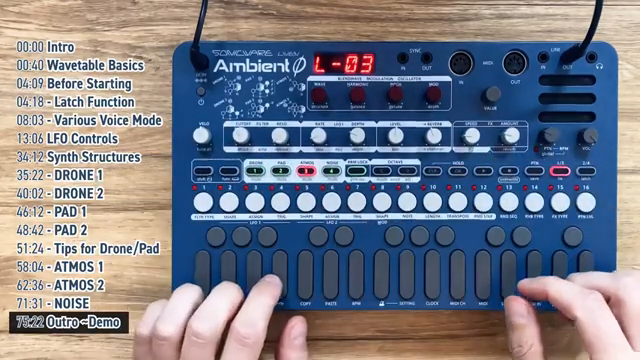
"But we definitely have some sounds that we can work with now and put together into some sort of ambient music. But how do we actually put them together?"
© Screenshot/Quote: Sonicware (YouTube)
This article is also available in German. Read it here: https://synthmagazin.at/sonicware-liven-ambient-o-im-architektur-check-digitale-klanglandschaften-auf-dem-pruefstand/
Watch on YouTube:
Latest articles
Watch on YouTube:
Visit the channel:
https://www.youtube.com/SONICWARE
https://www.youtube.com/SONICWARE
Links from SONICWARE:
SONICWARE web: https://sonicware.jp
facebook: https://facebook.com/SONICWARE
Instagram: https://instagram.com/sonicware_inc
Dr. Yu Endo Official: https://dr.yuendo.jp
Sponsored links:
If you purchase via these links, we may earn a small commission – at no extra cost to you. The link opens an Amazon keyword search, and results may vary depending on availability.
Sonicware Liven Ambient Ø
🔗 Check price on Amazon
🔗 Check price on Amazon