Forget what the gear snobs say—the Woovebox isn’t a labyrinth, it’s a rave bunker with a front door wide open. Free Beat, ever the practical groovebox wrangler, slices through the internet moaning to show us why this pocket-sized sonic street weapon is way more approachable than its feature list suggests. If you’re expecting menu hell and button-mashing nightmares, prepare to be pleasantly mugged by common sense. This video is a love letter to UI design that actually wants you to make music, not lose your will to live. Read on if you fancy a device that’s all killer, no filler—and maybe watch the video if you want to see it in action.

First Impressions: Not Your Average Toaster-Fight
Let’s get this out of the way: the Woovebox looks like it should be a nightmare. One glance at its feature list and you’d think you’re staring down the cockpit of a budget spaceship. Free Beat knows the drill—every time a Woovebox video drops, the comment section fills up with folks who’ve never touched the thing, convinced it’s a usability disaster. The assumption? Too many features, too little sense, and a UI designed by a caffeine-addled hermit.
But here’s the twist: Free Beat argues that this box is actually a masterclass in accessible design. Sure, the skill ceiling is somewhere in orbit, but the skill floor is basically the pavement. Beginners can get rolling without a manual, and only the truly adventurous will ever hit the deep-end complexity. The Woovebox is a rare beast—one that’s as friendly as it is formidable. Don’t let the haters or the spec sheet fool you.

"The skill ceiling, yes, it's extremely high, basically unlimited. However, the skill floor is also extremely low, allowing anyone to easily get the basics down."
© Screenshot/Quote: Freebeat (YouTube)
Menu Diving? More Like Puddle Jumping
The big myth is that you’ll spend your life lost in menus. In reality, the Woovebox keeps things tight: most functions are mapped to physical buttons, not endless rotary scrolling. For basic and intermediate features, menu diving is almost non-existent. You’re not stuck in a digital maze—you’re pressing buttons with actual labels, both on the hardware and on the display.
This design means you can keep your eyes on your groove, not glued to a tiny screen. The display is there to remind you where you are, not to force you into a spreadsheet. If you’re allergic to menu hell, this box is a breath of fresh air—unless you’re chasing the most advanced features, in which case, well, you probably like pain anyway.
Button Combos: Two Moves to Rule Them All
"To get started with the Woovbox, you only need to memorize two button combinations. That's it."
© Screenshot/Quote: Freebeat (YouTube)
Worried you’ll need a photographic memory to get started? Forget it. Free Beat lays it out: you only need to memorise two button combos—one for switching tracks, one for switching patterns. That’s it. Everything else is either labelled on the hardware or pops up digitally when you need it. If you can remember how to tie your shoes, you can handle this.
Update 2.0: Now Even Your Nan Can Use It
The 2.0 update didn’t just add features—it made the Woovebox even easier to use. If you bounced off the UI before, now’s the time to give it another shot. Free Beat points out that the update smoothed out the rough edges, making the device even more welcoming for first-timers. Sometimes firmware miracles do happen.
Real-World Riffs: From Saw Waves to Sonic Mayhem
Here’s where the Woovebox earns its keep. Free Beat runs through actual workflows: every track starts as a basic saw wave, and you can morph any of the 16 tracks into whatever you fancy—synth, sample, you name it. Once you learn one track, you’ve cracked them all. Navigation is fast, with pages for sequencer, global, oscillators, envelopes, and more. You can jump between them with a click or a scroll, and the buttons light up to show you what’s tweakable. It’s muscle memory in the making.
The real fun? Sequencing, patch selection, and randomisation are all a breeze. Even if you forget where something is, the UI makes it dead simple to find. Free Beat shows off how you can build patterns, dial in effects, and even get wild with random patches—all without ever touching a manual. The Woovebox is a playground for both rookies and veterans, and if you want to see just how quick and dirty it gets, you’ll need to watch the video for the full sonic carnage.
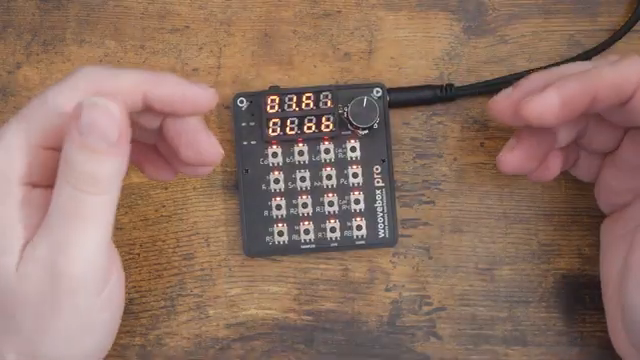
"The beauty of this UI design is that it lets you learn at your own pace."
© Screenshot/Quote: Freebeat (YouTube)
This article is also available in German. Read it here: https://synthmagazin.at/free-beat-und-die-woovebox-nicht-kompliziert-sondern-genial-einfach/
Watch on YouTube:
Latest articles
Watch on YouTube:
Visit the channel:
https://www.youtube.com/FreeBeat
https://www.youtube.com/FreeBeat
Links from FreeBeat:
Support the Channel: https://patreon.com/freebeat
Instagram: https://instagram.com/freethebeatwithin
Sponsored links:
If you purchase via these links, we may earn a small commission – at no extra cost to you. The link opens an Amazon keyword search, and results may vary depending on availability.
Woovebox
🔗 Check price on Amazon
🔗 Check price on Amazon