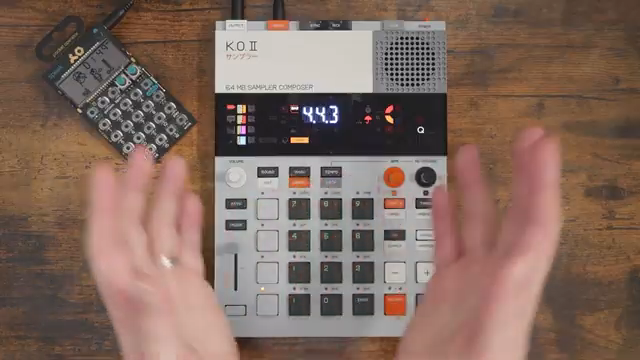
Ever wondered if the Teenage Engineering EP-133 KOII can actually pull off a full track, or if it’ll just have you pulling your hair out? Free Beat dives headfirst into the groovebox’s infamous song mode, wrestling with scenes, patterns, and the kind of workflow quirks that make or break a hardware jam. Expect honest frustration, accidental sample deletions, and a few moments of creative clarity. If you’re after a no-fluff, hands-on look at whether this little box is a rave weapon or a workflow headache, you’re in the right bunker.
7. December 2025
SPARKY
Free Beat vs. KOII: Can the Teenage Engineering EP-133 Actually Do a Full Song?
Song Mode: The KOII’s Marmite Feature
The Teenage Engineering EP-133 KOII’s song mode is the stuff of forum arguments and late-night gear rants. Free Beat jumps in with a fresh project, determined to see if this groovebox can actually handle a full-length track. The KOII didn’t ship with song mode, but the Champions update brought it to the party—though not everyone’s convinced it’s a welcome guest.
From the off, the architecture is a bit of a maze: patterns, scenes, commits, and a song mode that’s more cryptic than a warehouse party flyer. Free Beat’s approach is practical, loading up drums, bass, and leads, then poking at the structure to see what breaks. If you’re expecting plug-and-play, think again—this is more like plug-and-pray.
Full Tracks: Possible, but Prepare for Pain
Yes, you can build a full song on the KOII, but don’t expect it to be a walk in the park. Free Beat quickly discovers that while the device offers up to 99 patterns per group and 99 scenes, the workflow isn’t exactly intuitive. Committing scenes and arranging patterns feels more like solving a Rubik’s Cube with oven mitts on.
There’s a lot of trial and error, with accidental duplications and some head-scratching moments around the commit function. If you’re new to the KOII, expect to get lost in the weeds a few times before things start to make sense. Still, the raw potential is there—if you’re stubborn enough to stick with it.

"A full song is definitely possible on here. You can have up to 99 song sections, I believe."
© Screenshot/Quote: Freebeat (YouTube)
Scene Juggling and Pattern Gymnastics
Navigating the KOII’s song structure is a proper test of patience. Free Beat demonstrates how scenes, song sections, and patterns interact, often with unexpected results. The commit function, in particular, seems to have a mind of its own, duplicating patterns and forcing you to think in terms of electronic music’s endless variations rather than traditional song sections.
Sample management isn’t exactly smooth sailing either—expect to accidentally delete sounds or resample the wrong thing more than once. Still, there’s a certain twisted satisfaction in finally getting a verse section to line up, even if it takes a few botched takes and some creative sample trimming. Watching Free Beat wrestle with these quirks is oddly reassuring for anyone who’s ever wanted to throw a groovebox out the window.
When It Clicks: KOII’s Creative Payoff
"It is going to be frustrating at first. It's going to take some fiddling around and some learning."
© Screenshot/Quote: Freebeat (YouTube)
Despite the initial chaos, the KOII starts to reveal its creative side once you’ve survived the learning curve. Free Beat admits it’s frustrating at first, but there’s an addictive quality to the workflow once you get your head around scenes, patterns, and the infamous commit. The box offers a ridiculous amount of sequencing power—enough for marathon tracks or modular-style jams.
It’s not all smooth, but the more you use it, the more the logic starts to make sense. If you’re after instant gratification, look elsewhere. But if you like your gear with a side of challenge and the potential for deep, hands-on song construction, the KOII starts to look less like a toy and more like a street weapon.
Want the Full KOII Experience? Watch the Video
There’s only so much chaos and creativity we can cram into words. If you want to see Free Beat’s workflow in action—sample juggling, scene building, and the kind of hands-on troubleshooting that separates the dabblers from the diehards—go watch the video. The sound design, real-time jams, and all the little quirks are best experienced with your own eyes and ears.
This article is also available in German. Read it here: https://synthmagazin.at/free-beat-vs-koii-kann-der-teenage-engineering-ep-133-wirklich-einen-ganzen-song/
Watch on YouTube:
Latest articles
Watch on YouTube:
Visit the channel:
https://www.youtube.com/FreeBeat
https://www.youtube.com/FreeBeat
Links from FreeBeat:
Support the Channel: https://patreon.com/freebeat
Instagram: https://instagram.com/freethebeatwithin
Sponsored links:
If you purchase via these links, we may earn a small commission – at no extra cost to you. The link opens an Amazon keyword search, and results may vary depending on availability.
Teenage Engineering EP-133 KOII
🔗 Check price on Amazon
🔗 Check price on Amazon