Frap Tools, the Italian maestros of modular design, step boldly into the polyphonic arena with Magnolia, their 8-voice analog synthesizer boasting true through-zero FM. In this exhaustive, knob-by-knob tutorial, the brand showcases how Magnolia bridges classic polysynth warmth with the timbral wildness of modular FM, all wrapped in a user interface that’s as immediate as it is deep. With a focus on patchability, sound design flexibility, and real-world workflow, Frap Tools delivers a machine that feels as much at home in a Eurorack-inspired setup as it does in a standalone rig. Let’s dissect how Magnolia’s architecture, modes, and modulation options invite both vintage and experimental approaches to polyphonic synthesis.
4. February 2026
MILES
Frap Tools Magnolia: Analogue Polyphony with a Modular Mindset
Through-Zero Polyphony: Magnolia’s Core Identity
Magnolia enters the scene as an 8-voice analog synthesizer, but it’s the inclusion of through-zero linear FM that truly sets it apart from the garden-variety polysynths. Frap Tools position Magnolia as a bridge between the familiar warmth of classic analog polyphony and the more esoteric timbres often found in modular environments. The video opens with a clear statement: Magnolia isn’t just about lush pads and vintage brass—its FM engine can conjure metallic, evolving, and harmonically rich tones that would feel right at home in a Eurorack rack bristling with complex oscillators.
This approach reflects Frap Tools’ modular DNA, inviting users to explore the boundaries of analog synthesis. The through-zero FM implementation is not just a technical checkbox; it’s presented as a creative tool for sound designers who want to push beyond the expected. Magnolia’s architecture encourages experimentation, whether you’re after classic chords or the kind of sonic mayhem usually reserved for patch-cable jungles.
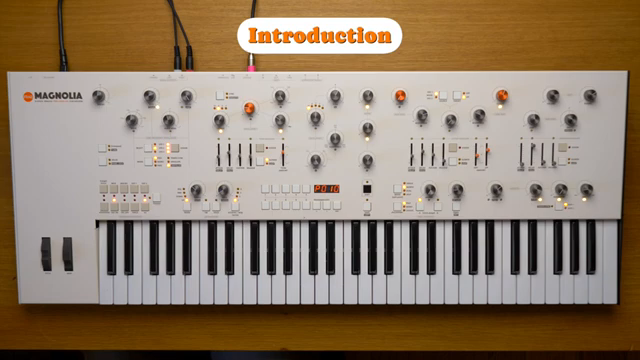
"It can allow programming some less conventional timbres that are peculiar to certain modular synthesizer environments."
© Screenshot/Quote: Fraptools (YouTube)
One Knob per Function: Interface and Program Management
Magnolia’s front panel is a nod to the golden age of synthesizer design, with a one knob per function layout that eliminates menu diving and keeps every parameter within immediate reach. Each control is clearly labeled, making it easy to understand the signal flow and tweak sounds on the fly. Despite this analog immediacy, Magnolia is digitally controlled, allowing for the storage and recall of up to 200 programs—100 factory presets and 100 user slots.
The tutorial walks through program management in detail, including how to load, save, and compare programs, as well as the use of lists for quick access to favorite patches. There’s also a panel mode for direct, what-you-see-is-what-you-hear operation, and a panel lock function to prevent accidental tweaks during performance. The process for initializing, copying, pasting, and swapping parts is methodical, reflecting Frap Tools’ attention to workflow for both studio and live users.
Modes for Every Mood: Single, Morph, Dual, and Split
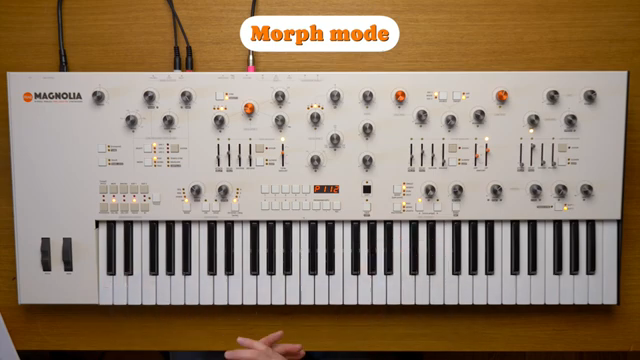
"The morph technique consists of changing the sound from one part to the other by gradually adjusting all the parameters at once, instead of changing everything in the blink of an eye."
© Screenshot/Quote: Fraptools (YouTube)
Magnolia isn’t content with a single approach to voice allocation. The synthesizer offers four distinct modes—single, morph, dual, and split—each catering to different compositional and performance needs. In single mode, all eight voices share the same settings, but Magnolia’s bitimbral structure means you can switch between two independent parts (A and B) within a program. Morph mode introduces a continuous transformation between part A and B, allowing for smooth, parameter-level transitions that go far beyond a simple crossfade.
Dual mode layers both parts for thicker, more complex sounds, while split mode assigns part A and B to different keyboard zones, with a user-definable split point. The video demonstrates how voices can be freely distributed between parts, supporting setups like a seven-voice pad with a monophonic lead. Unison and chord modes further expand the palette, enabling stacked voices for fatness or intervallic chords from a single key press. Glide, detune, and transpose controls round out the expressive options, all accessible without leaving the front panel.
Sonic Architecture: Oscillators, Filters, Modulation, and Effects
At the heart of Magnolia’s sound design are two oscillators per voice, each with their own character and a mixer section that includes noise. Oscillator 1 is the FM workhorse, while oscillator 2 brings additional wave shaping and harmonics. Both oscillators offer continuous waveform morphing, with discrete selection available via shift functions. The through-zero FM, wavefolder, and sync options provide a playground for timbral exploration, and the mixer’s headroom and gentle saturation add analog nuance to the signal path.
Filtering is handled by a resonant 18dB/oct high-pass and a 24dB/oct low-pass, both with envelope control and the ability to invert or track the keyboard. Filter FM is available from either oscillator or noise, enabling everything from subtle movement to talkbox-like effects. The VCA, pan, and voice spread controls support spatial and dynamic shaping, while the analog drive and dual digital effects slots (chorus, fast and ping-pong delays) can be chained or synchronized to the arpeggiator clock.
Modulation is a major theme: three envelopes, three LFOs, and a suite of assignable sources (aftertouch, velocity, macro knob, polymove, and more) can be routed to nearly any parameter with a white LED. The modulation matrix is deep but approachable, with clear assignment and monitoring procedures. The tutorial showcases creative uses like mod-wheel vibrato, cross-modulating LFOs, and polyphonic modulation sources, all reinforcing Magnolia’s modular-inspired flexibility.
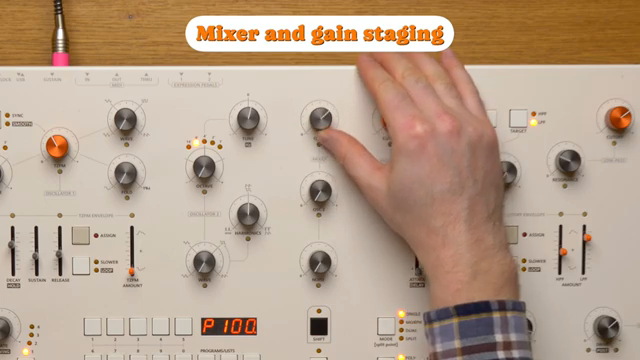
"After that mark the sound will gently distort by saturating the mixing bus."
© Screenshot/Quote: Fraptools (YouTube)
Arpeggiator and Sequencer: Rhythmic and Melodic Engines
"It also defines the tempo to which the LFOs and the effects are synced."
© Screenshot/Quote: Fraptools (YouTube)
Magnolia’s arpeggiator and sequencer functions are more than afterthoughts—they’re tightly integrated into the synth’s architecture. The arpeggiator offers tempo, direction, octave range, note division, gate, swing, and hold controls, with external MIDI clock sync for tight integration into larger setups. The hold function doubles as a sustain pedal, and the arpeggiator can run in mono, poly, or legato modes, with settings per part for layered or split performances.
The sequencer mode allows for up to four 16-note sequences per part, with real-time recording and transposition. The video demonstrates how arpeggios and sequences interact with polyphony, voice allocation, and effects, enabling everything from tight, rhythmic patterns to evolving, textural soundscapes. Synchronizing LFOs and delays to the arpeggiator clock opens further creative avenues, making Magnolia a versatile centrepiece for both structured and experimental workflows.
This article is also available in German. Read it here: https://synthmagazin.at/frap-tools-magnolia-analoge-polyphonie-mit-modularem-geist/
Watch on YouTube:
Latest articles
Watch on YouTube:
Visit the channel:
https://www.youtube.com/FrapTools
https://www.youtube.com/FrapTools
Links from FrapTools:
website: https://frap.tools
instagram: https://instagram.com/fraptools
facebook: https://www.facebook.com/fraptools
twitter: https://twitter.com/fraptools
soundcloud: https://soundcloud.com/fraptools
Sponsored links:
If you purchase via these links, we may earn a small commission – at no extra cost to you. The link opens an Amazon keyword search, and results may vary depending on availability.
Frap Tools Magnolia
🔗 Check price on Amazon
🔗 Check price on Amazon