Frap Tools, the Italian maestros of modular mixing, have unveiled the CGM Insert module—a long-awaited addition that brings true stereo effect integration to their acclaimed Eurorack mixer system. This official video takes us through the Insert’s dual approach to routing: both series and parallel, with hands-on examples that show off its flexibility in real-world patching. As always with Frap Tools, the focus is on sonic quality, modular workflow, and user-driven design, with the Insert module promising to become a key utility for anyone looking to sculpt complex soundscapes or streamline live rigs. Let’s see how this new tool slots into the CGM ecosystem and what it adds to the modular mixing table.
24. April 2024
MILES
Frap Tools CGM Insert: Expanding Eurorack Mixer Connectivity with Stereo FX
A Missing Link: The CGM Insert Arrives
Since 2016, the CGM mixer family from Frap Tools has steadily grown into a staple of Eurorack mixing, but even with its flexible architecture, users have long requested a more elegant way to integrate stereo effects. The new Insert module, affectionately dubbed the ‘I’ in the CGM lineup, directly answers this demand by allowing both series and parallel connections of stereo effects within the CGM ecosystem.
The Insert module is designed as an add-on that can be patched between any two points in the CGM summing bus. Whether you want to insert a compressor at the end of your mix or run a reverb in parallel to glue things together, the Insert makes it possible. This approach not only expands the creative palette for modular mixers but also reflects Frap Tools’ willingness to listen to its user community, as the module’s conception was driven by suggestions from their Discord server.

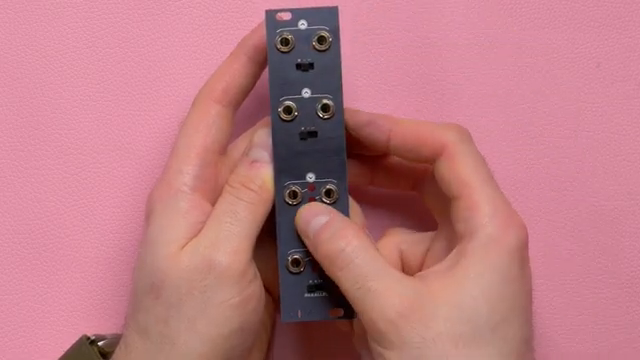
"The INSERT is a CGM add-on that allows you to connect stereo effects to your CGM setup, both in series and in parallel."
© Screenshot/Quote: Fraptools (YouTube)
Dual Circuits and Gain Control: The Heart of the Insert
"These switches allow you to balance the level of your module system to many different circuits."
© Screenshot/Quote: Fraptools (YouTube)
At its core, the Insert module features two pairs of stereo inputs and outputs, each with its own dedicated gain switches. The first pair forms the Insert circuit, which completely replaces the internal CGM signal path at the chosen point, while the second pair operates as a parallel circuit, summing external effects back into the mix.
The gain switches on both input and output sides offer three levels of attenuation or amplification, allowing precise control over signal levels. This means you can balance modular-level signals with outboard gear or compensate for devices lacking make-up gain. The flexibility here is crucial for maintaining unity gain or intentionally boosting or cutting signals, ensuring the Insert adapts to a wide range of effect processors and patching scenarios.
Routing Freedom: Insert Anywhere in the Chain
One of the Insert module’s standout features is its routing flexibility. It can be placed between a group and the master, between groups, between channels and groups, between channels, or even directly between a channel and the master—no group required. This modular approach means you can target specific sections of your mix for processing or create subgroups with their own dedicated effects.
Throughout the video, Frap Tools demonstrate each of these connection types, showing how the Insert can serve as an end-of-chain effect point, a subgroup processor, or a creative parallel effects send. The ability to move the Insert to different positions in the signal path is a boon for patch-oriented users who want to experiment with dynamic signal flows and custom mixing architectures.

"The INSERT module can be used between a group and a master, between a group and a group, between a channel and a group, between a channel and a channel, between a channel and a master (without a group)."
© Screenshot/Quote: Fraptools (YouTube)
Practical Patchwork: Insert in Action
The video walks through a series of patch examples that highlight the Insert module’s practical applications. First up, placing the Insert between a group and the master allows for end-of-chain processing—think compressing the entire mix or adding a final reverb. The gain switches prove their worth here, letting you tame hot signals or compensate for effects lacking output controls. The parallel circuit comes into play for summing in a room reverb, gluing the mix together without losing dry signal clarity.
Moving the Insert earlier in the chain, Frap Tools show how to process only a subgroup—say, all percussive elements—by inserting a stereo compressor after the first group. This leaves melodic and harmonic content untouched, demonstrating selective processing within a modular mix. The video also explores creative parallel routing, such as running a shimmer reverb alongside a mono delay, and shows how the Insert can be used to form channel subgroups with independent solo and PFL functions.
Even in more basic setups, the Insert shines. Placing it between channels and the master (without a group) is possible, though some CGM functions are limited. Still, this configuration is handy for smaller rigs prioritising serial inserts and send/return effects. Across all examples, the Insert maintains compatibility with CGM’s mute, solo-in-place, and pre-fade listen features, ensuring it integrates seamlessly into established workflows.
Universal Cables and CGM Compatibility

"The INSERT module literally opens up new mixing possibilities with the CGM."
© Screenshot/Quote: Fraptools (YouTube)
Frap Tools have ensured that the Insert module plays nicely with every member of the CGM family, including discontinued units. The module ships with two dedicated Insert cables, designed to handle the necessary connections between modules—whether you’re patching between channels, groups, or the master. The video provides a step-by-step installation guide, covering various scenarios and highlighting the importance of correct cable orientation and power management. For more complex setups, additional link cables are available, but the included pair will cover most needs. This attention to compatibility and modularity cements the Insert as an essential utility for anyone looking to expand their CGM-based sound design or live mixing arsenal.
This article is also available in German. Read it here: https://synthmagazin.at/frap-tools-cgm-insert-stereo-effekte-clever-ins-eurorack-mischpult-integrieren/
Watch on YouTube:
Latest articles
Watch on YouTube:
Visit the channel:
https://www.youtube.com/FrapTools
https://www.youtube.com/FrapTools
Links from FrapTools:
website: https://frap.tools
instagram: https://instagram.com/fraptools
facebook: https://www.facebook.com/fraptools
twitter: https://twitter.com/fraptools
soundcloud: https://soundcloud.com/fraptools
Sponsored links:
If you purchase via these links, we may earn a small commission – at no extra cost to you. The link opens an Amazon keyword search, and results may vary depending on availability.
Frap Tools CGM Insert
🔗 Check price on Amazon
🔗 Check price on Amazon