Expressive E returns to its roots with Soliste, a physically modeled suite of MPE-ready solo string instruments designed for violin, viola, cello, and double bass. In this detailed walkthrough, the French innovators showcase how Soliste leverages real-time gesture control, advanced bowing customization, and nuanced articulation to deliver a new level of expressive performance. The video highlights not just the instrument’s sound engine but also its workflow, interface, and seamless integration with a wide range of MPE controllers. For those seeking to bridge the gap between digital flexibility and the tactile soul of acoustic strings, Soliste promises a compelling new toolset.
20. June 2025
LYRA
Expressive E Soliste: A Deep Dive into Next-Gen MPE String Expression
Soliste: Physically Modeled Strings for the MPE Era
Soliste marks Expressive E’s latest foray into physically modeled instruments, offering a suite of four solo string plugins: violin, viola, cello, and double bass. Unlike traditional sample libraries, Soliste’s engine is built from the ground up to respond to real-time gestures, translating finger movement, pressure, and articulation into nuanced sound. This approach aims to bring musicians closer to the tactile experience of playing actual string instruments, with the digital architecture serving as a transparent conduit for expression.
The walkthrough emphasizes that Soliste is not just a collection of static presets, but a dynamic performance instrument. Each modeled instrument—VLN356, VLA419, CL0756, and DBS1130—can be shaped in real time, making the suite suitable for both spontaneous improvisation and detailed composition. Expressive E’s focus on MPE (MIDI Polyphonic Expression) ensures that every subtle gesture is captured, providing a level of control and realism that sample-based solutions often struggle to achieve.
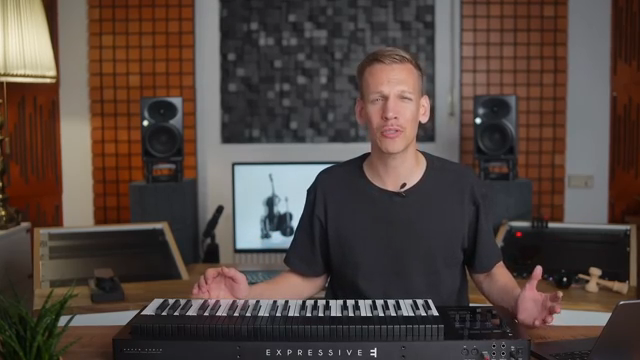
"Soliste's physical modeling technology allows you to be much closer to how those instruments are meant to be played by live gestures on a physical instrument."
© Screenshot/Quote: Expressivee (YouTube)
Interface: Intuitive Control Meets Deep Customization
Soliste’s interface is designed to balance accessibility with depth. Upon opening the plugin, users are greeted by a clear visualization of the selected instrument, with quick access to switch between models. Key performance parameters are surfaced on the main page, with excerpts from both the bow and pitch pages visible for immediate tweaking.
Navigation is streamlined: a single click brings up dedicated pages for bowing (right hand) and pitch (left hand) controls. The interface also includes sidebars for MIDI assignments, effects, and global settings, as well as a scalable layout and a direct link to the manual. This structure allows users to tailor the instrument’s response to their playing style, whether they’re after quick inspiration or deep parameter dives.
Playing Modes: Classic, Virtuoso, and Tremolo Unpacked

"Virtuoso mode is an advanced playing mode designed to allow you to take immediate control of the bow movement in real time with maximum precision and nuances."
© Screenshot/Quote: Expressivee (YouTube)
Soliste offers a rich palette of playing modes, each designed to unlock different expressive possibilities. Classic mode provides a straightforward approach: each new note triggers an attack, followed by a sustain phase where dynamics are continuously controlled by finger position or pressure. This mode is ideal for users seeking immediate, musical results with minimal setup.
Virtuoso mode takes things further, handing full control of the bow movement to the performer. Here, pressing a key moves the bow forward, while releasing it brings the bow back, closely mimicking real-world string technique. The system’s lift limiter and adaptable threshold logic ensure that nuanced gestures—like quick taps or slow releases—are interpreted musically, allowing for organic arpeggios, manual tremolos, and intricate rhythmic patterns.
Tremolo mode automates rapid bow movement, with parameters for amplitude and speed modulated by expression signals such as key pressure or aftertouch. The video also highlights a range of articulations (Sul Ponticello, Pizzicato, Spiccato, and more), all achieved through parameter adjustments rather than hidden samples. Across all modes, advanced bow parameters—position, intensity, accents, pressure, and noise—remain accessible, supporting both realism and creative sound design.
MPE Integration: Personalized Expression Across Controllers
While Soliste was developed with Expressive E’s own Osmose in mind, the plugin is fully compatible with all MPE controllers, including Touché and Push 3. The walkthrough demonstrates that Soliste’s mapping is optimized for nuanced, per-note control, but the instrument also performs well with legacy MIDI controllers, albeit with reduced expressivity.
Users can adapt Soliste’s configuration to match their hardware, toggling MPE mode on or off and assigning parameters to classic MIDI controls like mod wheels or faders. This flexibility ensures that musicians can craft a responsive, personalized playing experience, regardless of their preferred controller setup.
Effects: Shaping Tone and Space for Any Context
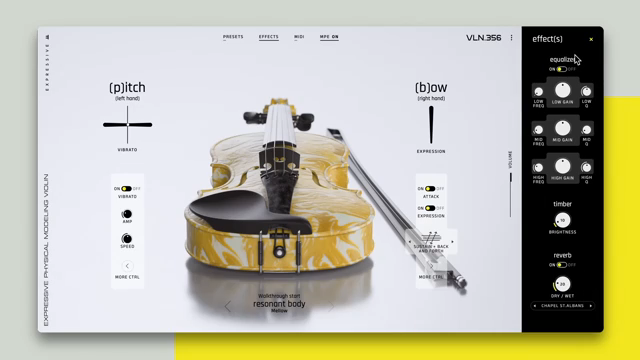
To help Soliste fit seamlessly into a mix, Expressive E includes a simple yet effective effects suite. Users have access to a three-band parametric EQ for detailed tone shaping, a timbre knob to control overall brightness, and a convolution reverb for realistic spatial placement. These tools, while not overwhelming in number, provide enough flexibility to adapt Soliste’s sound for solo performance, ensemble layering, or cinematic scoring.
"The effects sidebar offers simple but effective tools to balance the instrument's tone and make it fit in the mix."
© Screenshot/Quote: Expressivee (YouTube)
This article is also available in German. Read it here: https://synthmagazin.at/expressive-e-soliste-ein-architektur-check-fuer-die-naechste-generation-mpe-streichinstrumente/
Watch on YouTube:
Latest articles
Watch on YouTube:
Visit the channel:
https://www.youtube.com/ExpressiveE
https://www.youtube.com/ExpressiveE
Links from ExpressiveE:
Sponsored links:
If you purchase via these links, we may earn a small commission – at no extra cost to you. The link opens an Amazon keyword search, and results may vary depending on availability.
Osmose
🔗 Check price on Amazon
🔗 Check price on Amazon
Soliste
🔗 Check price on Amazon
🔗 Check price on Amazon
Touché
🔗 Check price on Amazon
🔗 Check price on Amazon