Elektron’s Tonverk steps into the spotlight as a highly capable sampler, and in this official tutorial, Risa T walks us through its dual sampling engines: Recorder and Auto Sampler. The video showcases how Tonverk can capture audio from both external devices and its own internal engine, making it a flexible tool for sound design and music production. With a focus on workflow, connectivity, and practical parameter tweaks, this session is a must-watch for anyone interested in building custom sample libraries or integrating unique sounds into their projects. As always with Elektron, the emphasis is on hands-on creativity and deep, performance-ready features.
17. September 2025
LYRA
Elektron’s Tonverk Sampling: Deep Dive into Recorder and Auto Sampler Workflows
Tonverk: A Sampler Built for Versatility
Tonverk is introduced as a sampler that stands out for its ability to capture audio from a wide range of sources, both external and internal. Whether you’re sampling from synthesizers, computers, mobile devices, or even the Tonverk’s own sound engine, the instrument is positioned as a central hub for creative audio capture. This flexibility is immediately apparent, setting the stage for a workflow that can adapt to various production and sound design scenarios.
The video makes it clear that Tonverk is not just about recording snippets—it’s about integrating diverse sound sources into your projects. With the ability to choose between Recorder and Auto Sampler modes, users are given tools to approach sampling in ways that suit their specific needs, whether that’s grabbing a quick loop or building a detailed multi-sampled instrument. This duality is a core part of Tonverk’s appeal as presented here.

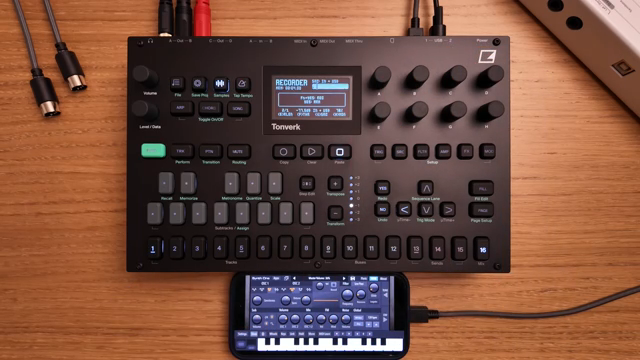
"Tonverk is a highly capable sampler. Using input AB or USB, it can sample mono or stereo audio from a wide range of external sources, including synthesizers, computers, and mobile devices."
© Screenshot/Quote: Weareelektron (YouTube)
Recorder Mode: Flexible Capture with Deep Control
"If it's set to max, sampling will continue up to six minutes and six seconds, or until you manually stop sampling."
© Screenshot/Quote: Weareelektron (YouTube)
Diving into Recorder mode, the tutorial highlights Elektron’s familiar sampling workflow, now enhanced with a generous six-minute recording buffer. Users can select from multiple input sources, including main mix, individual tracks, buses, and both analog and USB audio inputs, making it easy to capture exactly the material you want. The interface allows for precise control over input selection, monitoring, and gain staging, ensuring clean recordings from any source.
Sampling length is adjustable in musical steps, tightly linked to the current BPM, which is ideal for capturing loops that sync perfectly with your project. The arming feature lets you set a threshold so recording starts automatically when audio is detected—crucial for grabbing the start of a phrase or loop. After recording, Tonverk provides straightforward tools for previewing, looping, trimming, and normalizing samples, as well as assigning them directly to tracks. The workflow is designed to be fast and musical, with minimal menu-diving.
Auto Sampler: Automated Multisampling via MIDI
Switching to Auto Sampler mode, the video demonstrates how Tonverk can automate the process of multisampling an instrument over MIDI. This is particularly useful for capturing the full range and dynamic response of hardware or software synths, allowing users to build rich, playable instruments. The setup involves connecting MIDI and audio—handled by a single USB cable for many modern devices, or traditional MIDI and audio cables for hardware synths.
The workflow includes defining the note range, interval, and number of velocity layers to sample, with the option to tailor these parameters for different sound sources. Tonverk even measures latency and release time automatically, streamlining the process further. The interface provides helpful feedback, such as estimated sampling time and file size, so users can make informed decisions before committing to a multisample session. This automation transforms what is usually a tedious process into something efficient and repeatable.
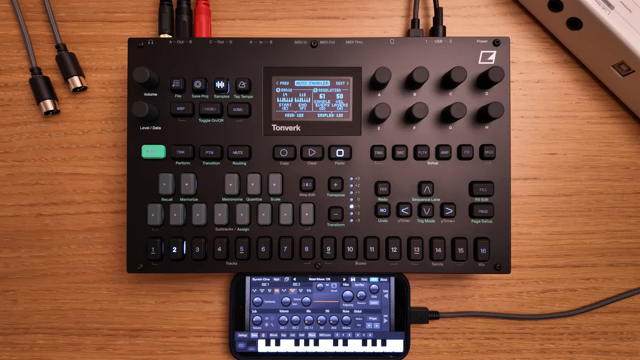
"For a digital instrument, there might be much less detail to capture, and you might also want to keep the file size small."
© Screenshot/Quote: Weareelektron (YouTube)
Workflow and Connectivity: Tailoring Tonverk to Your Rig
Throughout the tutorial, the importance of proper connections and parameter adjustments is emphasized. Whether sampling from a phone, DAW, or hardware synth, Tonverk’s flexible I/O options (USB, analog inputs, MIDI) make it adaptable to a variety of setups. The video demonstrates how a single USB-C cable can handle both MIDI and audio when sampling from a mobile device or computer, reducing cable clutter and setup time.
Adjusting sampling parameters—such as note intervals, velocity layers, and note duration—is shown to be crucial for capturing the nuances of different instruments. The presenter encourages experimentation, noting that more complex acoustic instruments benefit from denser sampling, while digital sources may require less detail. Tonverk’s interface supports this creative exploration by providing real-time feedback and easy access to settings.
The workflow is clearly designed to support both quick captures and deep, detailed sampling sessions. By making connections and parameter tweaks straightforward, Tonverk invites users to experiment and tailor their sampling approach to each unique sound source, whether in the studio or a live rig.
From Capture to Playback: Integrating Samples into Your Music
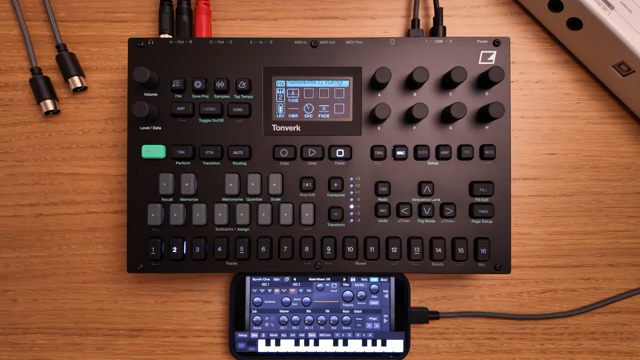
"Now I can play this sound as a polyphonic instrument on Tonverk, add effects and so on."
© Screenshot/Quote: Weareelektron (YouTube)
Once sampling is complete, Tonverk streamlines the process of integrating new sounds into your projects. Samples and instruments are automatically organized on the SD card, making them easy to browse and load onto tracks. The video demonstrates how quickly a freshly sampled instrument can be assigned to the multiplayer machine and played back polyphonically, with effects and further processing available.
This seamless integration means that custom sounds are always just a few button presses away, encouraging users to enhance their music with unique textures and timbres. The workflow supports both rapid idea capture and more elaborate sound design, making Tonverk a powerful addition to any production or performance setup.
This article is also available in German. Read it here: https://synthmagazin.at/elektrons-tonverk-sampling-tiefenanalyse-von-recorder-und-auto-sampler-workflows/
Watch on YouTube:
Latest articles
Watch on YouTube:
Visit the channel:
https://www.youtube.com/WeAreElektron
https://www.youtube.com/WeAreElektron
Links from WeAreElektron:
website: https://www.elektron.se
twitter: https://twitter.com/WeAreElektron
facebook: https://www.facebook.com/WeAreElektron
instagram: https://instagram.com/weareelektron
Sponsored links:
If you purchase via these links, we may earn a small commission – at no extra cost to you. The link opens an Amazon keyword search, and results may vary depending on availability.
Elektron Tonverk
🔗 Check price on Amazon
🔗 Check price on Amazon