Grab your snorkel, synth fans, as soulbrixofficial takes us on a deep dive into the hidden features and secrets of the Elektron Digitakt. This ain’t your average sampler rundown; it’s a journey through myth, mystery, and music-making magic, seasoned with just the right amount of nerdy enthusiasm and street-smart insights. Get ready to explore the depths with this DAWless dynamo!
20. October 2025
RILEY
Diving Deep with soulbrixofficial: The Elektron Digitakt Iceberg
Into the Deep—Electron’s Hidden Gems
Let’s start with the deep waters of the Digitakt iceberg. Now, what soulbrixofficial does is akin to throwing open the vaults of Elektron’s past, revealing the not-so-obvious treasures hiding within. He talks us through ELK-HERD, a badass project manager that needs no installation – just your browser and the courage to delve deep. This digital beast seamlessly connects with your Digitakt via web MIDI and offers a smorgasbord of management options—sample reordering, project archiving, and even pattern imports between projects. All of these goodies without cost, making it a perfect tool to navigate these digital depths.
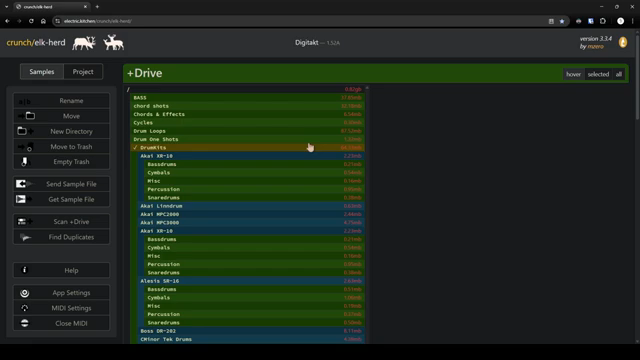
"You can manage samples, you can do project management including reordering of patterns."
© Screenshot/Quote: Soulbrixofficial (YouTube)
Synth Pairing and Keyboards—A Match Made in Heaven
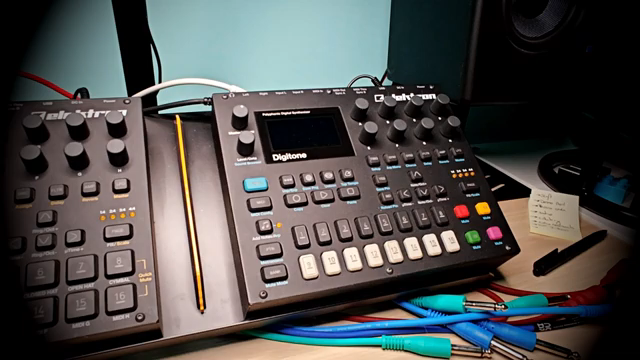
"The Digitone greatly complements the features that the Digitakt lacks."
© Screenshot/Quote: Soulbrixofficial (YouTube)
soulbrixofficial doesn’t leave us treading water; he smoothly pairs the Digitone’s FM synth prowess with the Digitakt’s sampling mastery. Imagine these two syncing patterns like two synchronized swimmers wowing the crowd—pure magic, right? It’s like having your mac and cheese perfectly baked, each filling the gaps the other leaves. Then, he dips into using external MIDI keyboards, showcasing how to unleash the Digitakt’s rhythmic potential without even activating chromatic mode. Who knew you could play with that kind of finesse? The groove, dear friends, is officially tight.
Sound Packs—The Secret Sauce
Next, soulbrixofficial lets us in on a little secret that’s almost as tasty as your favorite street taco. The deal with sound packs—they extend your sonic repertoire without breaking the bank. Whether sourced from Elektron or other creative geniuses, these packs ensure your Digitakt remains a sonic powerhouse, always packed and ready to roll at your next gig. Using the Elektron Transfer ensures that loading these babies into your Digitakt is as smooth as a Chicago-style deep dish pizza.
Mastering the Menu and Beyond
Now, here’s a tip that’s more valuable than your grandma’s secret cookie recipe. The startup menu of the Digitakt, which soulbrixofficial navigates like a maestro. By simply holding the function button while powering up, you can test and reset your device—now, talk about a power move. Whether you’re dealing with stubborn patterns or just wanting a fresh start, the factory reset is your best friend, though be mindful—it wipes everything but saves your first project. And for those who love a lucky punch, the Linear and Random locks bring unexpected flair—happy accidents that can make even skeptics believers in the chaos theory of music making.
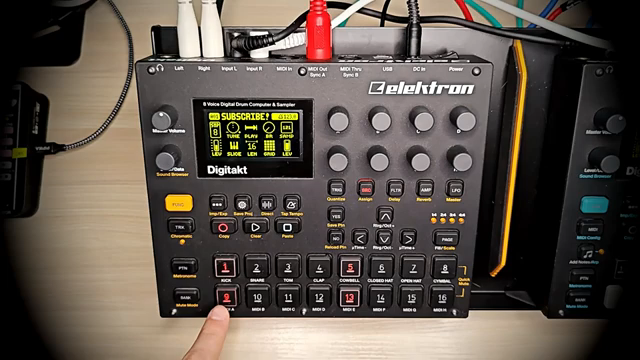
"The second option is great to have happy accidents."
© Screenshot/Quote: Soulbrixofficial (YouTube)
Rhythmic Mayhem—Fill Mode and Sound Locks
Once you’ve got your basics sorted, soulbrixofficial introduces us to the anarchic world of Fill Mode. Imagine hitting a button and triggering a new sequence that’s bound to make your grandma dance harder than at your cousin’s wedding. It’s all about those surprise elements that keep your sets fresh and unpredictable. Then, just when you thought you’d hit peak creativity, enter Sound Locks—allowing you to switch up samples mid-track. If you wanted to catch your audience off-guard in the best possible way, this is your golden ticket.
Timing Tricks and Live Hacks
soulbrixofficial steps it up by showing us the subtleties of micro timing and retrig—perfect for crafting that signature sound. It’s like dialing in the perfect kick in your favorite late-night burger—just the right combo of seasoning and spice. Temporary save and reload features ensure you can experiment wildly without fear, a true unsung hero for live performances. And what about going portable? With a simple MyVaults ripcord and power bank, you’re free to drop beats anywhere, whether you’re in the subway or chilling at a park.
Digitakt in the Digital Age
"Since Digitakt has MIDI over USB you can use it together with a DAW."
© Screenshot/Quote: Soulbrixofficial (YouTube)
Finally, our journey with soulbrixofficial concludes with Digitakt’s role in a DAW-based world. Integration with your digital audio workstation becomes as effortless as ordering that third round of drinks. MIDI over USB opens up a world of possibilities—syncing sounds, recording sequences, and even creating complex patterns for later. Plus, for those pesky sticky keys? Well, let’s just say knowledge is power and forums are your best friend. It’s all about community, and soulbrixofficial knows how to keep it real, keeping you in the groove.
This article is also available in German. Read it here: https://synthmagazin.at/tiefgang-mit-soulbrixofficial-der-elektron-digitakt-eisberg/
Watch on YouTube:
Latest articles
Watch on YouTube:
Visit the channel:
https://www.youtube.com/soulbrixofficial
https://www.youtube.com/soulbrixofficial
Links from soulbrixofficial:
Sponsored links:
If you purchase via these links, we may earn a small commission – at no extra cost to you. The link opens an Amazon keyword search, and results may vary depending on availability.
Elektron Digitakt
🔗 Check price on Amazon
🔗 Check price on Amazon
Elektron Digitone
🔗 Check price on Amazon
🔗 Check price on Amazon
ELK-HERD
🔗 Check price on Amazon
🔗 Check price on Amazon