Creative Sauce, the home-studio sage, dives headfirst into sonible’s smart:comp 3 and finds five features that actually impress – no small feat in a world of copy-paste plugins. Forget twiddling endless knobs: this compressor wants to do the heavy lifting, whether you’re a DAW rookie or just sick of menu-diving. Expect matrix madness, spectral sorcery, and input riding that’ll save you hours of mouse-dragging. Mike’s practical, no-nonsense approach slices through the hype and gets to the guts of what makes this plugin a potential secret weapon for your next mix. If you’re tired of compressors that fight back, this one might just play nice.

23. December 2025
SPARKY
Creative Sauce Unleashes sonible smart:comp 3 – Compression for the Lazy, the Curious, and the Sonic Perfectionist
Compression, but Smarter – The New School
Let’s face it: most compressors are about as exciting as a spreadsheet. But sonible’s smart:comp 3 is gunning for a different crowd – the ones who want results, not just ratios. Creative Sauce wastes no time pointing out that this plugin isn’t just a rehash; it’s got fresh ideas designed to make the compression process less of a guessing game.
Instead of burying you in menus, smart:comp 3 brings a workflow that’s all about speed and outcome. The plugin’s headline features are built to get you to a finished sound quicker, whether you’re wrangling wild vocals or smoothing out a synth line. This is compression for the modern bunker – efficient, flexible, and just a bit cleverer than your average plugin.

"This plugin really addresses all of that in quite an easy way."
© Screenshot/Quote: Creativesauce (YouTube)
Analysis Paralysis? Not Here.
Here’s where smart:comp 3 flexes its AI muscle: you feed it a vocal, pick a type, hit learn, and boom – it spits out custom settings. No need to know your attack from your elbow. For home-studio heads who’d rather make music than read manuals, this is a game-changer. It’s not new for sonible, but the ease of getting dialled-in compression without the faff is still a win.
Matrix Mayhem – Choose Your Sonic Fighter

"So threshold, ratio, attack and release without us having to really understand them all fully."
© Screenshot/Quote: Creativesauce (YouTube)
Now for the fun bit: the matrix view. Forget dry numbers – you drag a point around a grid labelled dense, punchy, dynamic, and snappy, and the plugin morphs its settings to match. Want your vocal to punch through the mix like a steel-toed boot, or breathe easy and dynamic? Just move the dot. It’s intuitive, and you can blend between styles for that Goldilocks zone of compression.
What’s clever is the way smart:comp 3 restricts the range based on your source, so you’re not likely to nuke your sound by accident. And if you’re the type who likes to override the autopilot, you can still tweak everything manually. This matrix isn’t just a gimmick – it’s a genuinely useful way to think about compression outcomes, not just parameters. For those who want to get hands-on, the style tab opens up even more control, from saturation flavours to attack and release curves. Deep, but not daunting.
Input Riding – Automation for the Lazy Genius
Manual gain-riding is about as fun as ironing socks. Enter input riding: smart:comp 3’s way of levelling out your vocals automatically, before compression even kicks in. Mike shows how this feature acts like a ghost fader, smoothing out the peaks and valleys so you don’t have to.
It’s a proper time-saver, especially for anyone who’s spent hours drawing automation or slicing up clips. The plugin adjusts the input to hit your target level, letting you focus on the creative stuff. For anyone mixing vocals that jump around like a caffeinated squirrel, this is a workflow upgrade you’ll actually use.
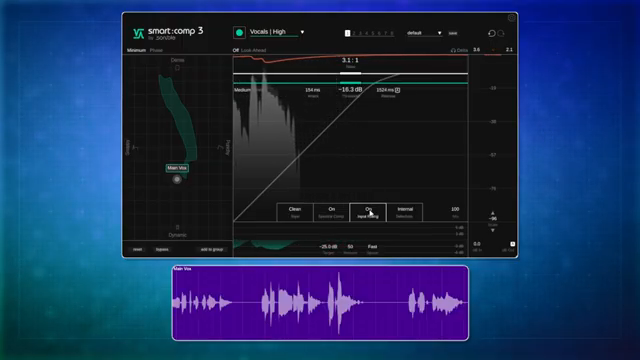
"Adjusting those different passages to kind of even them out."
© Screenshot/Quote: Creativesauce (YouTube)
Spectral Compression – The Secret Sauce for Clarity
"It's making little micro adjustments to specific frequencies."
© Screenshot/Quote: Creativesauce (YouTube)
Spectral compression is where smart:comp 3 really flexes. Instead of squashing everything, it targets specific frequencies, making micro-adjustments to clean up the mud and boost clarity. Mike demonstrates how this can make a guitar sound brighter or warmer, depending on your settings.
You get granular control – from neutral to bright to warm – and the results are obvious, especially when you push the settings. It’s not just a party trick; it’s a serious tool for mixes that need surgical precision. If you want to hear the real magic, though, you’ll have to watch the video – the sonic difference is something words just can’t do justice.
This article is also available in German. Read it here: https://synthmagazin.at/creative-sauce-entfesselt-den-sonible-smartcomp-3-kompression-fuer-faule-neugierige-und-perfektionisten/
Watch on YouTube:
Latest articles
Watch on YouTube:
Visit the channel:
https://www.youtube.com/CreativeSauce
https://www.youtube.com/CreativeSauce
Links from CreativeSauce:
website: https://www.creativesauce.net
instagram: https://www.instagram.com/creativesauce2b
soundcloud: https://soundcloud.com/user-183426888
Sponsored links:
If you purchase via these links, we may earn a small commission – at no extra cost to you. The link opens an Amazon keyword search, and results may vary depending on availability.
sonible smart:comp 3
🔗 Check price on Amazon
🔗 Check price on Amazon