Ever wondered if a plugin could turn your music theory nightmares into dancefloor dreams? Bthelick, the groove doctor himself, takes Scaler 3.2 for a wild spin through the world of EDM production. He’s not just poking at presets—he’s stress-testing the plugin’s brains and brawn in trance, tech house, and deep house, all while keeping it real about what slaps and what flops. If you’re tired of plugins that promise the moon and deliver a soggy sandwich, this review’s got the streetwise perspective you crave. Spoiler: some features are more hidden than your favorite sample folder after three beers.
16. December 2025
RILEY
Bthelick vs. Scaler 3.2: When Chords Meet Club Floors
Scaler 3.2: Chords Over Scales, Theory for the Rest of Us
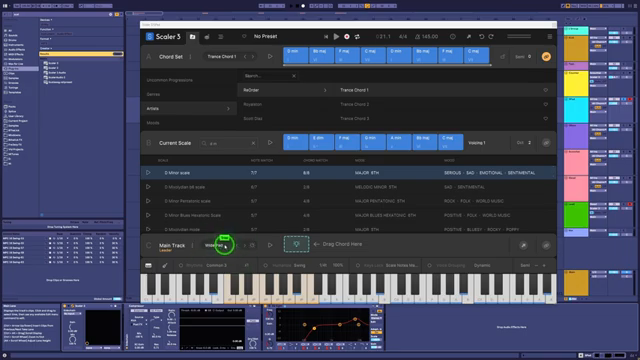
Scaler 3.2 rolls up promising to make music theory as easy as microwaving ramen, especially for EDM heads who’d rather vibe than study. Bthelick jumps right in, calling out the plugin’s name—Scaler—because, let’s be real, this thing is way more about chords than scales. If you’re expecting a scale wizard, you’ll find yourself knee-deep in chord progressions before you can say “circle of fifths.”
He breaks down how most dance music producers, especially in the club scene, aren’t exactly jazz professors. The plugin’s supposed to bridge that gap, but Bthelick points out that not all EDM even wants chords—genres like techno and tech house often skip ‘em entirely. So, Scaler’s mission to simplify theory is a bit of a mixed bag, depending on what kind of banger you’re trying to cook up.
"When you assume, you make an ass of you and me."
© Screenshot/Quote: Bthelick (YouTube)
Trance, Tech, and the Genre Gamble
Bthelick puts Scaler 3.2 through its paces across different dance genres, and the results are as varied as a crate of dollar-bin records. In trance and melodic styles, the plugin shines—helping you whip up those lush, uplifting chord stacks that make ravers throw their hands up. He shows how Scaler’s workflow fits right in, letting you audition, tweak, and drag out progressions like you’re flipping pancakes at a diner.
But when the genre shifts to tech house or retro tech, things get trickier. Some tracks barely use chords at all, and Scaler starts to feel like a third wheel at a two-step. Bthelick’s honest: for genres that live on the one, or just want a fat bass and a catchy arp, you might end up working around the plugin more than with it. Still, he finds ways to squeeze some juice out of Scaler, even if it means a few creative detours.
Sounds, UI, and the Frustration Olympics
"I've not found a single inspiring sound within here."
© Screenshot/Quote: Bthelick (YouTube)
Let’s talk about the elephant in the club: Scaler’s built-in sounds. Bthelick doesn’t sugarcoat it—the internal presets are about as inspiring as a cold slice of pizza. Sure, you get some basic pads, pianos, and basses, but if you want your track to actually slap, you’ll be reaching for your favorite synths faster than you can say “Vital.” The plugin’s workflow assumes you start with chords, but most dance producers start with sounds, and that’s where things get awkward.
The user interface? It’s a maze. Bthelick spends days hunting for a simple key lock feature, only to find it hiding behind a tiny padlock icon. He’s got jokes, but you can feel the pain—especially when the UI forces you to jump through hoops just to change a progression’s key or swap out a bassline. Beginners might bounce before they ever find the good stuff. If you love a challenge, Scaler’s got puzzles for days, but if you want to get grooving quick, you’ll need patience (and maybe a magnifying glass).
Streetwise Workarounds: Making Scaler Play Nice
Despite the gripes, Bthelick drops some real-world hacks for getting Scaler 3.2 to pull its weight in your setup. He shows how you can use the plugin’s creative page as a kind of mood board, poking around for chords without knowing theory, and then dragging your finds straight into your DAW. If the built-in key detection struggles, he suggests splitting your reference track into stems and using your DAW’s MIDI conversion to get the job done—then letting Scaler lock in the vibe.
He also points out that you don’t have to keep everything inside Scaler. Once you’ve got a groove or progression, just drag that MIDI out and chop it up in your DAW like leftover samples. It’s not always smooth, but with a little hustle, you can bend Scaler to your will—especially if you’re willing to mix and match with your own sounds and external synths. That’s the street-level workflow: use what works, ditch what doesn’t, and keep the beat moving.
"I'm just not sure how capable in the hands of a true beginner, which is surely the point of a plugin like this."
© Screenshot/Quote: Bthelick (YouTube)
Why You Gotta Watch: The Real Sauce Is in the Video
Look, you can read about Scaler’s quirks all day, but the real flavor’s in Bthelick’s video. He demos the plugin live, builds tracks from scratch, and lets you hear exactly how Scaler 3.2 fits (or doesn’t) in a modern dance workflow. If you want to catch the sound, the process, and the honest reactions—plus a few laughs—hit play and see for yourself. Some things just can’t be explained; they gotta be heard.
This article is also available in German. Read it here: https://synthmagazin.at/bthelick-vs-scaler-3-2-wenn-akkorde-auf-clubfloors-treffen/
Watch on YouTube:
Latest articles
Watch on YouTube:
Visit the channel:
https://www.youtube.com/Bthelick
https://www.youtube.com/Bthelick
Links from Bthelick:
Instagram: https://instagram.com/bthelickmusic
SoundCloud: https://soundcloud.com/bthelick
Ko-Fi: https://ko-fi.com/bthelick
facebook: https://facebook.com/bthelick
Twitter: https://twitter.com/BtheLick
Sponsored links:
If you purchase via these links, we may earn a small commission – at no extra cost to you. The link opens an Amazon keyword search, and results may vary depending on availability.
Ableton
🔗 Check price on Amazon
🔗 Check price on Amazon
Scaler 3.2
🔗 Check price on Amazon
🔗 Check price on Amazon
Vital
🔗 Check price on Amazon
🔗 Check price on Amazon