Bolo Da Producer, the platinum beatmaker with a knack for straight talk, dives into the MPC XL and MPC Live 3 to answer the age-old question: do you actually need all those external synths cluttering your studio, or can you just ride the MPC wave solo? Expect no-nonsense advice, a few gear confessions, and a reality check for anyone still tangled in MIDI cables. If you’re tired of menu-diving and cable spaghetti, this one’s for you. Bolo’s got opinions, and he’s not afraid to drop them—strap in for a streamlined, groove-heavy reality check.

13. February 2026
SPARKY
Bolo Da Producer’s MPC XL & Live 3 Showdown: Do You Really Need External Synths?
Akai MPC Live 3, Akai MPC XL, Roland Phantom 7EX, Yamaha MODX M6
MPC Muscle: Built-in Powerhouses
Bolo Da Producer doesn’t mince words: with the new MPC XL and MPC Live 3, external synths and workstations are starting to look like optional extras, not essentials. He lines up his own heavyweight setup—MPC XL, Yamaha ModX M6, Roland Phantom 7EX—then admits the new MPCs are so stacked with sounds and features, he can barely believe he’s saying you might not need all that extra hardware anymore.
The MPC’s internal arsenal has levelled up, packing in so many fresh sounds and capabilities that even a die-hard synth collector has to pause. Bolo’s honesty is refreshing—he’s the guy who’s been selling synths for years, but now he’s calling it straight: the MPCs are powerful enough to stand alone. If you’re still clinging to racks of gear, you might want to check if you’re doing it for the sound, the workflow, or just the bragging rights.
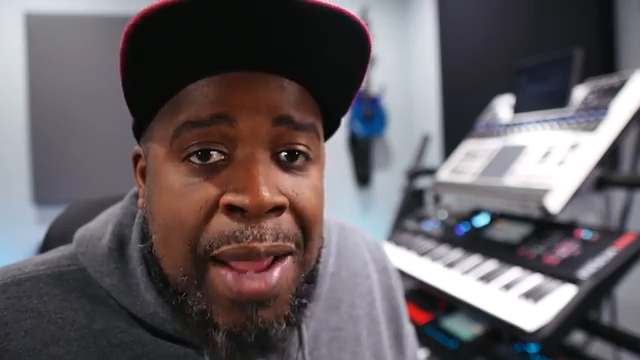
"With all the new sounds and everything in these new MPCs, you don't really need them and I can't believe I'm saying that."
© Screenshot/Quote: Bolodaproducer (YouTube)
Streamline or Die: The One-Box Beat Machine
"If you want to keep the clutter down and you want to keep the confusion and you want to just have just a streamlined setup with just using like a MIDI controller and your MPC, you can do that."
© Screenshot/Quote: Bolodaproducer (YouTube)
Let’s talk about clutter. Bolo points out that using just the MPC (and maybe a MIDI controller if you’re feeling fancy) can keep your setup lean and mean. No more cable jungles or endless troubleshooting—just pure, focused beatmaking.
He’s not saying you should burn your synths, but if you want a clean, confusion-free workspace, the MPC’s got you covered. It’s a one-box street weapon that lets you stay in the zone, not in the weeds. For those who like their studios more bunker than spaghetti junction, this is music to the ears.
The Eternal Debate: Internal vs. External
Of course, it’s not all sunshine and MPC rainbows. Bolo breaks down the pros and cons of both worlds. Using external synths means you’re barely touching the MPC’s CPU or RAM—those boards do the heavy lifting, leaving your MPC free for drums and samples. That’s a win for resource management, especially if you’re running big, complex projects.
But there’s a catch: wiring, syncing, and saving across multiple devices can be a right pain. You’ll need to keep track of sequences on every bit of kit, and sometimes MIDI just doesn’t play nice. Saving three different sequences on three different boxes? That’s a toaster-fight waiting to happen. Still, the payoff is that classic hardware sound—especially when you run things through chunky quarter-inch cables and a decent preamp. It’s a trade-off between hassle and that elusive analog vibe.
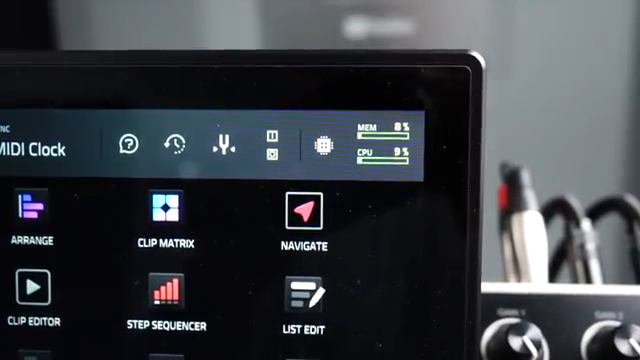
"You'll be practically using none of the RAM and CPU resources inside of the MPC."
© Screenshot/Quote: Bolodaproducer (YouTube)
Workflow Wars: Simplicity vs. Spaghetti
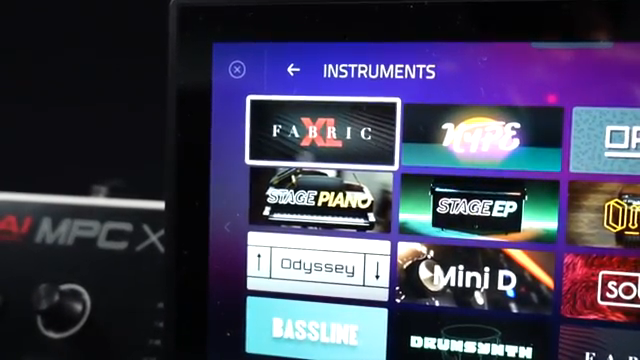
"The sounds in there sound really, really, really good and plus all of the new native instrument sounds and all their presets, they sound awesome."
© Screenshot/Quote: Bolodaproducer (YouTube)
Bolo lays it out: the MPC’s internal sounds mean you can finish a beat, save it once, and you’re done. No more juggling saves across boards and boxes. The new VSTs inside the MPC, like Fabric XL and the latest Native Instruments presets, sound seriously good—good enough that even hardware heads might raise an eyebrow.
But it’s not all roses. Load up too many VSTs and effects, and you’ll start to feel the strain on RAM and CPU. Bolo’s workaround? Keep it simple, use the best sounds, and lean on effects built into the VSTs themselves. It’s a workflow that keeps you moving fast, not bogged down by technical headaches. If you want to see just how slick (or messy) this can get, the video’s the place to watch the real-time action.
Sound, Taste, and the Producer’s Choice
At the end of the day, it’s all about taste. Bolo admits the MPC’s internal sounds are top-notch, and with export options galore—USB-C, audio cables, or classic track bounces—you’re spoiled for choice. But there’s still something about running sounds through hardware, cables, and preamps that hits different. It’s a vibe thing, not just a technical one.
Whether you go all-in on the MPC, stick with your beloved boards, or run a hybrid setup, the only thing that really matters is what works for you. Bolo’s advice? Don’t get hung up on gear—practice, experiment, and pick the workflow that keeps you making music, not making excuses. If you want to hear the difference for yourself, you’ll have to check the video—some things just don’t translate to text.
This article is also available in German. Read it here: https://synthmagazin.at/bolo-da-producer-im-mpc-xl-live-3-check-brauchst-du-wirklich-noch-externe-synths/
Watch on YouTube:
Latest articles
Watch on YouTube:
Visit the channel:
https://www.youtube.com/BoloDaProducer
https://www.youtube.com/BoloDaProducer
Links from BoloDaProducer:
Instagram: https://instagram.com/bolodaproducer
Patreon: https://patreon.com/bolodaproducer
Sponsored links:
If you purchase via these links, we may earn a small commission – at no extra cost to you. The link opens an Amazon keyword search, and results may vary depending on availability.
Akai MPC Live 3
🔗 Check price on Amazon
🔗 Check price on Amazon
Akai MPC XL
🔗 Check price on Amazon
🔗 Check price on Amazon
Roland Phantom 7EX
🔗 Check price on Amazon
🔗 Check price on Amazon
Yamaha MODX M6
🔗 Check price on Amazon
🔗 Check price on Amazon