Absynth 6 as an effect processor? Audio Tutorial Experts demonstrate how, with a bit of patch geometry and DAW trickery, you can open up rhythmic sound spaces far beyond standard presets. If you thought Absynth was just a synthesizer, think again: envelopes become groove architects, MIDI notes act as timekeepers for pulsating textures. The tutorial remains pleasantly analytical and invites you to experiment for yourself—definitely not for workflow fetishists, but a feast for those who love to bend sound. If you want to know how machine ethics and groove unite in Absynth, don’t miss the video.
28. January 2026
RAUMKLANG
Audio Tutorial Experts unleash Absynth 6: Rhythm meets machine ethics
Effect architecture from scratch: Absynth 6 as FX processor
Audio Tutorial Experts venture into rarely explored territory: Absynth 6 is unfolded not as a synthesizer, but as an effect processor. The approach is refreshingly purist—rather than relying on ready-made presets, the empty signal path takes center stage. A drum loop serves as the test subject, while Absynth is placed as an insert effect in the DAW.
The distinction between instrument and effect presets in Absynth creates a moment of patch geometry: what is saved as an instrument remains inaccessible in FX mode. The creator demonstrates how to start with a pristine preset and initially pass the audio signal through unchanged. Only through targeted interventions—such as inserting a filter—does the space for sonic manipulation open up. The stage is set for rhythmic experiments.
Tempo-synced envelopes: The trigger trick
The tutorial shows that envelopes in Absynth effects do not respond automatically—they lack a start signal. The usual instrument logic does not apply here, as the pure audio signal does not trigger an envelope.
With a DAW trick, the problem is elegantly bypassed: an additional MIDI track sends notes directly to the Absynth effect. This way, envelopes are triggered precisely and in sync with the tempo. The creator emphasizes that the note itself is irrelevant—what matters is the trigger timing. By duplicating MIDI notes, rhythmically precise starting points for lively sound progressions are created. Machine ethics meets groove logic.
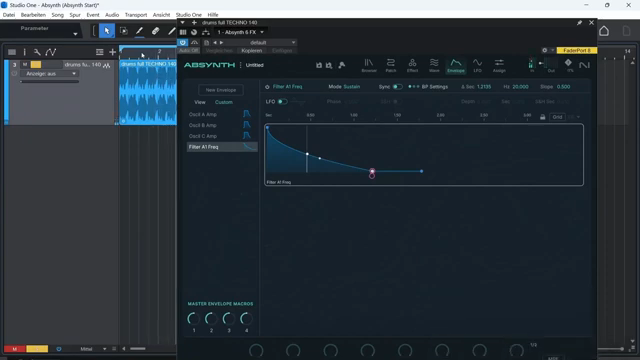
"Because this envelope actually needs a trigger, that is, a signal to start the envelope, and of course that's completely missing here in this context."
("Denn diese Hüllkurve braucht eigentlich einen Trigger, also ein Signal, was das Starten der Hüllkurve erstmal auslöst und das fehlt natürlich jetzt hier in dem Zusammenhang komplett.")© Screenshot/Quote: Audiotutorialexperts (YouTube)
Groove architecture: Modulation and MIDI in interplay
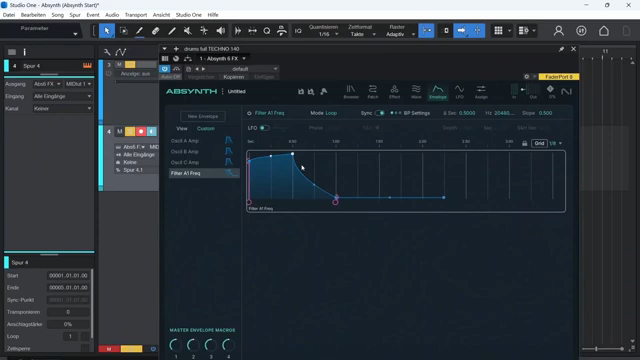
By deliberately setting and looping MIDI notes, envelopes can be triggered exactly in DAW tempo. Using the grid system and synchronizing with the song tempo enables pulsating, rhythmically animated textures.
Modulation is not limited to filter frequencies: other parameters like frequency shift are also integrated into the patch geometry. With simple pattern variations and switching between smooth curves and steps, grooving pads are created that can be flexibly adapted. To fully experience the impact of this rhythmic modulation, you should not miss the sound examples in the video—the sound folds like origami from tension and noise.
Beyond presets: Parameter mutations and creative copies
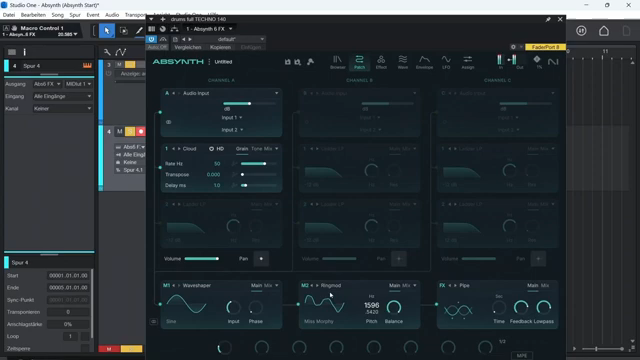
"And there really isn't such an effect included in Absynth, but as you can see, you can still build it relatively quickly."
("Ja und so ein Effekt gibt es jetzt hier tatsächlich bei Absinth nicht, der hier mitgeliefert wird und wie man sieht, kann man sich das trotzdem relativ schnell bauen.")© Screenshot/Quote: Audiotutorialexperts (YouTube)
Audio Tutorial Experts show how envelope patterns can be used not just for one parameter, but copied and pasted to other effect modules. Thus, a filter modulation instantly becomes a frequency shift or ring modulator effect—patch geometry in its purest form.
The tutorial remains pleasantly experimental: parameters are spontaneously assigned to macros, ranges are adjusted, and modulation targets are flexibly expanded. Those who are not afraid to patch off the beaten path will find inspiring methods here that go far beyond what factory presets offer. Machine ethics here means: control and chance in a productive dialogue.
Macros and modulation: Individualization as sound space
The final section offers tips for creative use of macro controls. Parameters such as the base frequency of the ring modulator or the effect time are assigned to macros, making them controllable live or via DAW automation. The control range and even the direction of modulation can be individually adjusted—including inverted control.
The video encourages you to experiment: by strategically setting MIDI triggers and linking multiple parameters to a macro, highly individual effects emerge. Those with patience and an ear for the unpredictable will be rewarded with unique sound spaces. The true magic of these modulations is reserved for the video—some patch geometries are simply better heard than described.
"Including the possibility that, as we've seen elsewhere, I can use macro controls to change the breakpoints, that is, the control points of the envelope."
("Inklusive der Möglichkeit, dass ich auch über Makro-Regler, wie wir es ja schon in anderer Stelle gesehen haben, die Breakpoints, also die Kontrollpunkte der Hill-Kurve, verändere.")© Screenshot/Quote: Audiotutorialexperts (YouTube)
Translated from German. Read the original here: https://synthmagazin.at/audio-tutorial-experts-entfesseln-absynth-6-rhythmus-trifft-maschinenethik/
Watch on YouTube:
Latest articles
Watch on YouTube:
Visit the channel:
https://www.youtube.com/AudioTutorialExperts
https://www.youtube.com/AudioTutorialExperts
Links from AudioTutorialExperts:
Tutorial Experts Shop: https://tutorial-experts.de
Tutorial Experts bei Amazon: https://amazon.de/DVD-Lernkurs-Software/s?k=DVD%20Lernkurs&rh=n%3A301927
Tutorial Experts bei Thomann: https://thomann.de/de/tutorial_experts.html
Impressum: https://tutorial-experts.de/impressum
Sponsored links:
If you purchase via these links, we may earn a small commission – at no extra cost to you. The link opens an Amazon keyword search, and results may vary depending on availability.
Native Instruments Absynth 6
🔗 Check price on Amazon
🔗 Check price on Amazon