Arturia’s Tape J37 plugin aims to bottle the legendary character of the classic Stutter J37 tape machine and inject it directly into your DAW. In this official walkthrough, Lena demonstrates how the plugin’s blend of vintage tape coloration, flexible drive, and advanced digital controls can shape everything from subtle warmth to saturated grit. True to Arturia’s style, the video balances historical reverence with a clear focus on workflow—showing how Tape J37’s architecture, from color profiles to advanced EQ and delay, is designed for contemporary music production. If you’re curious about how digital tape emulation can fit into your studio or live rig, this is a deep dive worth your attention.
18. December 2024
LYRA
Arturia Tape J37: Iconic Tape Warmth Meets Modern Plugin Architecture
From Abbey Road to DAW: The Tape J37 Vision
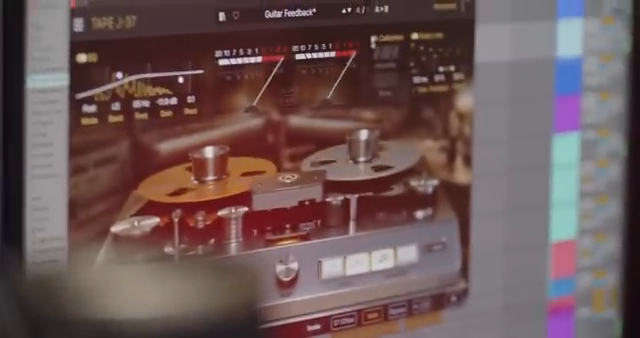
Arturia’s Tape J37 plugin is introduced as a digital homage to the legendary Stutter J37 tape machine, famed for its role in shaping the sound of classic records at Abbey Road Studios. The video positions Tape J37 as a bridge between the analog warmth of the 1960s and the workflow demands of today’s producers. Rather than a simple nostalgia trip, the plugin is presented as a versatile tool, able to deliver both subtle tape coloration and bold, analog-style distortion within a DAW environment. This sets the stage for a plugin architecture that is as much about flexibility and integration as it is about vintage character.
"Tape J37 recreates that legendary character while adding modern features to suit today's producers."
© Screenshot/Quote: Arturiaofficial (YouTube)
Color, Drive, and the Heart of Tape Emulation
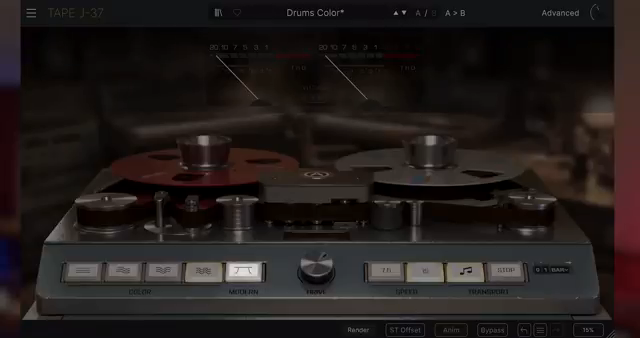
"You can enable Modern mode, which bypasses the tape machine's natural EQ curves for a cleaner and broader frequency response."
© Screenshot/Quote: Arturiaofficial (YouTube)
The main panel of Tape J37 is where users sculpt their foundational sound, starting with four distinct tape color profiles. Each profile is modeled on different tape types, EQ calibrations, and tape ages, offering a spectrum from pristine clarity (Color 1, new SM911 tape with European CCIR EQ) to gritty, over-biased saturation (Color 4, old SM468 tape). For those seeking a more transparent sound, Modern mode bypasses the tape machine’s inherent EQ curves, resulting in a cleaner, broader frequency response.
Central to the plugin’s workflow is the drive control, which determines the input level hitting the virtual tape. Increasing drive introduces harmonic distortion, moving from gentle warmth to pronounced saturation, all while maintaining gain compensation to avoid drastic output level jumps. The speed setting further shapes the sonic character, with higher speeds yielding cleaner detail and lower speeds enhancing analog coloration—ideal for lo-fi textures. These core controls are designed to be explored in combination, allowing users to dial in just the right amount of analog flavor for any source.
Deep Dive: Advanced Panel for EQ, Calibration, and Delay
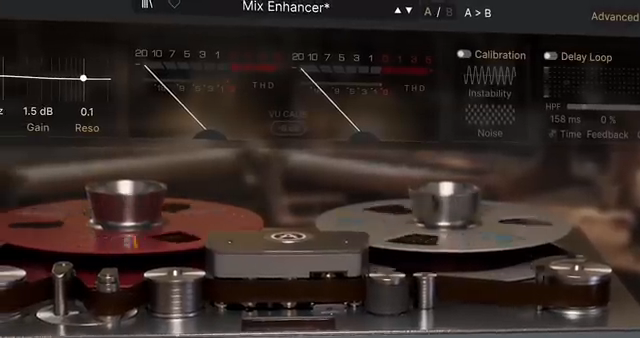
Tape J37’s advanced panel opens up a suite of sound design tools that go well beyond basic tape emulation. The three-band parametric EQ is both flexible and visually intuitive, with modes for pre-tape, post-tape, and an emphasis setting inspired by classic noise reduction techniques. This allows for precise tonal sculpting—whether you want to add clarity, warmth, or use the emphasis mode for creative distortion shaping. The interface supports direct manipulation of EQ nodes, making detailed adjustments straightforward and immediate.
Calibration controls introduce the imperfections that give analog tape its signature charm. Instability parameters simulate pitch drift and modulation (classic wow and flutter), while noise settings add authentic tape and hardware hiss. The delay loop section is another highlight, offering classic tape delay effects with tempo sync, feedback control, stereo offset, and onboard filtering. This enables everything from subtle slapback to lush, modulated echoes, all processed through the tape engine for added character. These advanced features push Tape J37 beyond mere emulation, positioning it as a creative tool for modern sound design.
"The advanced panel opens up exclusive features that enhance and extend the effect's functionality."
© Screenshot/Quote: Arturiaofficial (YouTube)
Modern Tape Workflows: Transport, Automation, and Creative Options
"You can also automate these in your DAW for even more creative possibilities."
© Screenshot/Quote: Arturiaofficial (YouTube)
Tape J37 doesn’t just replicate the sound of tape—it also emulates the mechanical behaviors that made the original hardware so distinctive. The transport section allows users to control playback and stop effects, including tape stop time that can be synced to DAW tempo for musical transitions. Start modes let you choose between instant playback and a fast-forward acceleration effect, expanding the palette of tape-based performance tricks.
Hands-on interaction is encouraged: users can click and hold on the virtual reels to temporarily halt playback, mimicking real tape manipulation. All these controls are automatable within a DAW, opening up creative possibilities for transitions, pitch effects, and more. Additional settings like oversampling quality and stereo offset further tailor the plugin’s behavior, balancing CPU load with modeling accuracy and stereo width. This focus on workflow and integration makes Tape J37 a flexible addition to both studio and live setups.
Adding Character: Tape J37 in Contemporary Production
Ultimately, Tape J37 is designed to infuse recordings with warmth, depth, and analog character, regardless of the audio source. Whether used on vocals, guitars, synths, drums, or full mixes, the plugin’s architecture supports a wide range of creative applications. By combining authentic tape emulation with modern workflow features, Arturia positions Tape J37 as a versatile tool for contemporary music production—one that can transform sterile digital tracks into rich, textured soundscapes.
This article is also available in German. Read it here: https://synthmagazin.at/arturia-tape-j37-legendaerer-tape-sound-trifft-moderne-plugin-architektur/
Watch on YouTube:
Latest articles
Watch on YouTube:
Visit the channel:
https://www.youtube.com/ArturiaOfficial
https://www.youtube.com/ArturiaOfficial
Links from ArturiaOfficial:
website: https://www.arturia.com
instagram: https://instagram.com/arturia_official
twitter: https://twitter.com/ArturiaOfficial
soundcloud: https://soundcloud.com/arturia-official/albums
Sponsored links:
If you purchase via these links, we may earn a small commission – at no extra cost to you. The link opens an Amazon keyword search, and results may vary depending on availability.
Arturia Tape J37
🔗 Check price on Amazon
🔗 Check price on Amazon