Arturia’s Mix DRUMS plugin promises to put heavyweight drum processing at your fingertips, distilling the real-world techniques of producer Emre Ramazanoglu into a single, intuitive interface. In this official walkthrough, Arturia demonstrates how Mix DRUMS can transform uninspiring loops into punchy, characterful beats—without sacrificing peak level discipline. We get a guided tour through its layered architecture, from parallel distortion and transient shaping to spatial effects and output finesse. For producers obsessed with workflow, macro control, and creative sound design, this video offers a clear window into what Mix DRUMS can do—and how it wants to be played.
13. June 2025
LYRA
Arturia Mix DRUMS: Architectural Impact for Modern Drum Processing
Mix DRUMS: The Power Plugin with Producer DNA
Arturia introduces Mix DRUMS as a plugin designed to inject character, energy, and weight into drum tracks. The video positions it as a solution for making drums not just louder, but fuller and more impactful, all while maintaining peak level integrity—a nod to modern mix requirements where loudness wars meet headroom discipline.
Developed in collaboration with Emre Ramazanoglu, Mix DRUMS encapsulates his signature processing chain into a streamlined digital tool. The approach is to make advanced drum enhancement accessible to both specialists and newcomers, leveraging techniques like parallel distortion and transient shaping in a way that’s approachable for users who might otherwise shy away from complex routing or multi-plugin chains.
"Mix Drums is a powerful yet accessible effect designed to enhance your drum sound with character, energy, and weight."
© Screenshot/Quote: Arturiaofficial (YouTube)
Interface Anatomy: Layers, Bands, and Macro Controls
"Clicking auto-set analyzes incoming peaks and positions the ceiling accordingly."
© Screenshot/Quote: Arturiaofficial (YouTube)
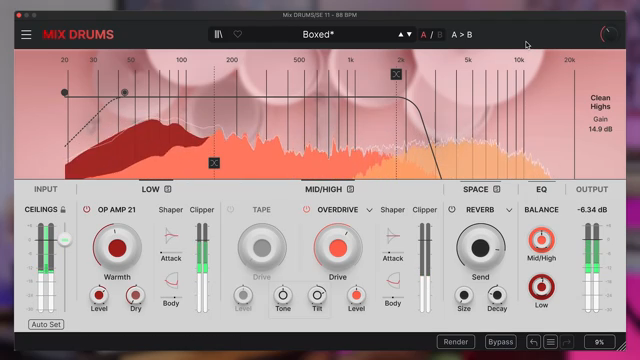
The main interface of Mix DRUMS is built around a clear, band-split architecture. Input settings ensure your source material hits the plugin at the right level, with an auto-set ceiling feature that analyzes peaks and sets optimal headroom. This is a workflow-centric touch, minimizing the guesswork and making preset auditioning more reliable.
Low and mid/high bands are processed independently, each with their own dedicated controls. The crossover frequency, visible via a spectrum visualizer, lets users define exactly where the low end hands off to the mid/high section—essential for tailoring the plugin to different drum sources. The interface also includes a space section, which applies reverb or delay-based depth, and a global EQ and output stage for final tonal shaping and level balancing.
Arturia’s design here is unapologetically macro-focused: most parameters are surfaced as large, direct controls, with advanced options tucked into secondary panels. This keeps the workflow fast for everyday use, while still offering depth for those who want to dig in.
Parallel Distortion, Transient Shaping, and Peak Preservation
Mix DRUMS leans heavily on parallel processing and transient control to shape drum sounds. The low band features a modeled Op Amp 21 distortion circuit, inspired by the Sans Amp pedal, providing warmth and harmonic heft. Users can blend this with the dry signal, then further sculpt transients with a shaper that independently adjusts attack and body—offering detailed control over punch and sustain.
The mid/high band brings its own flavor, with tape drive, multimode distortion, and a similar transient shaper. Pre- and post-distortion filters allow precise frequency targeting, while the ability to solo bands aids in fine-tuning. Throughout, the plugin is careful to preserve peak levels, ensuring that even aggressive processing doesn’t overload the mix bus. This architecture supports both subtle enhancement and more radical transformations, all within a controlled gain structure.
"it preserves precise control over kick definition."
© Screenshot/Quote: Arturiaofficial (YouTube)
Presets, Tweaks, and Transformative Workflows
The video encourages users to treat Mix DRUMS presets as creative starting points, not endpoints. By selecting a preset close to the desired vibe, then adjusting the low end, distortion, and transient sections, even lackluster drum tracks can be revitalized. The workflow is designed to be iterative—dial in a broad character, then refine with band balance, EQ, and output controls.
There’s also a tip for those who want to push the envelope: releasing the peak level constraint and compensating with output gain can yield dramatic results, accentuating transients and punch in a way that’s both bold and mix-aware. This flexibility makes Mix DRUMS adaptable to a wide range of production scenarios, from subtle glue to full-on drum resuscitation.
Experimentation: The Invitation to Play
"A little can go a long way, but it also loves being pushed, so enjoy and play around with it."
© Screenshot/Quote: Arturiaofficial (YouTube)
Arturia closes the walkthrough by encouraging users to explore Mix DRUMS’ full potential through hands-on experimentation. With its blend of macro controls and deep tweakability, the plugin is positioned as a playground for drum sound design—capable of everything from gentle enhancement to creative abuse. The message is clear: the architecture is there, now it’s up to the user to push the boundaries.
This article is also available in German. Read it here: https://synthmagazin.at/arturia-mix-drums-architektonischer-punch-fuer-modernes-drum-processing/
Watch on YouTube:
Latest articles
Watch on YouTube:
Visit the channel:
https://www.youtube.com/ArturiaOfficial
https://www.youtube.com/ArturiaOfficial
Links from ArturiaOfficial:
website: https://www.arturia.com
instagram: https://instagram.com/arturia_official
twitter: https://twitter.com/ArturiaOfficial
soundcloud: https://soundcloud.com/arturia-official/albums
Sponsored links:
If you purchase via these links, we may earn a small commission – at no extra cost to you. The link opens an Amazon keyword search, and results may vary depending on availability.
Arturia Mix DRUMS
🔗 Check price on Amazon
🔗 Check price on Amazon