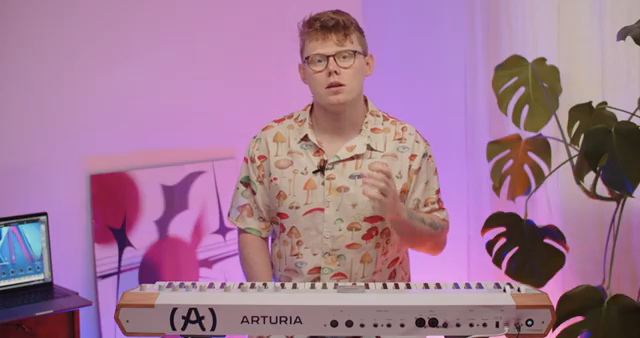
Arturia’s AstroLab isn’t just another stage keyboard—it’s a hybrid powerhouse designed for musicians who demand both depth and immediacy. In this official tutorial, Arturia demonstrates how AstroLab and Analog Lab unite to create a tightly integrated ecosystem, letting users mirror sounds, manage libraries, and edit presets across hardware and software. The video walks through the linking process, preset management, and the nuanced workflow advantages this pairing brings to both live and studio environments. For those obsessed with sound architecture and performance prep, this is a glimpse into how digital integration can actually enhance creative flow.
11. April 2024
LYRA
Arturia AstroLab & Analog Lab: Seamless Integration for Modern Stage and Studio Workflows
AstroLab: A Hybrid Stage Keyboard with Deep Integration Ambitions
Arturia positions AstroLab as a 61-key stage keyboard that goes beyond traditional hardware by leveraging a deep integration with Analog Lab. This isn’t just about playing presets—AstroLab is designed to act as a bridge between the tactile immediacy of hardware and the expansive sonic palette of Arturia’s software instruments. The video introduces AstroLab’s core concept: a unified sound structure shared with Analog Lab, including macros, effects, and fader controls, all intended to streamline both performance and sound design workflows.
From the outset, Arturia emphasizes that AstroLab and Analog Lab are built to work in tandem. Whether you’re prepping sounds for a live set or sculpting new patches in the studio, the two platforms mirror each other’s architecture. This shared DNA means that what you create or tweak in one environment is instantly accessible in the other, reducing friction and making it easier to move from rehearsal to stage without missing a beat.
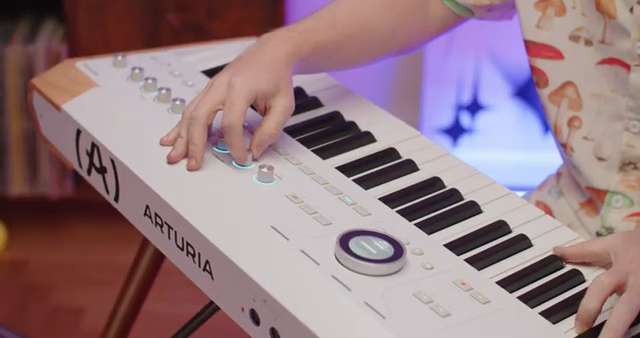
"Astrolab and AnalogLab share the same sounds in their structure of macros, effects and faders, therefore they can work great together while preparing your sounds or playlists before your performance, or while designing your own sounds too."
© Screenshot/Quote: Arturiaofficial (YouTube)
Linking AstroLab and Analog Lab: The Workflow Backbone
"Loading a preset on Astrolab sends it and loads it on AnalogLab and vice versa."
© Screenshot/Quote: Arturiaofficial (YouTube)
The tutorial quickly moves to the practicalities of connecting AstroLab to Analog Lab. Users simply connect the keyboard to a computer, launch Analog Lab, and select AstroLab as the device within the software’s settings. This action reveals a dedicated toolbar with a ‘link to AstroLab’ button, which, when activated, synchronizes the two systems.
Once linked, a robust set of mirrored functions comes online. Loading a preset on AstroLab instantly loads it in Analog Lab, and vice versa. Any changes made to macros or effects on either device are reflected in real time on the other, ensuring that sound tweaks and performance adjustments remain consistent across both hardware and software. This bidirectional mirroring is central to the workflow, making the integration feel less like a bolt-on feature and more like a core design philosophy.
Preset Loading, Editing, and Compatibility: Navigating the Ecosystem
A key highlight of the integration is the ability to load and send presets between AstroLab and Analog Lab with minimal friction. When linked, users can browse and select sounds in Analog Lab, which are then pushed to AstroLab with a simple mouse click. The hardware displays the preset name, confirming the transfer. If a preset isn’t already stored on AstroLab—perhaps because it was purchased via the Analog Lab sound store—the software temporarily sends the preset and its samples to the hardware, intelligently managing memory to avoid overload.
The workflow is equally fluid in the opposite direction: presets selected on AstroLab using its rotary wheel or preset buttons are mirrored in Analog Lab. However, the video is careful to note that not all Analog Lab presets are compatible with AstroLab. In such cases, Analog Lab issues a warning, and there are polyphony limits—8 voices for some synth sounds, 48 for pianos—to prevent CPU strain. These constraints are clearly communicated, and users are directed to the manual for further details.
This section underscores the importance of compatibility and resource management in hybrid systems. While the integration is powerful, Arturia is transparent about its boundaries, ensuring users know what to expect when moving complex sounds between platforms.

"It's also worth noting that some presets from AnalogLab are not compatible with Astrolab."
© Screenshot/Quote: Arturiaofficial (YouTube)
Library Management and Playlist Creation: Streamlining Sound Organization
Analog Lab’s browser becomes a command center for AstroLab’s sound library when the two are linked. Users can view, manage, and edit all AstroLab presets directly from the software’s left panel, making it easy to organize sounds, create playlists, or tweak patches before a performance. This approach caters to those who prefer the speed and clarity of a computer interface for large-scale library management.
The workflow supports not just editing and saving sounds, but also playlist creation and deletion. Sounds can be dragged and dropped between libraries and playlists, and Analog Lab even displays AstroLab’s available disk space to help users avoid memory issues. This level of integration is particularly valuable for performers who need to curate setlists or rapidly reconfigure their instrument’s sound palette.
Collaborative Power: Optimizing Sound Design and Performance Prep
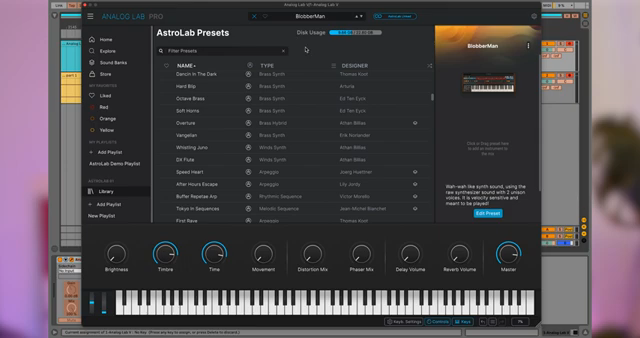
"When linked, Astrolab presets loaded on AnalogLab can be edited."
© Screenshot/Quote: Arturiaofficial (YouTube)
The tutorial closes by emphasizing the collaborative nature of AstroLab and Analog Lab. Editing AstroLab presets from within Analog Lab is straightforward: users can adjust macros, keyboard settings, effects, part mixes, and EQ parameters, all from the software interface. If you own the underlying instrument, you can even open it up in Analog Lab for deeper parameter editing.
Arturia’s message is clear—AstroLab and Analog Lab are engineered to work together, empowering musicians to streamline their creative process from studio sound design to stage performance. The integration isn’t just about convenience; it’s about enabling a workflow where hardware and software genuinely complement each other, making complex sound management and performance prep feel intuitive and efficient.
This article is also available in German. Read it here: https://synthmagazin.at/arturia-astrolab-analog-lab-nahtlose-integration-fuer-moderne-buehnen-und-studioworkflows/
Watch on YouTube:
Latest articles
Watch on YouTube:
Visit the channel:
https://www.youtube.com/ArturiaOfficial
https://www.youtube.com/ArturiaOfficial
Links from ArturiaOfficial:
website: https://www.arturia.com
instagram: https://instagram.com/arturia_official
twitter: https://twitter.com/ArturiaOfficial
soundcloud: https://soundcloud.com/arturia-official/albums
Sponsored links:
If you purchase via these links, we may earn a small commission – at no extra cost to you. The link opens an Amazon keyword search, and results may vary depending on availability.
Analog Lab
🔗 Check price on Amazon
🔗 Check price on Amazon
AstroLab
🔗 Check price on Amazon
🔗 Check price on Amazon