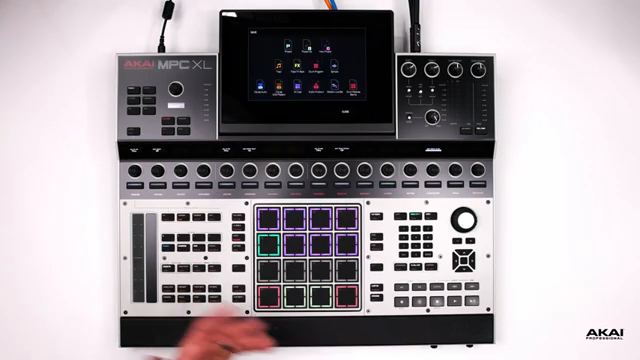
Akai Professional’s MPC XL steps into the spotlight as a flagship groovebox, promising a tactile, streamlined workflow for beatmakers and producers. In this official MPC Academy video, Akai walks through the XL’s physical layout, emphasizing its abundance of dedicated buttons, velocity-sensitive pads, and a control scheme designed to keep your hands off the touchscreen and your mind on the music. The focus here is on immediate access—sample editing, project management, and navigation are all just a button press away. For those seeking a modern production hub with robust connectivity and a learning path to mastery, the MPC XL aims to deliver a frictionless creative experience.
23. January 2026
LYRA
Akai Professional MPC XL: Hands-On Workflow, No Menu Diving Required
Streamlined Creation: The MPC XL Philosophy
Akai Professional positions the MPC XL as a music creation tool that prioritizes immediacy and hands-on control. The video opens with an emphasis on the abundance of physical buttons, each mapped to specific functions, reducing the need for deep menu navigation on the LCD screen. This approach is clearly aimed at keeping the creative process flowing, allowing users to focus on music rather than getting lost in submenus.
The layout is designed to support a fast, intuitive workflow. By providing direct access to essential features, the MPC XL encourages producers to stay engaged with their tracks and ideas. The philosophy here is clear: minimize friction, maximize creativity, and let the hardware do the heavy lifting so you can stay in the zone.
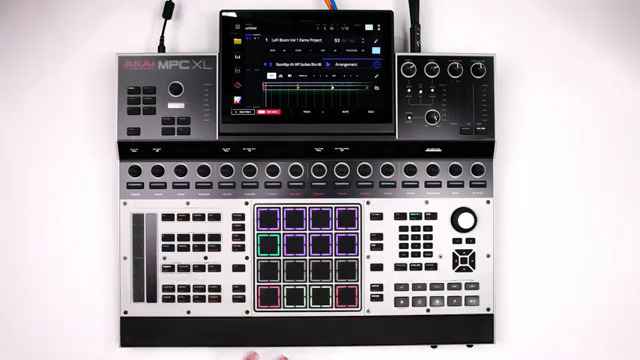
"Most of these buttons will allow us to jump into certain menus without us having to menu dive on the LCD screen."
© Screenshot/Quote: Akai Pro (YouTube)
Pads, Buttons, and Navigation: The Tactile Arsenal
"We could just hit save right away, and it allows us to save your session."
© Screenshot/Quote: Akai Pro (YouTube)
At the heart of the MPC XL are its 16 velocity-sensitive pads, a signature feature for expressive beatmaking. These pads are not limited to a single bank; with eight banks (A–H) accessible via quick double taps, users can rapidly navigate between sounds and samples, making live performance and complex arrangements more manageable. The inclusion of a dedicated save button and browser further streamlines project management and sound selection.
Navigation is further enhanced by dedicated controls for grid editing, track and pad muting, arranging, and mixing. The dual shift buttons—strategically placed on both sides of the unit—allow for quick access to secondary functions, ensuring that even the largest hands-on workflows remain ergonomic. The thoughtful placement of tap tempo, undo/redo, and numeric keypad functions means less reliance on the touchscreen and more time spent shaping music directly from the hardware.
Sample Editing and Project Management: Direct Access, Minimal Fuss
Sample editing on the MPC XL is made accessible through a dedicated sample edit button, allowing users to quickly truncate, normalize, or time-stretch samples without menu diving. The video highlights the use of secondary button functions, activated via double taps or shift presses, to access deeper features like the sampler or preferences. This layered approach to control means that both basic and advanced editing tasks are always within reach.
Project management is equally streamlined. Essential actions such as saving sessions, browsing files, and managing tracks are all handled with dedicated buttons, reducing the cognitive load on the user. The main page serves as a central hub, displaying sequence information and providing a familiar workspace for building tracks. Looping, arranging, and automation are controlled via quick keys, making it easy to experiment and iterate on ideas.
Performance tools like the touch strip add another layer of immediacy. Assignable to effects, pad fading, crossfading, pitch bend, and more, the touch strip offers real-time manipulation of sounds and parameters. The step sequencer, with its dedicated control buttons, enables fast drum programming and step-based editing, reinforcing the XL’s commitment to hands-on, menu-free operation.
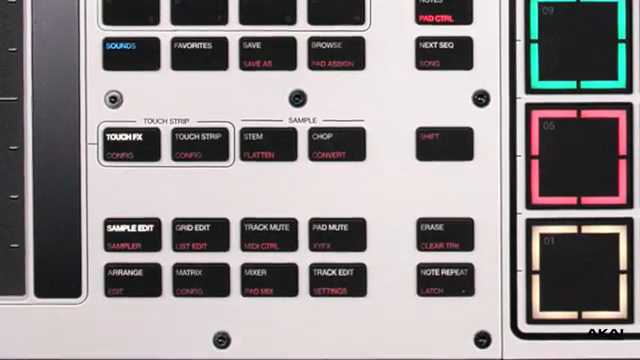
"At the very bottom of most of these function buttons, in red letters, we have a secondary function."
© Screenshot/Quote: Akai Pro (YouTube)
Connectivity: The Backbone of Flexible Workflows
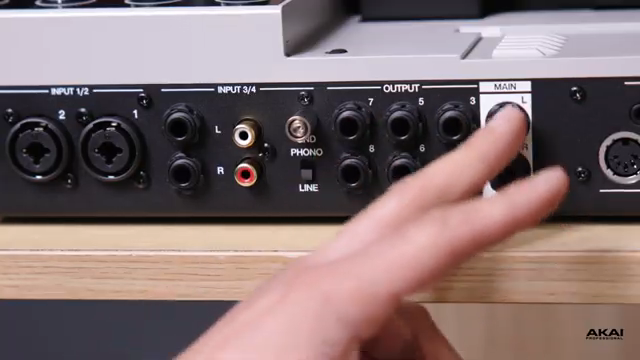
"If you guys want to use those additional outputs to send certain signals to certain pieces of outboard gear, or if you guys want to get creative and route these additional outputs through different sources, you guys can do that right here."
© Screenshot/Quote: Akai Pro (YouTube)
The MPC XL’s connectivity suite is designed to accommodate a wide range of creative setups. On the front, users will find SD card and USB slots for importing samples, as well as dual footswitch inputs and two quarter-inch instrument jacks for direct recording. Dual headphone outputs (3.5mm and quarter-inch) provide flexible monitoring options for both main and secondary outputs.
The rear panel expands these options with USB-C, additional USB ports, CV/gate, MIDI in/out, and a generous eight audio outputs for routing to outboard gear or multi-channel setups. Four audio inputs—two with XLR and phantom power, two with quarter-inch or phono options—ensure compatibility with microphones, instruments, and turntables. This extensive I/O makes the MPC XL a versatile hub for both studio and live environments.
MPC Academy: Structured Learning for Confident Creation
The MPC Academy initiative is highlighted as a key resource for users new to the MPC XL or those seeking to deepen their understanding. By providing step-by-step guides and focused tutorials, Akai Professional aims to lower the learning curve and empower producers to unlock the full potential of their hardware.
This structured approach ensures that foundational knowledge is covered, allowing users to progress from basic navigation to advanced workflows with confidence. The video serves as both an introduction to the MPC XL’s layout and a gateway to further exploration through the Academy’s educational content.
This article is also available in German. Read it here: https://synthmagazin.at/akai-professional-mpc-xl-hands-on-workflow-ohne-menue-tiefen/
Watch on YouTube:
Latest articles
Watch on YouTube:
Visit the channel:
https://www.youtube.com/Akai_Pro
https://www.youtube.com/Akai_Pro
Links from Akai_Pro:
website: https://akaipro.com
instagram: https://instagram.com/akai_pro
facebook: https://www.facebook.com/AkaiPro
twitter: https://twitter.com/akai_pro
google_plus: https://plus.google.com/107127819149441645522/posts
Sponsored links:
If you purchase via these links, we may earn a small commission – at no extra cost to you. The link opens an Amazon keyword search, and results may vary depending on availability.
MPC XL
🔗 Check price on Amazon
🔗 Check price on Amazon