1010music’s Bento groovebox aims to be more than just another beatmaker—it’s a portable powerhouse for constructing full tracks, from initial idea to finished song. In this official tutorial, 1010music walks through Bento’s core workflow: project management, sequencing, clip launching, and the all-important scene and song modes. The focus is firmly on how Bento’s digital architecture supports fluid creativity, letting users assemble, trigger, and arrange musical ideas with minimal friction. For anyone curious about Bento’s real-world performance and song-building chops, this video offers a clear, hands-on look at what the box can (and can’t) do straight out of the gate.
15. August 2025
LYRA
1010music Bento: Building Songs from the Ground Up—A Workflow Deep Dive
From Blank Slate to Song: Bento’s Core Mission
The video opens with a clear mission: using the 1010music Bento to create a song from scratch, leveraging its clip launching, sequencing, and scene arrangement features. This isn’t just about laying down a beat—it’s about demonstrating how Bento’s architecture supports the full songwriting process, from initial project setup to final arrangement.
1010music positions Bento as a versatile groovebox for music production, emphasizing its ability to handle everything from drums to leads within a single, portable unit. The workflow is designed to let users move quickly from empty project to structured song, with the interface guiding each step of the process. The focus here is on empowering creators to build entire tracks without leaving the hardware environment.
Project Management: Setting the Stage
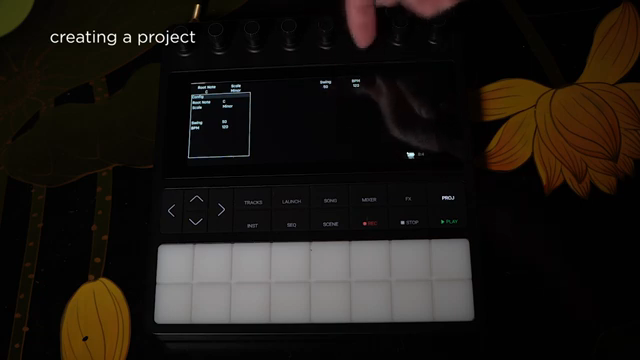
Bento’s project manager is more than just a file browser—it’s the nerve center for your session. Users can create new projects, assign names, and crucially, set the BPM and key for the song. This ensures that all note input on the pads is constrained to the chosen scale, making it easier to stay harmonically consistent while sketching ideas.
The video demonstrates how each of Bento’s eight tracks can be assigned its own instrument, mix level, and effects. Instrument assignment is streamlined: double-tap to load, with icons distinguishing one-shot, multi-sample, and other instrument types (though only the former are shown here). MIDI channel and audio routing are accessible via the config track menu, hinting at deeper integration potential for more complex setups. The process is quick and tactile, reflecting 1010music’s signature focus on touch-driven workflows.
"This makes sure that the notes played on the pads are constrained to the same key and scale to make it easier to quickly sequence some parts."
© Screenshot/Quote: 1010Music (YouTube)
Sequencing and the Launch Screen: Building Blocks in Motion
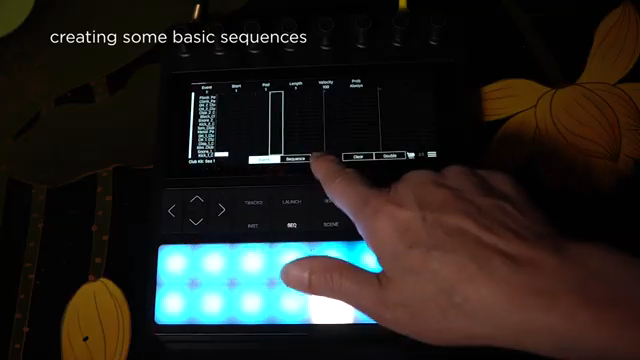
"I can do that by adding notes graphically, or by playing them in if I first hit the record button."
© Screenshot/Quote: 1010Music (YouTube)
The launch screen is where Bento’s sequencing engine comes alive. Each cell in the grid represents a sequence for a given instrument, and users can create, edit, and launch these sequences on the fly. The workflow is a hybrid of graphical note entry and real-time recording, with quantization available for tight timing.
Naming sequences and duplicating them for variations is straightforward, enabling rapid iteration. The video walks through building up drum parts—starting with an intro, then layering in hi-hats and snare hits via copy/paste and step editing. The same approach applies to melodic elements: bass, electric piano, and synth leads are added in their own slots, with octave shifting and sequence length adjustment available. The interface encourages experimentation, letting users try out ideas without breaking the creative flow.
Scenes and Song Mode: Arranging the Pieces
Once a palette of sequences is assembled, Bento’s launch mode allows users to trigger and combine them in real time—ideal for auditioning different combinations and building up song sections. The transition from improvisation to structure happens in scene mode, where sequences are grouped into scenes, and scenes are then arranged in song mode to form a complete track.
The tutorial demonstrates creating multiple scenes, each with its own selection of sequences. Scenes are then chained together in song mode, with options to set repeat counts for each section. The process is visual and direct, supporting both spontaneous performance and deliberate arrangement. This modular approach to song-building is a hallmark of modern grooveboxes, and Bento’s implementation appears both accessible and flexible.
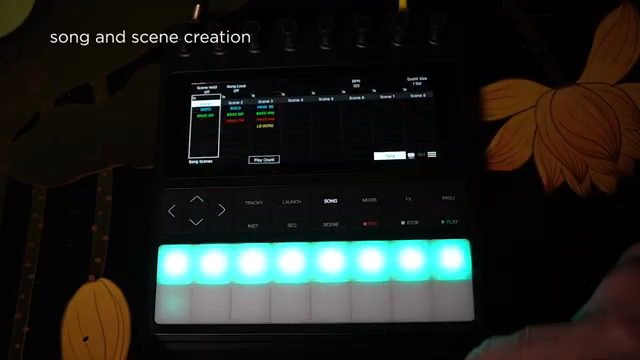
"If we hit play it will play through the different scenes one at a time, or if I want them to repeat I have a way to choose how many times that scene repeats playback."
© Screenshot/Quote: 1010Music (YouTube)
Fluidity and Performance: Seamless Transitions for Creative Flow
A recurring theme in the video is the fluidity of moving between sequences and scenes. The workflow is designed to minimize friction: switching from sequence editing to live launching, from clip auditioning to scene arrangement, all happens with minimal menu-diving.
This seamlessness is key for spontaneous creativity, whether in the studio or on stage. The ability to launch, stop, and combine sequences on the fly, then lock them into scenes and songs, supports both improvisation and structured composition. While the video focuses on basic instrument types and doesn’t delve into deeper sound design or external integration, it clearly showcases Bento’s strengths as a performance-oriented groovebox with a modern, touch-driven interface.
This article is also available in German. Read it here: https://synthmagazin.at/1010music-bento-songs-von-grund-auf-bauen-ein-workflow-deep-dive/
Watch on YouTube:
Latest articles
Watch on YouTube:
Visit the channel:
https://www.youtube.com/1010music
https://www.youtube.com/1010music
Links from 1010music:
website: https://1010music.com
instagram: https://www.instagram.com/1010_music
downloads: https://1010music.com/downloads
forum: https://forum.1010music.com
Sponsored links:
If you purchase via these links, we may earn a small commission – at no extra cost to you. The link opens an Amazon keyword search, and results may vary depending on availability.
1010Music Bento
🔗 Check price on Amazon
🔗 Check price on Amazon