Arturia’s Pitch SHIFTER-910 is more than a throwback to vintage pitch manipulation—it’s a deep, modern tool for creative sound design. In this official walkthrough, Arturia demonstrates how the 910 fuses pitch and formant shifting with delay, feedback, and advanced modulation, all wrapped in a workflow-focused interface. From harmonic intervals and chipmunk artifacts to lush stereo ensembles and MIDI-driven pitch control, the video highlights both the sonic character and the architectural flexibility of this plugin. For producers, vocal manglers, and synth tweakers alike, the SHIFTER-910 promises a playground of evolving effects and expressive possibilities—at least, as far as the demo reveals.
20. February 2026
LYRA
Arturia’s Pitch SHIFTER-910: Digital Pitch Alchemy for Modern Sound Design
A Modern Classic: Pitch SHIFTER-910’s Creative Core
Arturia introduces the Pitch SHIFTER-910 as a creative pitchshifting tool that merges pitch and formant shifting with delay and feedback, aiming to inspire new sound design workflows. The plugin draws inspiration from an iconic 1970s digital pitchshifter, known for its gritty tone and unpredictable musicality, but Arturia’s version expands the palette with modern features and flexibility. Rather than focusing on transparent correction, the emphasis here is on character—movement, artifacts, and the interplay between pitch, delay, and feedback.
The video wastes no time in demonstrating the plugin’s musicality, particularly on vocals. Arturia’s approach is clear: this is not just a utility effect, but a creative instrument in its own right. The addition of formant shifting, vibrato, and MIDI modulation points to a design philosophy that values both classic color and contemporary control, setting the stage for a deep dive into the plugin’s architecture.
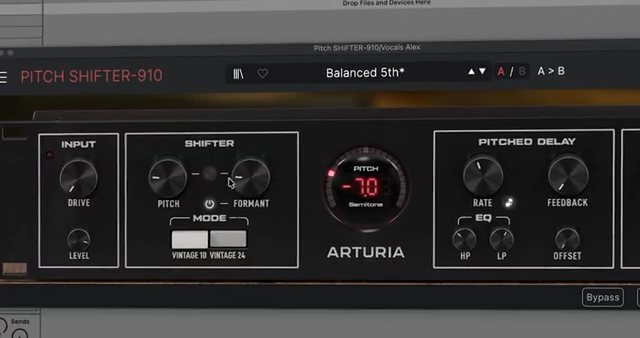
"Rather than delivering perfectly transparent pitch correction, this style of processing creates movement, texture, and characteristic artifacts through the interaction of pitchshifting, short delays, and feedback paths."
© Screenshot/Quote: Arturiaofficial (YouTube)
Shifter Section: Algorithms, Formants, and Visual Feedback
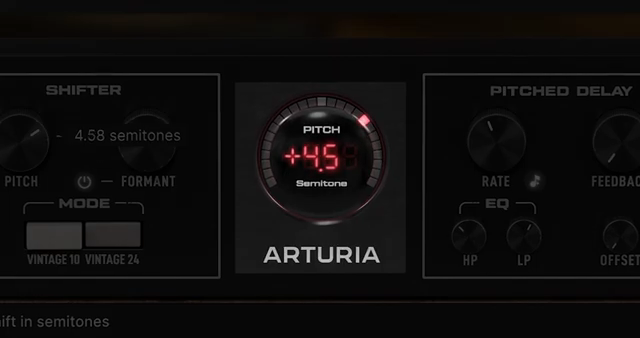
"The visualizer shows the amount of pitchshift being applied and also responds to incoming MIDI notes, helping you monitor the effect in real-time."
© Screenshot/Quote: Arturiaofficial (YouTube)
At the heart of the Pitch SHIFTER-910 is the shifter section, where users manipulate pitch and sculpt the tonal character of incoming audio. The pitch control allows for precise interval shifts—like a fifth up for harmonizing vocals—while the formant parameter lets you alter spectral qualities independently. The formant link can be toggled, so pitch and formant can move together for classic hardware emulation, or separately for more experimental results.
Two pitchshifting algorithms are available: Vintage 10, which closely models the original hardware’s signal flow (with all its musical quirks), and Vintage 24, a cleaner, artifact-reduced option. A real-time visualizer displays the amount of pitchshift and responds to MIDI notes, offering immediate feedback on how the effect is being applied. This section also covers input/output gain staging, drive for harmonic enhancement, and a mix lock feature for consistent wet/dry balance when browsing presets.
Delay and Pitched Delay: Evolving Echoes and Tonal Feedback
The delay section of the SHIFTER-910 is where things get especially interesting for sound designers. Users can choose between a standard delay and a pitch delay mode—the latter reprocesses each repeat through the pitchshifter, resulting in rising, falling, or harmonically evolving echoes. Controls for delay rate (with free or DAW-synced timing), feedback, and stereo offset allow for intricate rhythmic and spatial effects.
Arturia demonstrates how formant shaping and filtering within the feedback loop can keep repeats clear and evolving, rather than muddying the mix. The pitched delay mode, in particular, opens up creative territory for building complex, shifting textures that go far beyond simple slapback or echo. The video’s examples make it clear that this is a playground for both subtle enhancement and bold, experimental layering.
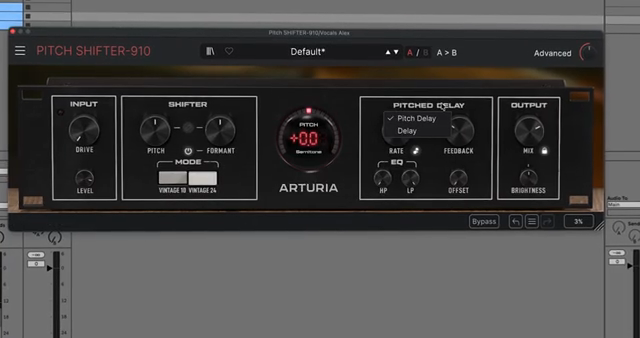
"In pitch delay mode, each repeat passes through the shifter again before being delayed, producing rising, falling, or harmonically evolving echoes."
© Screenshot/Quote: Arturiaofficial (YouTube)
Voice Mode: Detuned Ensembles and Stereo Width
Voice mode is a standout feature that transforms the processed signal into a lush, ensemble-like effect. By adding detuned copies of the input, users can create width and depth, with controls for detune amount and stereo spread. In stereo setups, this results in a wide, animated image that can mimic classic dual-unit rigs or push into modern, chorus-like territory.
The mode offers dual mono for recreating vintage stereo setups and unison for thickening pads or vocals. The flexibility here is significant: whether you’re after subtle width or full-on ensemble effects, the SHIFTER-910’s voice mode is designed to deliver. Arturia’s demonstration highlights how these controls can be used to sculpt everything from tight, focused sounds to expansive, swirling textures.
MIDI In: Playable Pitch and Expressive Modulation
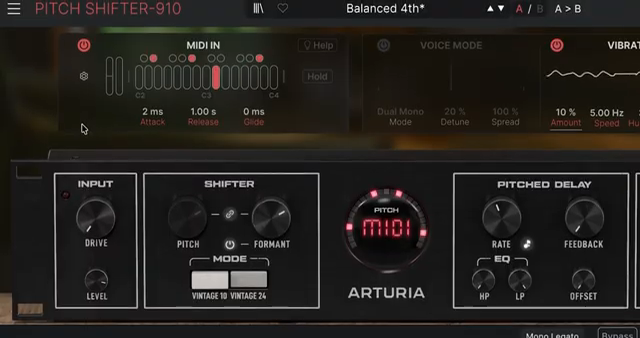
"It's an interesting way to transform your samples and sounds using MIDI information from your keyboard or DAW, shaping them through the character and tone of the pitch shifter."
© Screenshot/Quote: Arturiaofficial (YouTube)
Perhaps the most workflow-transforming feature is the MIDI In capability, which lets users control pitch directly via MIDI notes—either monophonically or polyphonically. This means the SHIFTER-910 can act as a playable instrument, not just an insert effect. The video details how MIDI input determines both pitch and amplitude, with a virtual keyboard for triggering notes and polyphony up to four voices for harmonically rich results.
Additional MIDI features include envelope shaping (attack, release, glide, and hold), as well as responsiveness to velocity, pitch bend, and mod wheel. This level of integration makes the SHIFTER-910 a powerful tool for both DAW-based and hardware-centric workflows, enabling expressive, real-time manipulation of pitch, spread, and vibrato depth. Arturia’s walkthrough hints at the creative potential, though users will need to explore further to see how it fits into their own rigs.
This article is also available in German. Read it here: https://synthmagazin.at/arturia-pitch-shifter-910-digitale-pitch-alchemie-fuer-modernes-sounddesign/
Watch on YouTube:
Latest articles
Watch on YouTube:
Visit the channel:
https://www.youtube.com/ArturiaOfficial
https://www.youtube.com/ArturiaOfficial
Links from ArturiaOfficial:
website: https://www.arturia.com
instagram: https://instagram.com/arturia_official
twitter: https://twitter.com/ArturiaOfficial
soundcloud: https://soundcloud.com/arturia-official/albums
Sponsored links:
If you purchase via these links, we may earn a small commission – at no extra cost to you. The link opens an Amazon keyword search, and results may vary depending on availability.
Arturia Pitch SHIFTER-910
🔗 Check price on Amazon
🔗 Check price on Amazon